Quoting & negotiation
Edit a quote after the request: add, remove and custom lines
By Jahangir Alam · September 16, 2026 · Updated October 15, 2026 · 6 min read
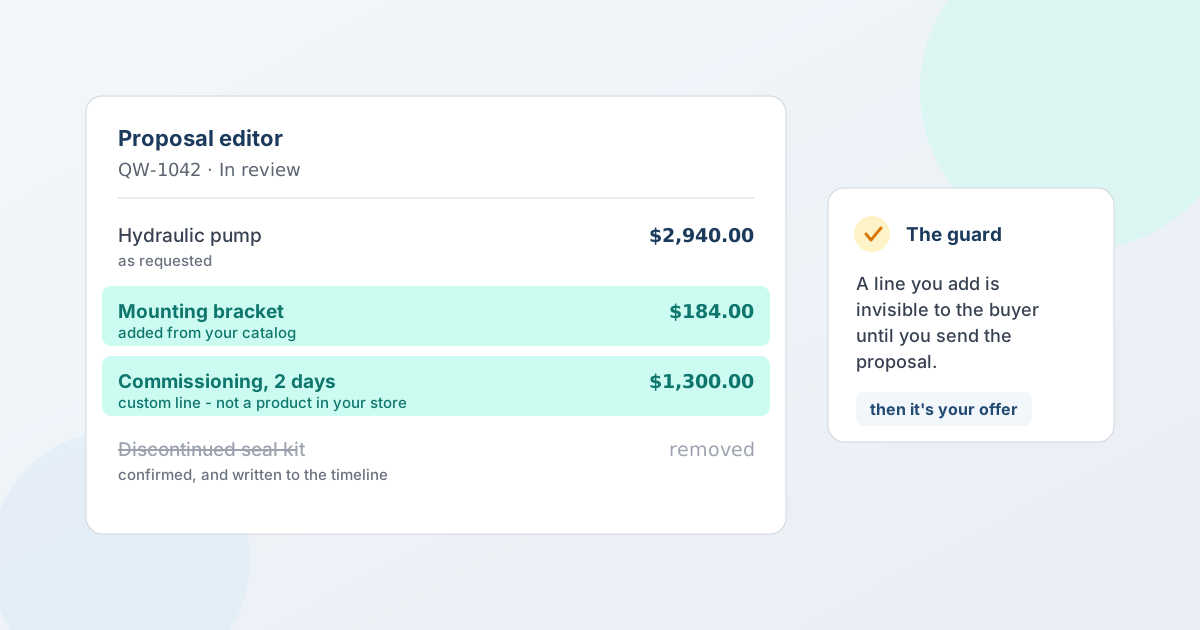
Quote requests arrive incomplete. The buyer orders the pump and forgets the mounting bracket. They ask for installation, which isn't a product in your store. They list a part you discontinued last spring. None of that is a reason to send them back to the form - and asking them to resubmit is a reliable way to turn a warm request cold.
This guide covers how to fix a quote in place: adding catalog products, pasting a list of SKUs, quoting something you don't sell at all, removing lines that shouldn't be there, and the one rule that keeps all of it honest - a line you add is invisible to the buyer until you send the proposal.
What most teams do instead
They quote it anyway and explain in the notes. Or they email back asking for a corrected request. Or - most commonly - they rebuild the whole thing manually as a new quote and lose the thread: the buyer's original message, the timestamps, the request they actually made.
All three cost you the same thing. The record stops matching reality, and every later conversation needs a human to reconcile them.
Fix it in place
A quote that's still in Submitted, In review or Countered can have lines added and removed directly in the proposal editor - the same screen where you're already setting prices. Open the quote, start a proposal, and expand the add-items prompt. There are three ways in:
- Search and browse your catalog and pick the product the buyer forgot
- Bulk add by SKU - paste a parts list and resolve it in one step (Professional and above)
- Add a custom line - type a title, quantity and price for something that isn't a product in your store: installation, freight, a made-to-order item, a service
Custom lines are the one most teams underuse. A quote is a commercial document, not a cart. If the deal includes two days of commissioning, that belongs on the quote as a line with a price, not as a sentence in a note field that nobody carries through to the order. For what a custom line can and can't do at conversion, see custom and manual line items.
To drop a line, use the delete control on its row. You're asked to confirm, and a quote can't be left with no lines at all - if none of it should be quoted, decline the quote rather than emptying it.
Pasting a parts list
The bulk route matters more than it sounds, because of where B2B requests come from. An MRO buyer works from a maintenance list. A contractor works from a bill of materials. Neither of them built that list in your storefront, and neither wants to search your catalog twenty times to reproduce it.
Bulk add by SKU takes the list as it arrives, resolves each code against your catalog in one step, and tells you what it couldn't match so you can handle those lines deliberately - as a custom line, a substitution, or a question back to the buyer. It's on Professional and above. If you want buyers to be able to submit that list themselves in the first place, bulk order forms on Shopify covers the request side.
The rule that makes this safe
Here's the part that took the most thought to get right, and it's the opposite of what you'd expect.
A line you add is invisible to the buyer until you send the proposal.
Before you've replied, the buyer's view of that quote is a record of their own request - the items they asked about, as they asked about them. If your additions appeared there immediately, the buyer would open their quote and see themselves apparently requesting a floor jack they never mentioned. At best that's confusing; at worst it looks like you edited their words.
So additions are held back until you send. At that moment the document becomes clearly your offer, and everything you've added appears with its price attached, where it belongs.
The same reasoning runs the other way once a proposal is out. A sent proposal is locked: its lines can't change while the buyer is reading it, because the version they're deciding on has to stay the version you sent. To move things on, the buyer counters (and your reply is a new version), accepts or declines. Each version is recorded as its own snapshot. See negotiation and counter-offers for how versions work, and immutable quote versions for the engineering behind them.
Everything is on the record
Each add and each remove is written to the quote's timeline, with what changed and when.
This matters more than it sounds. Line editing is the kind of feature that, done carelessly, lets a line appear on a quote with no explanation of where it came from. An audit trail turns that into a normal, reviewable commercial action - and if a buyer ever asks "when did this get added?", the answer is on the quote, not in someone's memory.
What this changes about intake
There's a second-order effect worth naming. Once a quote can be fixed after it arrives, your request form no longer has to be perfect.
A lot of B2B quote forms are long because the merchant is trying to capture everything up front, on the assumption that whatever the form misses is lost. That assumption is what makes forms that buyers abandon. If the form's job is only to start the conversation accurately - what they want, roughly how many, where it's going - then it can be short, and the detail can be added by the person who actually knows your catalog. Which fields to ask for goes through that trade-off in detail.
Availability
Adding and removing lines, including custom lines, is available on every plan, including the free Lite plan. Bulk add by SKU requires Professional or above. Editing is possible while a quote is in Submitted, In review or Countered - once a proposal is out and awaiting the buyer's answer, its contents are locked so the version they're reading stays true. A quote can hold up to 100 lines. See pricing for the full breakdown, or add or remove items on a quote for the step-by-step.
FAQ
Can I add an item to a quote after the customer submitted it?
Yes. While the quote is in Submitted, In review or Countered, you can add lines from your catalog, paste a list of SKUs, or add a custom line for something you don't stock, and remove lines that shouldn't be there. The buyer doesn't see any of it until you send the proposal. Adding and removing is on every plan; bulk add by SKU is Professional and above.
Can I edit a proposal the buyer is currently looking at?
No - and deliberately. Once a proposal is sent, its lines are fixed so the document the buyer is reading doesn't change under them. The next change comes as a new version: the buyer's counter, or your reply to it. If you need to change the offer first, message the buyer or duplicate the quote.
Will the buyer be told I added a line?
They see it when you send the proposal, priced, as part of your offer. The change is also written to the quote's timeline with a timestamp, so there's a record of when it was added and by whom.
Can I quote something I don't sell in my store?
Yes - that's what a custom line is for. Installation, freight, tooling, a made-to-order item, a service. It carries a title, quantity and price, and converts onto the Shopify draft order as a custom line item.
Is there a limit on how many lines a quote can have?
A quote can hold up to 100 lines. Worth knowing separately: a Shopify draft order holds up to 500 line items (499 through the Admin API's create and update mutations - see the draft-order limits post), so a very large quote may need splitting at conversion.
Which plan do I need to edit quote lines?
Every plan can add and remove lines, including custom lines - the free Lite plan included. Bulk add by SKU requires Professional or above.
Related articles
See how QuotWay handles this on your store.