For Shopify agencies
Does a quote app slow down a Shopify store? What runs, measured
By Jahangir Alam · September 28, 2026 · 12 min read
- Last verified
- Shopify API
- 2026-07
- Audience
- Shopify agencies, developers and merchants weighing a quote or B2B app's storefront cost
- Scope
- What a quote app loads on a Shopify storefront (app embed, app blocks, app proxy, script tags), Shopify's Built for Shopify storefront test, a 42-run mobile Lighthouse A/B of one quote app with the dataset, the loading patterns that decide the cost, and a recipe to measure any app
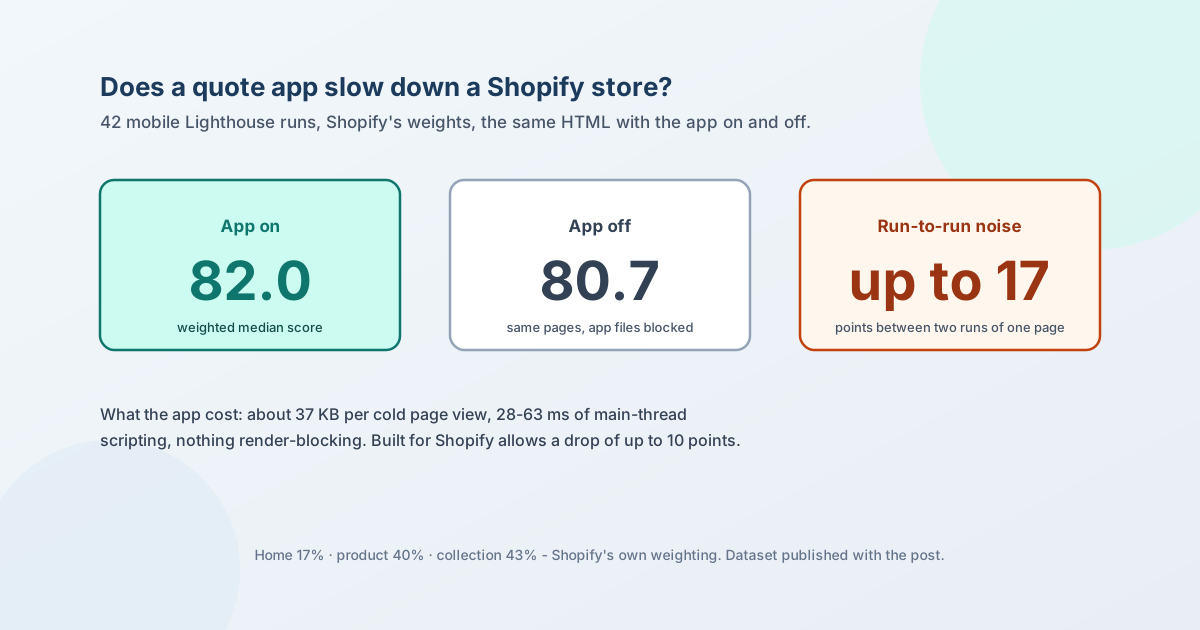
A quote app runs three things on a Shopify storefront: an app embed that loads its script and styles on every page, app blocks on the pages where the button or price display lives, and requests to its own server through the app proxy. Whether that slows a store down depends less on the app's size than on four behaviours: whether anything blocks rendering, how much main-thread work it does, whether it fetches before the page is usable, and whether its button shifts the layout when it appears.
We measured one - QuotWay - the way Shopify measures apps for its Built for Shopify programme: mobile Lighthouse on the home, product and collection pages, weighted 17%, 40% and 43%, with the app on and off. Across 42 runs the weighted median was 82.0 with the app and 80.7 without it - a difference smaller than the run-to-run noise, which reached 17 points between two runs of the same page. The app's script cost 28 to 63 ms of main-thread time per page and about 37 KB per cold page view. The full dataset is published with this post.
This page sets out what runs, how Shopify measures it, what we measured and how, the patterns that kept the cost down, and a recipe to measure any app yourself. The method and checklist are vendor-neutral; the measurement is of our own app, labelled as such.
Everything about Shopify below was checked against Shopify's own pages on 28 September 2026; sources are at the end.
What a quote app runs on a storefront
| Surface | Where it appears | When it loads | What to check |
|---|---|---|---|
| App embed block | Every page (it targets head or body) |
On page load | Is the script async or defer? Is any stylesheet render-blocking? |
| App blocks | Where the merchant places them: product page, cart, collection | With the section's HTML | Is the button rendered in Liquid, or injected later by script (layout shift)? |
| App proxy requests | From the script, to the app's server via the store's domain | At boot, or only on interaction | How many requests fire before the buyer touches anything? |
| Script tags (older apps) | Every page | On page load | Shopify documents that script tags "can only be used with vintage themes" |
Theme app extensions are the current way to add any of this. Built for Shopify requires them for apps that touch the online store, and they come with a guarantee that matters for performance long after an app is gone: "When merchants uninstall apps, blocks that are associated with the apps are automatically and entirely removed from online store themes." Code an older app pasted into theme files stays until someone deletes it.
Shopify also sets size limits on those extensions. The enforced ones are generous - 10 MB for the whole extension, 100 KB of Liquid - but two are suggested: 10 KB of compressed JavaScript and 100 KB of compressed CSS. Keep the word "suggested" in mind; it comes up in the measurement.
How Shopify measures an app's impact
For Built for Shopify status, "your app must not reduce the storefront Lighthouse performance score by more than ten points". Shopify's method, from its storefront performance page:
- Lighthouse mobile, on a clean theme such as Horizon.
- Before and after the app is installed and configured.
- Three pages, weighted by how much they matter to sales: home 17%, product 40%, collection 43%.
- Shopify's own caveat: "Lighthouse scores can vary between runs", so average several.
That weighting is why a product-page button matters more than a home-page banner: the product and collection pages are 83% of the score.
The lab score is not the whole story. Shopify's web performance dashboard reports Core Web Vitals from real visits at the 75th percentile - good is LCP at or under 2,500 ms, INP at or under 200 ms and CLS at or under 0.1 - with up to 36 hours of delay. A lab test tells you what an app costs under controlled conditions; the dashboard tells you what buyers actually got.
What we measured
QuotWay observation, 28 September 2026. Lighthouse 13.5.0, mobile, simulated throttling (150 ms round trip, 1.6 Mbps, 4× CPU slowdown), browser cache cleared before every run. A Shopify development store on the Savor theme with other apps installed - so not a clean store, but the comparison isolates the app: the "off" runs load the same HTML with the app's three asset files and its app proxy path blocked, so the only difference between on and off is the app's code. Seven rounds, on and off interleaved, alternating which ran first.
| Page (weight) | Score on / off | LCP on / off | TBT on / off | CLS on / off |
|---|---|---|---|---|
| Home (17%) | 80 / 82 | 4.9 s / 4.4 s | 4 / 14 ms | 0 / 0 |
| Product (40%) | 85 / 82 | 3.9 s / 4.1 s | 18 / 15 ms | 0.039 / 0.024 |
| Collection (43%) | 80 / 79 | 4.7 s / 4.9 s | 19 / 6 ms | 0.014 / 0 |
| Weighted score | 82.0 / 80.7 |
How to read it. The weighted difference is 1.3 points in the app's favour, and it means nothing: within a single round, the on-minus-off difference on one page ranged from −11 to +17. The honest reading is no measurable effect on the Lighthouse score in this setup - not that the app makes a store faster. The ten-point Built for Shopify threshold is well clear of anything the data can resolve.
What the app actually cost, from the same runs:
| Measure | Result |
|---|---|
| Bytes per cold page view | 36.8-38.4 KB: script 30.9 KB, drawer styles 5.9 KB, button styles about 1 KB, plus a 0.6-0.7 KB request to the app on pages whose product cards needed it |
| Main-thread scripting (median, 4× CPU slowdown) | 28 ms home, 63 ms product, 30 ms collection - against 336, 517 and 418 ms for everything on those pages |
| Parse and compile | About 6 ms |
| Render-blocking resources | None: Chrome reported all three files as non-blocking |
| Requests before interaction | One on home and product (product-card eligibility), none on the collection page |
The number we would rather not print. The script is about 31 KB compressed - three times Shopify's suggested 10 KB for theme app extension JavaScript. It is a suggestion, not an enforced limit, and in these runs it did not move the score, because it loads without blocking and does little work until a buyer opens the quote form. It remains the obvious target for reduction, and the build enforces a size budget so it cannot grow unnoticed.
The raw data - all 42 runs, with settings - is published as storefront-lighthouse-2026-09-28.json.
What kept the cost down
Five patterns account for the result, and any storefront app can be judged against them.
- Nothing on the critical path. The script is
asyncand the drawer stylesheet is injected as a non-blocking link. A render-blocking script or stylesheet is the one thing that reliably costs points on every page, which is why Shopify's theme guidance says to "remove render-blocking apps". - Configuration in the HTML, not fetched. The app's settings and the buyer-facing text are rendered into the page as JSON by Liquid, so the script reads them instead of asking a server. On a 150 ms round trip, each request avoided is time a buyer doesn't wait.
- Work on interaction. The quote form's configuration loads only when a buyer first opens it. Shopify's guidance says the same: "Load JavaScript on user interaction."
- Server-rendered data removes the last request. On the collection page, a block renders each product card's eligibility data into the HTML, and the request disappears; on the home and product pages, whose cards had no such block, the script makes one request and caches the answer for five minutes. The measurement shows the difference directly.
- The button exists before the script runs. The quote button is rendered in Liquid, styled by a small stylesheet, and the script only wires it up - so it does not pop in and push the page down. The small CLS on the product page (0.039, well under the 0.1 "good" line) is where to look next.
Measure any app yourself
The recipe above works for any app, including a competitor's, and needs no access to the app's code.
- Pick Shopify's three pages on the store where the app is configured: home, a product page where the app is active, a collection page.
- Find the app's URLs in the browser's network panel - its assets on Shopify's CDN (the extension's
assets/folder) and its app proxy path under the store's domain. - Run Lighthouse mobile twice per round: once normally, once with those URLs blocked (
--blocked-url-patternsin the Lighthouse CLI, once per pattern). Same HTML, same store, same minute. - Do at least five rounds, interleaved, and compare medians; weight the pages 17/40/43. A single before-and-after pair is not evidence - our own runs varied by up to 17 points on the same page.
- Read the diagnostics, not just the score: render-blocking resources, the app's line in "JavaScript execution time", requests fired before interaction, and layout shift near the app's elements.
- Then check the field data in Shopify's web performance dashboard a few days after a change, because lab scores do not include real devices and real buyers.
For a quick look at one page, PageSpeed Insights runs the same Lighthouse engine; for a password-protected development store, run the Lighthouse CLI in a browser that has already entered the storefront password.
A storefront footprint checklist
- Does the app use a theme app extension (app embed and blocks), not script tags or edited theme files?
- Is its script
asyncordefer, and is any stylesheet render-blocking? - How many KB does it add per page, compressed, against Shopify's suggested 10 KB for JavaScript?
- Which requests fire before the buyer interacts, and could that data be rendered into the page instead?
- Is its visible element rendered in Liquid, or injected by script after load?
- Does it load on every page, or only where it is used?
- What does it leave behind on uninstall? With theme app extensions, the blocks are removed automatically.
- Has it been measured the way Shopify measures it - and does the vendor publish the numbers?
The rest of an app evaluation - data handling, API versions, enforcement - is in how to evaluate a Shopify B2B app, and the store-side security review is the B2B security review checklist.
Where QuotWay fits
The measurement above is QuotWay's storefront extension: an app embed on every page plus the quote button and cart button blocks the merchant places, and optional price-display blocks. It runs on every plan, including the free Lite plan - plan lines are on the pricing page, and what QuotWay can and cannot do lists the storefront options plan by plan. How the storefront, the quote layer and Shopify divide the work is in what lives in Shopify and what belongs in the quote layer.
FAQ
Do quote apps slow down a Shopify store?
They can, but the size of the app matters less than how it loads. A render-blocking script or stylesheet costs points on every page; an async script that does little until a buyer interacts may cost nothing measurable. In our 42-run test, one quote app's effect on the weighted mobile Lighthouse score was smaller than the variation between two runs of the same page.
How does Shopify measure an app's effect on store speed?
Shopify runs Lighthouse on mobile before and after the app is installed and configured, on a clean theme, across the home, product and collection pages weighted 17%, 40% and 43%. For Built for Shopify status the app must not reduce that score by more than ten points.
How do I check my Shopify store's speed?
Two ways, for two questions. PageSpeed Insights (or the Lighthouse CLI) gives a lab score for one page under fixed conditions - use it to compare before and after a change. Shopify's web performance dashboard shows Core Web Vitals from real visits at the 75th percentile, with up to 36 hours of delay - use it to see what buyers actually experienced.
What is the difference between script tags and app embeds?
Script tags inject remote JavaScript into every page and, per Shopify, "can only be used with vintage themes"; App Store apps that integrate with a theme must use theme app extensions instead. An app embed is part of a theme app extension: the merchant can switch it on or off in the theme editor, and it is removed automatically when the app is uninstalled.
Does uninstalling an app remove its code from my theme?
For apps built with theme app extensions, yes - Shopify states that the app's blocks "are automatically and entirely removed from online store themes". Code an older app pasted directly into theme files is not removed and has to be found and deleted by hand.
How big should an app's storefront JavaScript be?
Shopify suggests 10 KB compressed for a theme app extension's JavaScript. It is a suggestion rather than an enforced limit, and loading strategy matters more than size: in our test a 31 KB compressed async script did not change the score measurably. Treat the suggestion as the budget to aim for and the measurement as the test.
Sources
Shopify pages, read on 28 September 2026:
- Built for Shopify requirements - the ten-point rule, theme app extensions, removal on uninstall
- Storefront performance for apps - the before-and-after method, mobile, the 17/40/43 weights
- Theme app extension configuration - enforced and suggested size limits
- ScriptTag - vintage themes only
- Performance best practices for themes - async and defer, render-blocking apps, JavaScript on interaction
- Web performance dashboard - field Core Web Vitals and thresholds
Our measurement: 42 Lighthouse runs on 28 September 2026, dataset and settings in storefront-lighthouse-2026-09-28.json. QuotWay's loading behaviour is described from its extension's source.
Related articles
- For Shopify agenciesShopify B2B security review: a 40-point checklist for stores and quote apps15 min read
- For Shopify agenciesShopify B2B technical debt: the decisions that get expensive later13 min read
- For Shopify agenciesMigrating wholesale customers to Shopify Companies: an agency playbook14 min read
See how QuotWay handles this on your store.