For Shopify agencies
Building a Shopify B2B portal on customer accounts: what to know first
By Jahangir Alam · September 22, 2026 · 15 min read
- Last verified
- Shopify API
- 2026-07
- Audience
- Shopify agencies, developers and solution architects building the buyer side of a B2B store
- Scope
- Current customer accounts, account UI extensions (targets, capabilities, the 64/128 KB cap), the hosted-portal and headless surfaces, company account requests and the Customer Account API's draft orders at API 2026-07; the legacy-account axis is dropped as deprecated
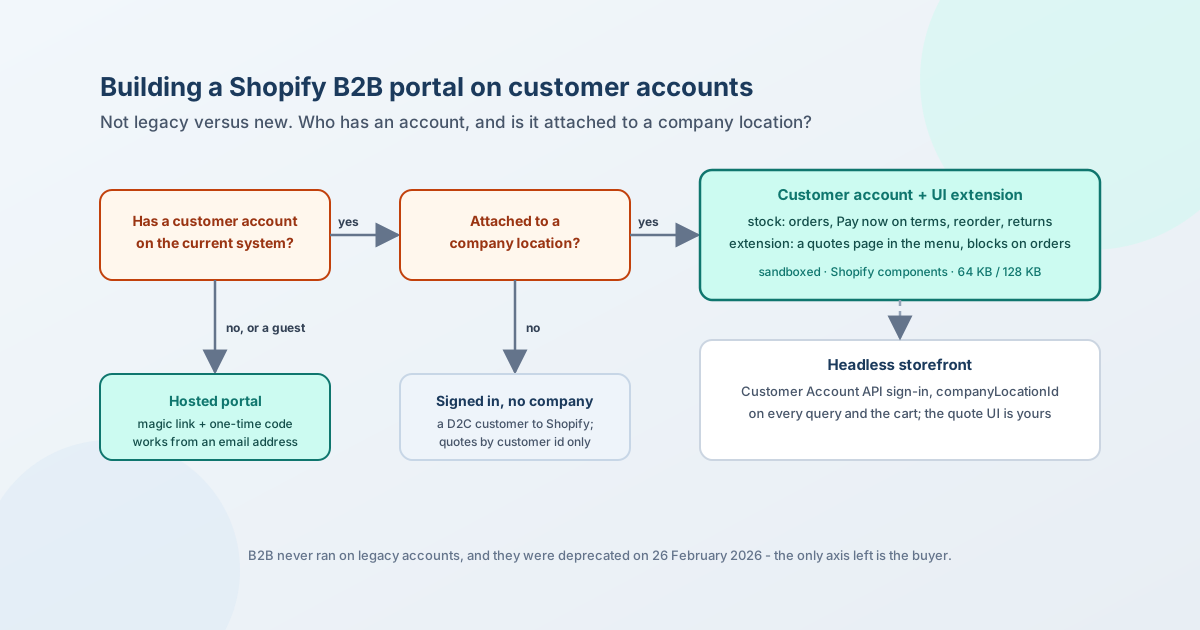
A Shopify B2B buyer portal is built on Shopify's customer accounts for the buyers who have one, and on a surface of its own for the buyers who do not. That is the whole decision. The question agencies still ask - new customer accounts or legacy? - stopped being a question on 26 February 2026, when Shopify deprecated legacy accounts; and it was never a B2B question, because B2B never ran on them. What remains to decide is which of four surfaces carries each part of the portal, and the answer turns on two facts about the buyer: whether they have a customer account, and whether that account is attached to a company location.
This page is for the agency scoping the buyer side of a B2B build: what customer accounts are now and what a signed-in B2B buyer already gets without any app; the four surfaces a portal can use and what each can carry, with the platform limits that decide it; what a customer account extension can and cannot do; where guest buyers fit; what headless changes; whether a buyer can see a draft order; and the failure modes that come from getting the account model wrong. Where it describes how QuotWay puts quotes inside the account, that is one implementation, labelled as such.
Everything about Shopify below was checked against Shopify's own pages on 22 September 2026 at API version 2026-07; sources are at the end.
What customer accounts are now
Shopify has one customer account system for new stores and one deprecated one. The current accounts sign a buyer in with an email address and a one-time code sent to it - "no password is required" - and for B2B the email is the one on a company location, so the sign-in is also the company check. A buyer attached to several locations chooses the one they are buying for before anything goes in the cart. The account can live on a subdomain of the store's own domain, such as account.yourstore.com, and a store can plug in its own identity provider over OAuth 2.0 or OpenID Connect; the Spring '26 Edition added profile and tag sync from Auth0, Ping Identity and Azure ID and sessions of up to 365 days.
Legacy customer accounts are deprecated as of 26 February 2026 - no longer available to new stores, no further updates, a sunset date "to be announced later in 2026" - and Shopify's B2B documentation is explicit that "you can't use legacy customer accounts for B2B customers and orders". Any build plan that still carries a legacy branch is planning for a store that cannot exist.
What a signed-in B2B buyer gets from the account with no app installed is more than a build sometimes assumes:
| In the account today | Detail |
|---|---|
| Orders | Order history across the buyer's locations, tracking, reorder by duplicating a past order, return requests |
| Payment terms | On an order with terms, a Pay now button, the due date, and an Overdue label once the term has passed; the buyer can pay any time before the due date |
| Deposits | The deposit amount and the balance's due date, shown at checkout, on the thank-you page and in the account (deposits are a Plus capability) |
| Company | Company and location information, saved payment methods; address edits need the Location admin permission |
| Permissions | Ordering only sees their own orders; Location admin sees every order for the location and edits addresses |
What it does not have is anything about a quote: no request, no proposal, no versions, no counter-offer, no approval. That is the gap a portal fills, and the four surfaces below are the places it can fill it.
The four surfaces
The matrix, with the limit that decides each row:
| Stock customer account | Account UI extension | Hosted portal (app) | Headless storefront | |
|---|---|---|---|---|
| Who can use it | Signed-in customers; B2B behaviour only when attached to a company location | Same - extensions render inside the account | Anyone with the link: guests, buyers without an account, stores without current accounts | Buyers the storefront signs in through the Customer Account API |
| Sign-in | Email + one-time code; optional OIDC provider | Shopify's, already done | The app's own: a magic link, a code to the same inbox | Customer Account API authorization flow |
| Where it lives | Shopify-hosted, or account.yourstore.com |
Inside the account; a full page gets a menu entry and its own route | The app's domain | Your domain |
| UI control | None beyond the editor | Shopify web components only; runs in a sandboxed worker; 64 KB per extension, 128 KB for a full page | Full | Full |
| Branding | Store's account theme | Store's account theme; the extension inherits it | The app's, with the store's logo and colours if it supports that | Yours |
| Data an app can reach | - | Storefront API reads (products, collections, metaobjects) with api_access; the app's own backend with network_access + a session token; purchasingCompany on the authenticated account |
Whatever the app's backend holds | Customer Account API + Storefront API with buyer context |
| What the buyer sees natively | Orders, terms, deposits, reorder, returns, company details | All of that, plus what the extension adds | Only what the app renders | Only what you render |
| Draft orders / invoices | Reached through the invoice link; orders on terms have Pay now | The Customer Account API exposes draftOrders with invoiceUrl, so a page can list them |
Whatever the app links to | Same API as the extension |
| Quotes | No | Yes, from the app's backend | Yes | Yes, if you build it |
| Failure surface | Shopify's | The bundle cap, the target rules, CORS and token verification | Email deliverability, a second domain | Everything, including sign-in |
Read the columns as a division of labour, not as rivals. A build that serves company buyers puts the quote pages in the account, because that is where those buyers already pay their invoices; the same build keeps a hosted surface because a guest, a buyer whose account is not yet attached to a company, and a store that has not moved to current accounts all fall outside the extension's reach. Headless replaces the first two columns for stores that own their storefront, and replaces nothing about the third.
What an account extension can and cannot do
The extension is the surface most builds underestimate in both directions: it can do more than a link in the menu, and less than a page.
Where it can render. A full page (customer-account.page.render, "not tied to a specific order") that merchants add to the account navigation; an order-bound page for flows like returns; blocks and announcements on the order index and order status pages; an order action that opens in a modal; profile blocks, including B2B-specific ones that render after the company details, the location addresses, the location's payment methods and the location's staff list; a footer slot. Shopify's own rule: "full-page targets cannot be combined with other extension targets in a single extension". A quotes page plus a "view my quotes" link on the orders page is therefore two extensions, and if the store should be able to add them together from the editor, an editor extension collection - which needs at least two extensions in it - groups them.
What it runs in. "An isolated sandbox, separate from the customer account page and other UI extensions" - a Web Worker - rendering Shopify's web components, "native UI elements that follow Shopify's design system", not HTML and CSS of your own. The compiled bundle "can't exceed 64 KB, or 128 KB for full-page customer account extensions". The extension has no access to "sensitive payment information or the customer account page itself". Those three constraints together mean the extension is a thin client: the quote's state, its rules and its documents live in the backend, and the page fetches and renders.
What it can reach. With api_access, the Storefront API for "unauthenticated read access to products, collections, product tags, selling plans, and metaobjects" - enough to read product data and any app-owned metaobject, such as per-store strings or a route slug. With network_access, the app's own backend, under two conditions Shopify states plainly: responses must carry Access-Control-Allow-Origin: *, and "requests could originate from anywhere on the internet" - the session token proves the customer's identity claim, not that the call came from Shopify, so the backend verifies the token on every request and treats the origin as untrusted. From the authenticated account the extension gets the customer and, for a business buyer, purchasingCompany; for anyone else that value is undefined, which is the check for "is this a company buyer at all".
What it cannot do. Render to a guest. Style itself outside Shopify's tokens. Hold a large client. Read the account page's DOM. Exist on legacy accounts. Each of these is a reason the hosted column in the matrix survives.
Guest quoting and buyers outside the company
Two kinds of buyer are invisible to the extension, and a portal plan has to say where they go.
The first is the guest: a buyer who requests a quote from a product page without signing in. Shopify has no object for that request, and no account page to show it on. The native on-ramp for turning such a buyer into a company is the company account request: a Shopify Forms form, inline or as a popup, whose submission "automatically creates" a company, a company location and a customer in the admin, parked under "Ordering not approved" until the merchant approves them - and until then "can't place orders in your online store or access B2B pricing". That is the right path for a buyer who wants an account. It is the wrong path to force on a buyer who wants a price by Friday, which is why the quote layer needs a surface that works from an email address alone.
The second is the buyer who is signed in but not attached to a company location. Shopify's help is direct: such a customer is treated as a D2C customer even when signed in. purchasingCompany is undefined, catalogs do not apply, and the B2B profile blocks do not render. An extension can still list that buyer's quotes by customer id, but nothing about company pricing or terms exists for them until an admin attaches them to a location.
QuotWay's answer to both, labelled as one implementation: a guest's proposal goes to a hosted portal through a magic link that is valid for seven days by default, gated by a one-time code sent to the same inbox that expires after an hour; a guest who later has an account can claim the quote into it with a one-time passcode; and the email that announces a proposal only links into the account page when the store runs current customer accounts and the buyer is a signed-in customer, otherwise it links to the portal. The two surfaces carry the same actions - accept, counter, decline, message, buyer-side approvals - on every plan.
Headless changes the sign-in, not the model
On Hydrogen or a custom storefront the buyer authenticates through the Customer Account API, and B2B context is something the storefront carries explicitly: it queries the customer's company contacts to find the locations they can buy for, offers a selector when there is more than one, and then sends companyLocationId with the customer access token into @inContext(buyer: …) on Storefront API queries - which is how contextual prices, quantity rules and volume pricing come back for that location - and into cartCreate or cartBuyerIdentityUpdate as the cart's buyerIdentity. Two caveats from Shopify's own page: changing the buyer identity on an existing cart can remove products that are not published for that buyer, and the Customer Account access token "can only be used to update the buyer identity of a cart", not to query the customer through the Storefront API.
For the portal this means the account extension column disappears - there is no Shopify-rendered account to extend - and the quote UI is yours, with the same backend contract an extension would use and the same identity check: the location the buyer selected is the location the quote is for, and the starting price is the one the buyer context returns.
Can a buyer see a draft order?
A converted quote is a draft order until the buyer pays, so the question comes up in every scoping call. The stock account shows orders; a draft order reaches the buyer as the invoice link Shopify sends, and once it is an order on terms it appears with Pay now and a due date. Underneath, the Customer Account API exposes customer.draftOrders - each with status, the invoiceUrl "sent to the customer in the invoice email", the purchasingEntity, the deposit and the line items - so an extension page or a headless storefront can list a buyer's open drafts next to their quotes and link straight to checkout. Whether Shopify's own account UI lists drafts as a section is not something its help pages state, so a build that needs the list should plan to render it from the API rather than assume the stock page has it.
Deciding the surface
| If | Then |
|---|---|
| Buyers are company contacts who already pay invoices in the account | Quotes belong in the account: a full-page extension in the menu, a block on the order index that points to it |
| Some buyers request quotes before they have an account, or before the company is approved | A hosted surface reached by email, and a claim step once the account exists |
| The store has not moved to current customer accounts | The hosted surface is the only one; the move is a Shopify setting, not a project |
| The storefront is headless | The Customer Account API for sign-in, companyLocationId on every query and the cart, your own quote UI on the same backend |
| The portal must look like the brand, not like Shopify | The hosted or headless surface; the extension inherits the account's theme |
| A rich, stateful buyer UI is required | Keep it out of the extension (64 / 128 KB, Shopify components only); the extension is the entry, the backend the state |
| Buyers should self-serve a company account | Shopify Forms' company account request, with the approval step budgeted into onboarding |
Failure modes
| Failure mode | What happens | Design |
|---|---|---|
| A legacy branch in the plan | Effort spent on a surface B2B cannot use and Shopify is sunsetting | Delete the branch; treat "no current accounts" as "hosted surface only" |
| Guests planned as "sign up first" | The request is lost at the sign-up wall | A surface that works from an email address; claim later |
| Signed-in but unattached buyer treated as B2B | purchasingCompany is undefined, catalog prices do not apply, terms do not exist |
Check purchasingCompany and route; make attaching the buyer to a location the onboarding task |
| Full page and block in one extension | Rejected by the platform rule | Sibling extensions plus an editor extension collection |
| Rich client in the extension | Over the 64 / 128 KB cap, or fighting the component set | Thin client; state in the backend |
| Backend trusts the origin | Anyone can call the endpoint; Shopify says the request can come from anywhere | Verify the session token on every call; CORS * is required, so authorisation is the token, never the origin |
| Multi-location buyer quotes for the wrong location | The proposal prices against a catalog the buyer will not check out under | Take the selected location from the account (or the headless selector) at request time and carry it on the quote |
| Magic-link email in spam | The guest never reaches the portal | SPF and DKIM on the sending domain; a code re-send from the portal itself |
| Portal on a second domain surprises the buyer | Trust drops; support asks "is this yours?" | The store's logo and colours on the portal; name-only emails that never show prices |
How QuotWay does it
One implementation, so the constraints above can be checked against something built. QuotWay ships three customer-account extensions: a full-page "My quotes" on customer-account.page.render, a "View my quotes" block on the order index that deep-links to the store's own /account/pages/… route (the slug is read from an app-owned metaobject through api_access), and an editor extension collection that lets a merchant add both in one step - the split is the platform rule above, not a preference. The page calls the app's backend with the session token in the Authorization header under network_access; in it a signed-in buyer lists quotes, reads a proposal, accepts, counters, declines, messages, acts on a buyer-side approval step, claims guest quotes and places a quick order. Guests, buyers on stores without current accounts and anyone the routing rule excludes get the hosted portal by magic link with the same actions, on every plan. The merchant-facing account is on the buyer portal feature page and in the docs on guest quotes and account claim; plan lines are on the pricing page; the launch tests for accounts, locations and sign-in are in the 50-test launch plan.
The Shopify facts in this post are kept current in the Shopify B2B reference.
FAQ
Does Shopify B2B work with legacy customer accounts?
No, and it never did: Shopify's B2B documentation states that legacy customer accounts cannot be used for B2B customers and orders. Legacy accounts are deprecated as of 26 February 2026, with a sunset date to be announced later in 2026. A B2B build targets the current customer accounts; a store still on legacy accounts moves in Settings before B2B can be used at all.
Can B2B buyers log in with a password?
Not on Shopify's customer accounts. A buyer signs in with the email address on their company location and a one-time code sent to it; there is no password. A store that runs its own identity provider can connect it over OAuth 2.0 or OpenID Connect, and sessions can last up to 365 days.
Can an app add a page to Shopify customer accounts?
Yes. A customer account UI extension with the full-page target creates a page the merchant adds to the account menu, and other targets add blocks to the orders, order status and profile pages. The extension runs in a sandbox, renders Shopify's components, is capped at 64 KB (128 KB for a full page), and reaches the app's backend through a session token. A full page cannot share an extension with other targets.
Can a buyer request a quote without a Shopify account?
Shopify has no request object, so this is entirely the quote layer's job. A guest can be served through a hosted page reached by email - a magic link plus a one-time code - and can later attach the quote to an account. The native way to turn a guest into a company buyer is the company account request form, which creates the company, location and customer for the merchant to approve.
Can a buyer see a draft order in their account?
Through the invoice link, and through the API. The Customer Account API exposes the customer's draft orders with their status, invoice URL, purchasing entity, deposit and lines, so an extension or a headless storefront can list them. Orders on payment terms show in the account with a Pay now button and a due date.
Do I need Shopify Plus for a B2B buyer portal?
No. B2B is on every Shopify plan, current customer accounts are on every plan, and account UI extensions run on any store with them. Plus adds deposits, unlimited active catalogs and direct catalog assignment - none of which the portal itself depends on.
Sources
Shopify pages, all read on 22 September 2026 at API version 2026-07 unless dated otherwise:
- Sign-in and customer accounts in B2B and setting up payment terms in B2B
- Company account requests and company contacts and permissions
- Setting up and managing customer accounts
- Customer account UI extensions, their targets and capabilities; the Authenticated Account API and the Session Token API
- Customer Account API: Customer and DraftOrder
- Headless with B2B and the Customer Account API with Hydrogen
- Legacy-account deprecation and the Spring '26 identity additions: the Shopify B2B reference, verified 20 September 2026
QuotWay's extensions, routing and portal behaviour are described from their source (extension configuration, the extension's API client and the buyer-link resolver) and the docs linked above.
Related articles
- For Shopify agenciesMigrating wholesale customers to Shopify Companies: an agency playbook14 min read
- For Shopify agenciesERP, CRM and PIM integration patterns for Shopify B2B quoting18 min read
- For Shopify agenciesWhat breaks between quote time and conversion time: 17 failure modes of converting a Shopify B2B quote16 min read
See how QuotWay handles this on your store.