For Shopify agencies
When you shouldn't use a Shopify quote app
By Jahangir Alam · September 20, 2026 · Updated October 15, 2026 · 11 min read
- Last verified
- Shopify API
- 2026-10
- Audience
- Shopify agencies and merchants scoping a B2B build
- Scope
- Native Shopify B2B (catalogs, quantity rules, draft-order checkout, account requests) versus a quote workflow
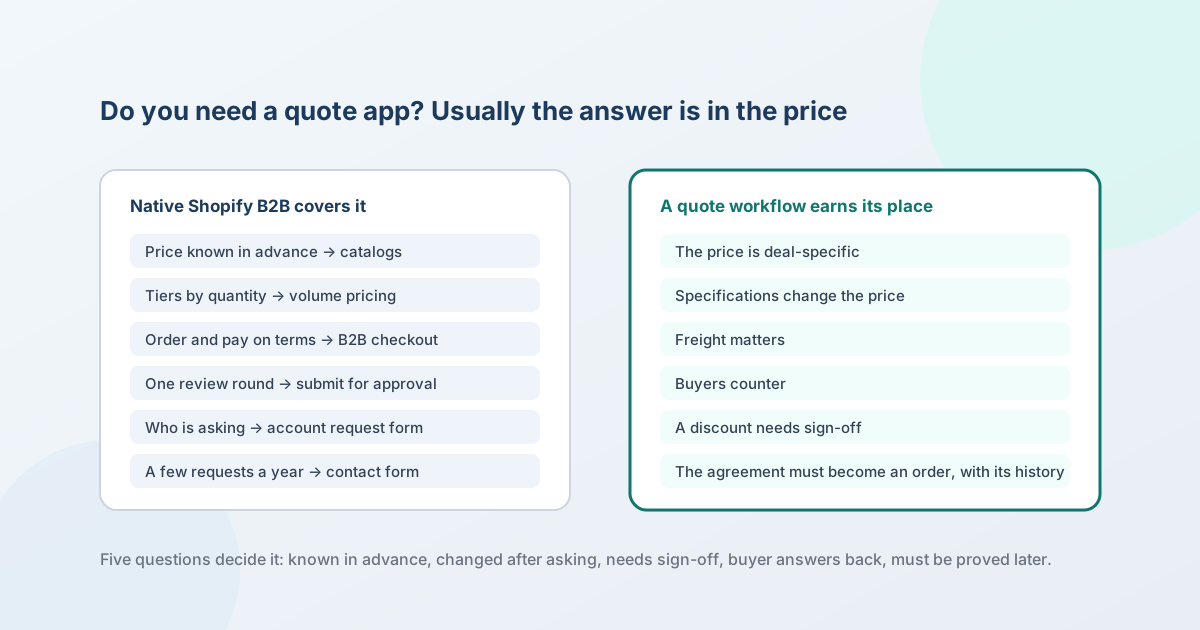
If the price is known before the buyer asks and nobody changes it afterwards, you don't need a quote app.
Shopify's native B2B already prices each company location from its catalog, handles quantity tiers with quantity rules and volume pricing, turns a checkout into a draft order for review with one setting, and takes account applications with a form that creates the company for you. A quote workflow earns its place only when the price is decided per deal - by negotiation, by specification, by freight, or by someone's sign-off - and the agreement then has to become an order with its history intact.
We build a quote app, which is exactly why this page exists. An agency scoping a client's B2B build asks "do we actually need an RFQ app?" before it asks anything else, and the honest answer is often no. The eight situations below are the ones where it is no, each with the Shopify feature that covers it and the plan that feature needs; then the six where it is yes; then a five-question test that settles the borderline cases.
Don't use a quote app when
1. The price is always predetermined
If every buyer's price is known before they ask - a trade price, a contract price, a tier - it belongs in a Shopify catalog, not in a quote. A catalog is a product selection plus a price list, quantity rules and volume pricing, assigned to a company location; a location can have several, and when the same product is in more than one, the lowest price shows (on Plus, a catalog assigned directly to the location comes first; what price a quote should start from has the full rule). That is a complete customer-specific pricing system. On Basic, Grow and Advanced you get up to three active catalogs across all your B2B markets; Plus lifts the cap and lets you assign a catalog directly to a company or location.
Where it stops: a catalog price is a standing price. It cannot express "for this order, given this quantity and this delivery date, this number". The catalogs guide covers the merchant setup.
2. Volume tiers are the whole negotiation
"Buy 50 and it's $9, buy 200 and it's $8" is not a negotiation; it is a price list with breaks. Shopify handles it natively: quantity rules set a minimum, maximum and increment per variant, and volume pricing adds up to 10 price breaks per product, applied per variant, on every plan. Once volume pricing is on, the price is fixed and the catalog's overall percentage adjustment no longer applies to that product - which is the behaviour a tiered price list should have.
Where it stops: the breaks are the same for every buyer on that catalog. The moment one buyer gets a break the others don't, you are quoting. The volume and tiered pricing post draws the same line from the merchant's side.
3. Buyers can just order from their catalog
If a signed-in buyer sees their price, can add what they need and check out on their location's payment terms, the order path is done. Native B2B checkout gives them Net 7 to Net 90 or due-on-fulfilment terms, a PO number field, vaulted credit cards at the location level, easy reorders by duplicating a past order, and quick order lists for adding many variants at once. None of that needs an app, and neither do deposits: on Plus, a deposit percentage on the location or the draft order is collected at checkout with the balance on terms.
Where it stops: every one of those features assumes the price on the line is the right price. They carry a price; they don't decide one.
4. One review round is enough
Some merchants want to look at an order before it becomes one - check stock, confirm the freight, correct a quantity - and then let the buyer pay. Shopify does this without a quote object. Set the company location to "Only allow draft orders at checkout": the buyer's button reads "Submit for approval", the order lands on your Drafts page, and it completes when you create the order or the buyer pays the invoice. Since the Spring '26 Edition you can override line prices and apply custom discounts on a draft order in the admin, lock the prices, reserve the stock, and send the invoice to the company contact. What that hold can record, and what it cannot, is set out in a Shopify draft order is not a quote.
Where it stops: a draft order has one state - awaiting payment or approval. It has no request, no proposal number, no counter-offer, no record of what was asked versus what was offered. If the buyer replies "can you do better on line 3", the conversation has left Shopify and the draft order is now out of date. The draft-orders workflow post shows where that starts to hurt.
5. You only need to know who is asking
A lot of "request a quote" buttons are really "apply for an account". Shopify's company account request form does that natively: company name and email are required, you can add custom fields including file uploads, and on submission a company, a company location and a customer are created in your admin for you to approve or deny. No pricing is involved, because none is needed yet - the applicant gets a catalog once approved. The wholesale application post covers what to ask on that form.
Where it stops: the approved buyer then orders at catalog prices. If they need a deal-specific price for their first order, you are back to quoting.
6. A contact form is sufficient
If you receive a handful of price requests a year and answer them by email, a contact form is the right tool and a quote workflow is process you don't have the volume to run. Your theme's contact page, or a lead form that creates a customer profile, captures the request; you reply; the buyer pays through a draft-order invoice. That is a legitimate setup for a store where quoting is rare.
Where it stops: at the point where you cannot say which requests are open, which proposals went out at which price, or who approved the discount - which tends to arrive somewhere between a few requests a week and the first buyer who asks for a revision. A form collects; it does not track, version, approve or convert.
7. The real problem is product configuration
If buyers build a product from options and rules - dimensions, materials, compatible parts, each combination with its own price - the hard part is configuration, and a quote app does not solve it. A quote app can hold a custom line at a price you type; it does not compute that price from the options. That is a product-options tool or, at the top end, a configure-price-quote system. The Shopify CPQ post separates the two, the decision guide scores all four options against eighteen requirements, and QuotWay versus enterprise CPQ says plainly which jobs a quote app should not be bought for.
8. The price is computed from measurable inputs
Printing priced by area and colour count, machining priced from a CAD file, signage priced by dimensions: the buyer wants a number in seconds, computed from inputs, with no human in the loop. That is an instant-quote engine, and it is neither a catalog nor a quote workflow. Instant quote or negotiated quote is the distinction; if your prices come out of a formula, look there first.
The scenario table
| The situation | What covers it natively | Plan | Where it stops |
|---|---|---|---|
| Every buyer's price is known in advance | Catalogs: price list per company location, lowest price wins across several | All plans (3 active catalogs; unlimited and direct assignment on Plus) | A standing price cannot be a deal price |
| Tiers by quantity | Quantity rules and volume pricing, up to 10 breaks per product | All plans | Same breaks for every buyer on the catalog |
| Buyers order and pay on terms | B2B checkout, net terms, PO numbers, vaulted cards, reorders, quick order list | All plans; deposits and partial payments on Plus | Carries a price, never decides one |
| One review before the order is final | "Only allow draft orders at checkout", custom prices and discounts on the draft, lock prices, reserve stock, invoice | All plans | No request, version, counter or approval state |
| Knowing who is asking | Company account request form: company, location and customer created on submit | All plans | The approved buyer still needs a price for a non-standard order |
| A few requests a year by email | Contact form or lead form, then a draft-order invoice | All plans | No tracking, versioning, approval or conversion |
| Price depends on product configuration | Product options or a configurator; CPQ at the top end | Depends on the tool | A quote app holds a custom line; it does not compute it |
| Price is a formula over measurable inputs | An instant-quote engine | Depends on the tool | Not a negotiation at all |
Use a quote workflow when
The six conditions below are what native B2B has no object for. One of them is usually enough.
- The price is deal-specific. The number depends on this buyer, this quantity, this month - and it is not the catalog's number. The quote layer records what was asked and what was offered, and negotiates from the catalog price rather than replacing it; the architecture post explains why it must never keep a price list of its own.
- Specifications change the price. A line that is not a variant - a custom size, a service, a setup charge - needs to be written into the offer as a custom line with its own price, tax flag and shipping flag, and then reach the draft order as one.
- Freight matters. When shipping is priced per deal, absorbed on some lines or shown on others, the proposal has to carry it explicitly and the buyer has to accept it; the freight post is about that decision.
- Buyers negotiate. A counter-offer is a state, not an email. A sent proposal's lines are locked - the buyer's move is a counter, and the seller's reply to it is a new version - so both sides can always say what was agreed at each step.
- Internal approval matters. A discount past a threshold has to reach the right person before it reaches the buyer, and the check has to run on the server so a rep cannot send around it. Shopify staff permissions scope which company accounts a rep can see; they do not gate whether a price may go out. The approval matrix post covers the policy; a quote layer enforces it.
- The agreement must become an order with its history. The accepted version converts to a native draft order at the agreed prices - with the negotiated unit price written onto each line, the buyer's payment terms applied, the PO number carried, and the draft order and order IDs written back to the quote - so a year later the order, the proposal it came from and who approved it are one record. A buyer who accepts some lines and leaves the rest open for another round needs that too.
Two more that are about the buyer rather than the price: a guest who wants a number before they have an account (native B2B shows prices only to a contact assigned to a company location), and a request that has to be routed to a rep, timed, reminded and expired - the automation post is about when that is worth doing.
The five questions
Answer for the deals you actually see, not the ones you imagine.
- Is the price known before the buyer asks? If yes for every buyer, catalogs. If yes for most, catalogs plus a quote path for the rest.
- Does anyone change the price after the buyer asks? If never, you are done at question 1. If sometimes, the change needs a record.
- Does the change need someone's sign-off? If yes, you need an approval that runs before the price goes out, not a note in an email.
- Does the buyer answer back - counter, ask for a revision, accept part? If yes, you need versions and a counter state.
- Will someone need to prove what was agreed, later? Disputes, audits, a rep who left. If yes, you need an immutable record that ends in the Shopify order.
Zero or one yes: native Shopify B2B, and perhaps a contact form. Two: a quote workflow for the exceptions, catalogs for the rest. Three or more: quoting is your sales process, and it should have its own system.
The hybrid: native B2B plus a quote path
A store doesn't have to be all-catalog or all-quote. A sound shape is native B2B for standing prices, reorders and terms, with a quote path for the deals that don't fit - and the quote path reads the catalog rather than fighting it. That is how QuotWay's company-aware quoting works: a proposal for a company contact starts from that location's catalog price, negotiates from there, and converts to a draft order with the payment terms set on the proposal; buyers who don't qualify for a quote button never see one, and the free Lite plan runs the whole request-to-draft-order loop so a store can find out whether it has quoting volume before it pays for it. If after a quarter every request was answered with the catalog price, you have your answer, and it is the one this page started with.
Whether Shopify is the right platform for the business at all is a separate question - is Shopify good for B2B? sets out when it isn't.
FAQ
Does Shopify have a built-in quote feature?
Not a quote object. Shopify has the pieces around one: catalogs for customer-specific prices, "submit for approval" to turn a checkout into a draft order, custom prices and discounts on draft orders, invoices from draft orders, and a company account request form. What it lacks is a request, a proposal with versions, a counter-offer and an approval - the negotiation itself. If your deals don't involve those, the pieces are enough.
Can I use draft orders as quotes?
For a single review round, yes: the buyer submits, you adjust and lock prices, you send the invoice. For anything with a reply - a counter, a revision, an approval - a draft order has no state to hold it, and it neither reserves stock nor locks prices unless you set both. Create the draft order when the price is agreed, not as the place to agree it.
Is "hide prices plus a contact form" a quote workflow?
No. Hiding prices decides who sees a number; a contact form collects a message. Neither tracks the request, prices it, versions it, approves it or converts it. Hiding prices on its own has two layers worth knowing about - a visual hide on the storefront, and a search-engine-safe hide that keeps the price out of the page source, meta tags and structured data a signed-out visitor or crawler receives, which needs a one-time theme edit - and the hide-prices guide covers both. If the form is receiving price requests you then answer by hand, count them: that is your quoting volume.
Do I need Shopify Plus for the native options above?
No. Since 2 April 2026, companies, locations, catalogs, quantity rules, volume pricing, payment terms, vaulted cards, draft orders at checkout and the account request form are on Basic, Grow and Advanced. Plus adds unlimited catalogs, direct catalog assignment, deposits and partial payments. The plan matrix has the full list.
Can a quote app and catalogs work together?
They should, and the test of a good one is that it never stores prices of its own. The catalog stays the standing price for the location; the quote starts from that price for that buyer, and the agreed price goes onto the draft order line for that one order. If an app asks you to import or maintain a price list inside it, that is the second pricing system the architecture post warns about; the evaluation checklist turns that and fifty other questions into tests you can run on a development store.
We only get a few requests a month. Is a quote app worth it?
Probably not yet, unless those few carry most of your revenue or need approval. Answer them from a draft order and a form, and keep a count. The signal that you have outgrown that is not volume alone; it is the first time you cannot say what you offered a buyer three weeks ago.
Sources
Shopify pages, all read on 20 September 2026 and re-read on 7 October 2026:
- B2B catalogs and quantity rules and volume pricing
- Overview of B2B features and B2B features by plan
- Checkout and accounts and creating B2B orders using draft orders
- Payment terms
- Allowing new B2B customers to request access to your store
- Sign-in and customer accounts in B2B
- Shopify Forms
- Shopify Editions Spring '26 (custom pricing on draft orders)
- B2B for all - announcement, 2 April 2026
Related articles
- For Shopify agenciesIs Shopify good for B2B? When it's the right platform, and when it isn't14 min read
- For Shopify agenciesWhy a quote converts at the wrong price on Shopify: diagnose it by the size of the difference13 min read
- For Shopify agenciesWhen the quote and the Shopify order disagree: what drifts after conversion12 min read
See how QuotWay handles this on your store.