Quoting & negotiation
How to automate quotes on Shopify: a practical guide
By Jahangir Alam · August 12, 2026 · Updated August 23, 2026 · 7 min read
Most B2B quotes are routine: a known buyer, a familiar product, a discount well within your limits. Automating those - so they price, accept, assign, or follow up on their own - frees your team for the deals that actually need a human. This guide covers how to automate quotes on Shopify: what you can automate, how the rules work, and the guardrails that keep automation from doing something you'd regret. The goal isn't to remove judgment; it's to stop spending it on the predictable ones.
What "automating quotes" on Shopify means
Automating quotes means letting rules you define handle the routine parts of a quote - accepting, pricing, assigning, declining, or following up - based on conditions from the quote itself: its value, the customer, the products, the discount. Shopify doesn't automate quoting on its own; you add it with a quote app that has a rules engine. Done right, it's deterministic: a rule acts only when your conditions match, so there's no guesswork and nothing decided by a black box. (In QuotWay, automation is a Professional-plan capability - the routine parts of quoting aren't on the free tier.)
What you can automate - and what you shouldn't
Good candidates for automation are the predictable quotes:
- Auto-accept a quote that's already within your limits (paired with a price floor, below).
- Auto-price a familiar request the way you'd have priced it by hand.
- Auto-assign a quote to the right person the moment it arrives.
- Auto-decline requests that clearly don't fit - a region you don't serve, below a minimum.
- Auto follow-up on quotes a buyer hasn't answered, and expire stale ones. (How to follow up on a B2B quote covers the cadence and what stays human.)
What to keep human: the judgment calls - a deep discount, a new strategic account, an unusual configuration. The point of automating quotes is to free up that judgment, not replace it. For which quotes to automate and which to hold back, see when to automate B2B quotes.
How to automate quotes on Shopify, step by step
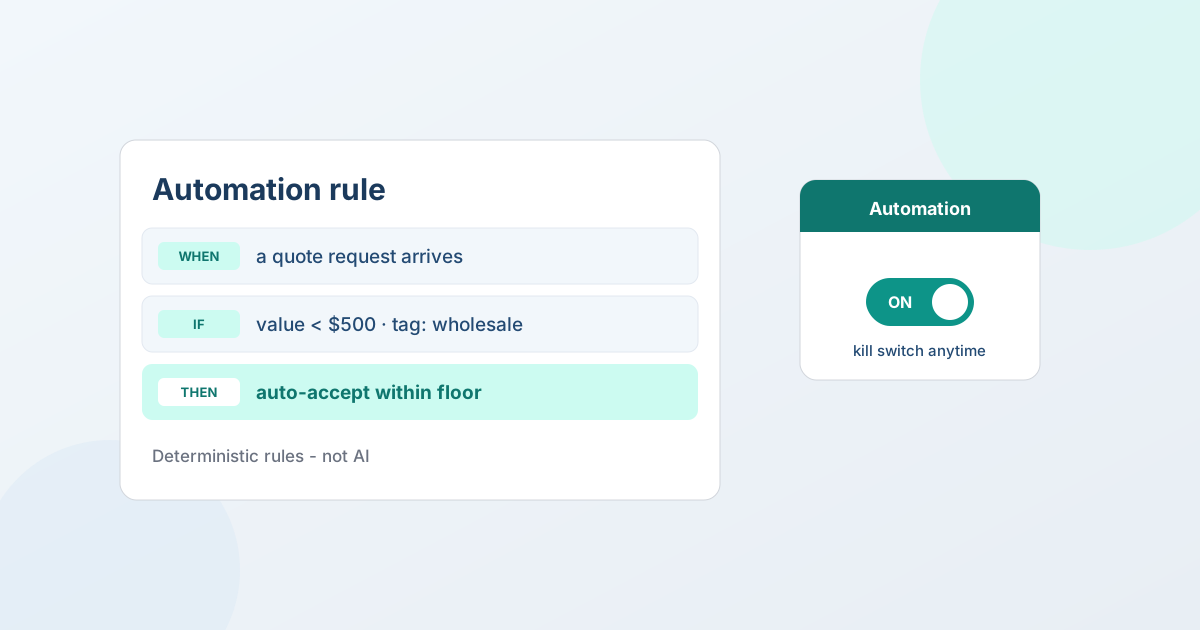
In QuotWay, every automation rule follows the same plain shape - When → If → Then - so you can read a rule the way you'd say it out loud.
- Choose the When (the trigger). What starts the rule: a new quote request arriving, or a buyer accepting a proposal.
- Set the If (the conditions). Narrow the rule to the quotes you mean: a value below a threshold, a specific customer tag, particular products. Combine conditions to keep it precise.
- Pick the Then (the action). What QuotWay does: auto-accept within your floor, auto-price, auto-assign (routing quotes to the right rep), auto-decline, or send a follow-up. Save it, and it runs on every matching quote from then on.
Because a rule only fires when your conditions are true, it's predictable and auditable - every automated action is written to the quote's event log. See automation rules for the full engine.
The guardrails that make automation safe
Automation is only safe if the exceptions are controlled:
- Price floor. Set a maximum discount below catalog; auto-accept checks every line against it, and a below-floor quote skips the rule and waits for a human instead of closing automatically. See negotiation and the price floor.
- Approvals. Route a quote that crosses a threshold to a manager before it's sent or accepted - see approval workflows.
- A kill switch. One global toggle pauses every rule at once - useful during a price change or a busy season.
- It's rules, not AI. QuotWay's automation is deterministic and rule-based; it doesn't use AI to set prices or decide outcomes.
FAQ
How do I automate quotes on Shopify?
Use a quote app with a rules engine. In QuotWay you build a rule as When → If → Then: a trigger (a quote arrives), your conditions (value, customer tag, products), and an action (auto-accept within a floor, auto-price, auto-assign, auto-decline, or follow up). The rule then runs on every matching quote, and every action is logged. Automation is on the Professional and Enterprise plans.
Does automating quotes use AI?
No - QuotWay's quote automation is rule-based and deterministic. It acts only on the conditions you set and takes the action you chose; it doesn't use AI to price, predict, or negotiate. A global kill switch pauses every rule at once.
Will an automated rule ever accept a quote below my price?
No. Auto-accept checks every line against your price floor - a maximum discount below catalog that you set - and a below-floor request skips the rule and waits in your inbox for a human. The skip and its reason are recorded in the quote's activity.
Which plan includes quote automation?
Automation rules are on QuotWay's Professional ($79/mo) and Enterprise ($199/mo) plans. Lite and Starter don't include automation. Every paid plan includes a 14-day trial.
Where QuotWay fits
QuotWay is a B2B quote and negotiation app for Shopify, built by EFOLI. Its automation runs the routine quotes on rules you define - auto-accept within a floor, auto-price, auto-assign, auto-decline, and follow-ups - with a kill switch and a full audit trail, so your team works the deals that matter. Automation is on Professional and up; the free Lite plan lets you run the manual quote-to-order loop first. See the plans and pricing or add QuotWay on Shopify.
Sources
Related articles
See how QuotWay handles this on your store.