For Shopify agencies
Shopify B2B security review: a 40-point checklist for stores and quote apps
By Jahangir Alam · September 25, 2026 · 15 min read
- Last verified
- Shopify API
- 2026-07
- Audience
- Shopify agencies, developers and store owners reviewing a B2B store and the apps installed on it
- Scope
- The store's own security review at API 2026-07: staff, collaborator and two-step authentication settings, company contact roles and sign-in, every place a price can be set, app scopes, custom-app and expiring offline tokens, webhook HMAC, app proxies, customer account extensions, PCI scope and customer data
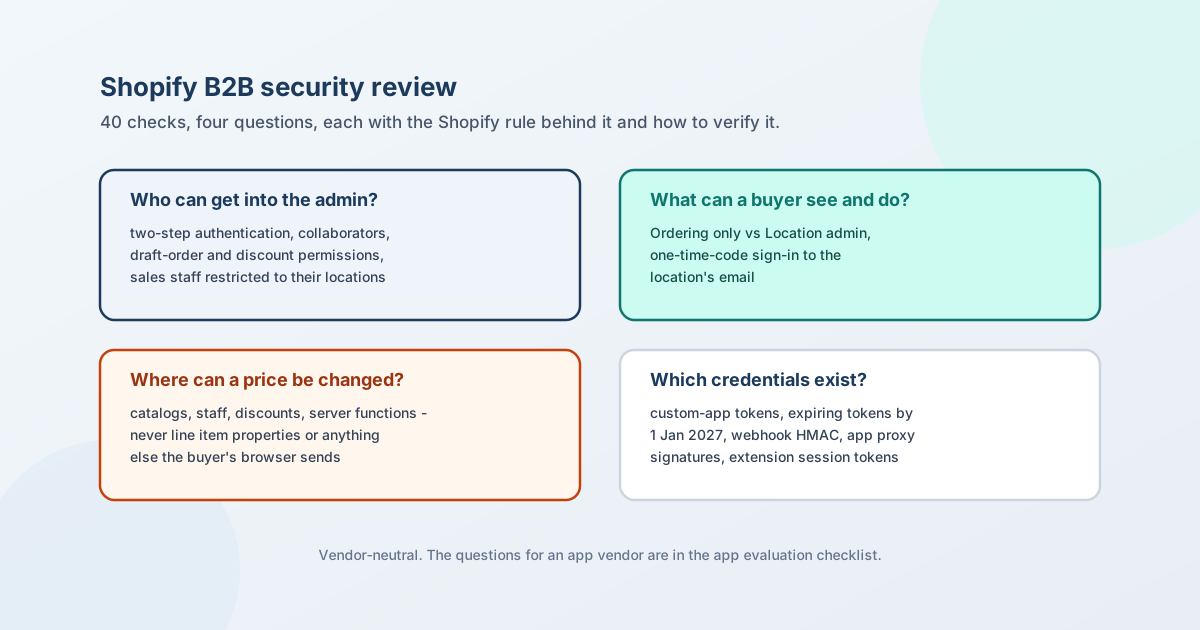
A security review of a Shopify B2B store has to answer four questions: who can get into the admin and with how much access, what a buyer can see and do, where a price can be changed, and which credentials and endpoints exist outside Shopify. The 40 checks below cover those four, plus the data a review has to account for, and each one names the Shopify rule behind it and how to verify it yourself.
Three dates make this more than housekeeping in 2026. Custom apps can no longer be created in the Shopify admin since 1 January 2026, but the ones that exist keep working. New public apps have had to use expiring offline access tokens since 1 April 2026, and every public app must by 1 January 2027, after which non-expiring tokens get authentication errors. Custom and merchant-created apps are exempt - so after that date, the long-lived tokens left in a store are exactly the ones a review has to find.
This checklist is vendor-neutral. It is the store's review; the questions to put to an app vendor about its own data handling are in how to evaluate a Shopify B2B app, and this page links there instead of repeating them. It was written by a vendor whose own answers are published separately, linked at the end.
Everything about Shopify below was checked against Shopify's own pages on 25 September 2026 at API version 2026-07, unless another date is given; sources are at the end.
How to run the review
- Export the facts before the meeting. The staff list with each person's permissions, the collaborator list, the installed apps with their granted scopes, every custom app, and the company list with each contact's role. Sections A and B, and much of D, are answered by reading those five lists.
- Test the buyer side signed in as a buyer. A development store or a test company with two locations, one contact on each role, is enough to see what each role sees.
- Record the answer and the evidence for every row. A review is only as useful as its record: the next reviewer should be able to see what was checked, when, and what was found.
A. Admin access: staff, collaborators and two-step authentication
| # | Check | Why (the Shopify rule) | How to verify |
|---|---|---|---|
| 1 | Every user has two-step authentication on | "Stores on the Shopify Plus plan can require that all users in their organization use a secure sign-in method"; on other plans each user turns it on for their own account | Plus: check the organisation's security setting. Other plans: ask each user, and treat an account without it as a finding |
| 2 | No one relies on SMS as the only second factor | Shopify no longer offers SMS for new setups; it remains for existing accounts. Authenticator apps, security keys and built-in authenticators are the supported methods | Ask each admin which method they use |
| 3 | Collaborator accounts are known and scoped | Collaborators are Partners the owner accepted; they get roles with "the permissions that they require", and "don't count towards your store's user limit", so they are easy to forget | Export the collaborator list; for each, the agency, the person, the role and the end date of the engagement |
| 4 | The collaborator request code is not in circulation | "Only the Partners who you share the code with can request access to your store"; the code can be regenerated | Regenerate it after an engagement ends |
| 5 | Leavers are removed, not just deactivated in practice | Staff and collaborators keep their access until removed; collaborator removal is permanent | Match the staff and collaborator lists against current people |
| 6 | Customer export and data requests are held by few people | Customer "Export" is a separate permission, and "Request data" is one of Shopify's flagged sensitive permissions | List who holds each; the answer should be a small number with a reason |
| 7 | Draft-order creators are the people who should be setting prices | Creating or editing a draft order requires at least one payment permission (payment terms, charge a card, mark as paid); "Apply discounts" is a separate permission | For each user with draft-order create/edit and apply-discounts, confirm the role needs it |
| 8 | Sales reps are restricted to their own locations | "Restrict permissions to assigned company locations" limits a rep to Customers, Orders, Draft orders and Companies, filtered to their locations; up to 10 sales staff per location | Sign in as a rep and try to open a company they are not assigned to |
| 9 | Delete companies is not a default permission | Deleting companies and locations is its own permission | List who holds it |
| 10 | "Manage settings" is held deliberately | It governs store settings including webhooks and Markets | List who holds it; a webhook added in the admin sends store data to an outside URL |
B. The buyer side: contacts, roles and sign-in
| # | Check | Why (the Shopify rule) | How to verify |
|---|---|---|---|
| 11 | Each contact has the narrowest role that works | Ordering only: buys for the location and sees their own orders. Location admin: sees "orders that all customers have placed for that location" and can update shipping and billing addresses | Export contacts with roles; Ordering only should be the default, with a named Location admin per location |
| 12 | The main contact's role was chosen, not inherited | "The main contact is assigned ordering only permission by default" - often fine, sometimes the reason a buyer cannot see what they need | Check each location's main contact |
| 13 | The buyer's mailbox is treated as the credential | B2B buyers sign in with the email on the company location and a one-time code - no password - so whoever controls that mailbox controls the buyer account | Confirm contact emails are named people or a controlled shared inbox, not a former employee's address |
| 14 | Contacts are removed when people leave the buyer's company | A contact stays a contact until removed, whoever holds the mailbox | Put contact review into the account manager's routine; ask the buyer's admin for leavers |
| 15 | Company pricing appears only for signed-in company buyers | A buyer not associated with a company location is treated as a D2C customer even if they sign in, and sees D2C prices | Sign in as an unattached customer and as a company contact; compare |
| 16 | A buyer cannot switch themselves into another location | A multi-location buyer picks among the locations they hold a role at | Sign in as a contact with one location; confirm no other appears |
C. Price integrity: where a price can be set
The question that matters most in B2B is not "can someone see a price" but "can someone change one outside the approved path". A Shopify B2B store has a short list of legitimate places a price is set; everything else is input a buyer controls.
| Where a price is legitimately set | Controlled by |
|---|---|
| A catalog's price list and volume breaks | Staff with catalog permissions |
| A draft order's lines and discounts | Staff with draft-order and discount permissions |
| A Shopify discount | Staff with discount permissions; applied by Shopify at checkout |
A cart transform function's lineUpdate |
An app's server-side function; Plus and development stores only |
| An app's own server, turned into one of the above | The app, under its scopes |
| Where a buyer supplies the value | What that means |
|---|---|
Line item properties (properties[...] in the product form) |
Documented as the customer's own input - engraving text, notes, uploads |
| Cart attributes, form fields, URL parameters | Anything the browser sends can be edited in the browser |
| # | Check | Why | How to verify |
|---|---|---|---|
| 17 | No app or theme reads a price from buyer input | Line item properties are set by the customer; a price taken from them, or from a cart attribute or URL, is a price the buyer chose | Ask each pricing or quote app where the price on a line comes from; read any theme code that posts to the cart |
| 18 | Price overrides at cart happen only in a server-side function | Cart transform lineUpdate can "override the price, title, and image of a cart line item", and only on Plus or development stores |
List the cart transform functions installed and what each one keys its price on |
| 19 | Rules that protect margin run on the server | The cart and checkout validation function API runs server-side on B2B checkout and draft orders; theme code runs in the buyer's browser | Map each rule (minimums, PO required, location restrictions) to catalog, quantity rules or a validation function |
| 20 | Integrations that create orders re-apply the rules | Validation functions do not run on the Create Order API or on order editing | For each integration that writes orders, ask where it enforces the buyer's rules |
| 21 | A negotiated discount has an approver | A draft order carries whatever price the staff member with the permission gave it | Check who can apply discounts, and whether anything above a threshold needs a second person |
| 22 | The invoice link has been tested, not assumed | Shopify's invoice page describes sending the checkout link by email or copying it into a message, and warns not to mark the order paid first; it does not say who else can open the link or whether it expires | Open an invoice link signed out, in a private window, on another device; record what you see and decide whether that is acceptable for your buyers |
| 23 | Draft orders are never marked paid before payment | "Mark as paid" is a payment permission; marking a draft paid before the buyer pays breaks the invoice link and records money that has not arrived | List who holds mark-as-paid |
D. Apps, credentials and endpoints
| # | Check | Why (the Shopify rule) | How to verify |
|---|---|---|---|
| 24 | Every app's granted scopes match what it does | Access scopes "control which store data your app can read and write"; Shopify asks apps to "request only the data your app needs"; write scopes include read | Read each app's scopes on its install and data-access screens; question any write_ scope the app's job does not explain |
| 25 | Granted scopes were checked, not configured ones | Optional scopes are "granted separately, after installation", so what an app holds can differ from its configuration | For custom apps, query the granted scopes; for public apps, read the data-access page in the admin |
| 26 | Apps with long order history access have a reason | read_all_orders (beyond the default 60 days) needs Shopify's approval |
Ask why, per app |
| 27 | Every custom app is inventoried with an owner | Custom apps can no longer be created in the admin since 1 January 2026, but existing ones "continue to work"; new custom apps are built in the Dev Dashboard | List custom apps, who built each, what it does, and whether it is still used |
| 28 | Long-lived tokens are known and can be revoked | A non-expiring offline token grants "permanent access until the app is uninstalled or the secret is revoked"; custom and merchant-created apps are exempt from the 2027 expiry rule | For each custom app: where is the token stored, who can read it, and how would you revoke it today |
| 29 | Public apps are on expiring tokens, or have a plan | New public apps since 1 April 2026; all public apps by 1 January 2027, after which non-expiring tokens "receive authentication errors". Expiring tokens last one hour with a 90-day refresh token | Ask each public app vendor whether they have migrated |
| 30 | Webhooks are verified by HMAC | Each delivery carries X-Shopify-Hmac-SHA256, a base64 HMAC of the raw body with the app's client secret; verify on the raw body, compare in constant time, return 401 on failure |
For your own endpoints, read the handler; for vendors, it is a question for the app evaluation checklist |
| 31 | Webhook handlers are idempotent | Deliveries can repeat; dedupe on X-Shopify-Webhook-Id |
Replay a delivery on a development store and check nothing happens twice |
| 32 | App proxy endpoints check the signature and the owner | App proxy requests carry a signature over the other parameters; logged_in_customer_id must be matched to the owner of the requested data after verification; Shopify strips cookies |
For each app proxy route that returns buyer data, confirm both checks |
| 33 | Customer account extensions prove who is asking | Extension network calls go out with CORS * from an origin that cannot be trusted; the session token is what proves the customer |
For each extension backend, confirm it verifies the session token and never trusts a customer or company ID sent in the body |
| 34 | Store webhooks added in the admin are accounted for | An admin-created webhook sends store data to whatever URL was entered | List the webhooks created in the admin's settings; each needs an owner and a purpose |
E. Customer data and payments
| # | Check | Why (the Shopify rule) | How to verify |
|---|---|---|---|
| 35 | Card numbers only ever enter Shopify checkout | "Shopify is certified Level 1 PCI DSS compliant", and the certification covers "your store, its shopping cart and web hosting" - not a quote form, an email thread or an uploaded file | Search quote forms, custom fields and upload fields for anything that invites card details; remove it |
| 36 | Apps holding customer data are approved for it | Name, address, email and phone are protected customer data, which public apps need Shopify's approval to access | Covered by the vendor questions in the app evaluation checklist |
| 37 | Erasure on uninstall is understood | shop/redact arrives 48 hours after uninstall; customers/redact 10 days after a request, or six months after the customer's last order; apps have 30 days to act |
Record each app's documented behaviour against those dates |
| 38 | File uploads are validated and access-controlled | Buyers attach drawings, specs and purchase orders to requests; a file is data the store now holds | Ask what validation an upload gets (type, size, active content), where it is stored, and who can download it |
| 39 | Customer exports leave a trail | Export and data requests are permissions, not settings, so the control is who holds them | Tie to check 6; decide where exported files may be stored |
| 40 | The review is dated and scheduled | Two of the rows above change on published dates (1 January 2027 for tokens) and Shopify ships B2B changes quarterly | Put the next review in the calendar; re-run it after every staff change in the admin, every new app, and every Shopify Edition |
The credential calendar
| Date | What changed | What to check |
|---|---|---|
| 1 Jan 2026 | Custom apps can no longer be created in the Shopify admin; existing ones keep working | Inventory them (check 27) |
| 1 Apr 2026 | New public apps must use expiring offline access tokens | Nothing for the store; relevant to vendors |
| 1 Jan 2027 | All public apps must use expiring tokens; non-expiring tokens get authentication errors | Ask vendors (check 29); custom and merchant-created apps are exempt, so check 28 matters more after this date, not less |
Retired checkout surfaces - checkout.liquid, additional scripts, Shopify Scripts - are a security question too, because code nobody maintains is code nobody reviews; their dates are in Shopify B2B technical debt.
Where QuotWay's answers are
Published rather than printed here, so this checklist stays usable for any store and any app: security and data protection covers QuotWay's data handling, retention and webhooks, the sub-processor list names who processes what, and what QuotWay can and cannot do answers the enforcement and permission questions plan by plan, and how discount approvals are routed and enforced is on the approvals feature page. The questions to put to any quote or pricing app are in the app evaluation checklist, and the 50-test launch plan covers the functional side. Plans are on the pricing page.
The Shopify facts in this post are kept current in the Shopify B2B reference.
FAQ
Can I require two-step authentication for all Shopify staff?
Only on Shopify Plus, where the organisation can require a secure sign-in method for every user. On other plans each user turns it on for their own account, so the review has to ask each person. Collaborator accounts are different: Partners must activate two-step authentication to use one at all.
Do collaborator accounts count toward my staff limit?
No. Shopify states that "collaborators don't count towards your store's user limit", which is one reason they get forgotten. They are requested with a 4-digit code you give the Partner, scoped by role, and removed permanently when you remove them.
Do Shopify access tokens expire?
Expiring offline access tokens last one hour and come with a refresh token valid for 90 days. New public apps have had to use them since 1 April 2026 and every public app must by 1 January 2027, after which non-expiring tokens receive authentication errors. Custom apps and apps created by merchants in the Dev Dashboard or the admin are exempt, and their non-expiring tokens last until the app is uninstalled or the secret is revoked.
How do I verify a Shopify webhook?
Compute a base64 HMAC-SHA256 of the raw request body with the app's client secret and compare it, in constant time, with the X-Shopify-Hmac-SHA256 header. Verify before any body parser touches the payload, return 401 when it does not match, and skip deliveries whose X-Shopify-Webhook-Id you have already processed.
Does Shopify's PCI compliance cover my B2B quote process?
Shopify is certified Level 1 PCI DSS compliant, and the certification covers the store, its shopping cart and web hosting. Card details collected anywhere else - in a quote form, an email or an uploaded file - are outside what that certification describes. Keep payment inside Shopify checkout or the draft-order invoice.
Can a buyer change a price through the cart?
Not through anything Shopify treats as a price. Line item properties and cart attributes are the buyer's own input, so the risk is an app or theme that reads a price from them. Price overrides at the cart are a cart transform function's lineUpdate operation, which runs server-side and only on Plus or development stores.
What can a Location admin see that an Ordering only contact cannot?
A Location admin sees every order placed for the company location, by any contact, and can update the location's shipping and billing addresses. An Ordering only contact sees the orders they placed. The main contact starts as Ordering only.
Sources
Shopify pages, read on 25 September 2026 at API version 2026-07 unless dated otherwise:
- Two-step authentication and collaborator accounts
- Staff permission descriptions
- Company contacts, sign-in and customer accounts in B2B and sales staff (the last two read 20-23 September 2026)
- Access scopes and protected customer data (read 20 September 2026)
- Offline access tokens, the changelog entries for new public apps (1 April 2026) and all public apps (1 January 2027), and legacy custom apps can't be created after 1 January 2026
- HTTPS webhook delivery and authenticating app proxies
- Customer account extension capabilities (read 22 September 2026)
- Cart transform, cart and checkout validation (read 24 September 2026) and line item properties
- Sending invoices for draft orders
- Shopify PCI compliance
Related articles
See how QuotWay handles this on your store.