Quoting & negotiation
How to negotiate B2B prices without the email chain
By Jahangir Alam · June 20, 2026 · Updated August 22, 2026 · 8 min read
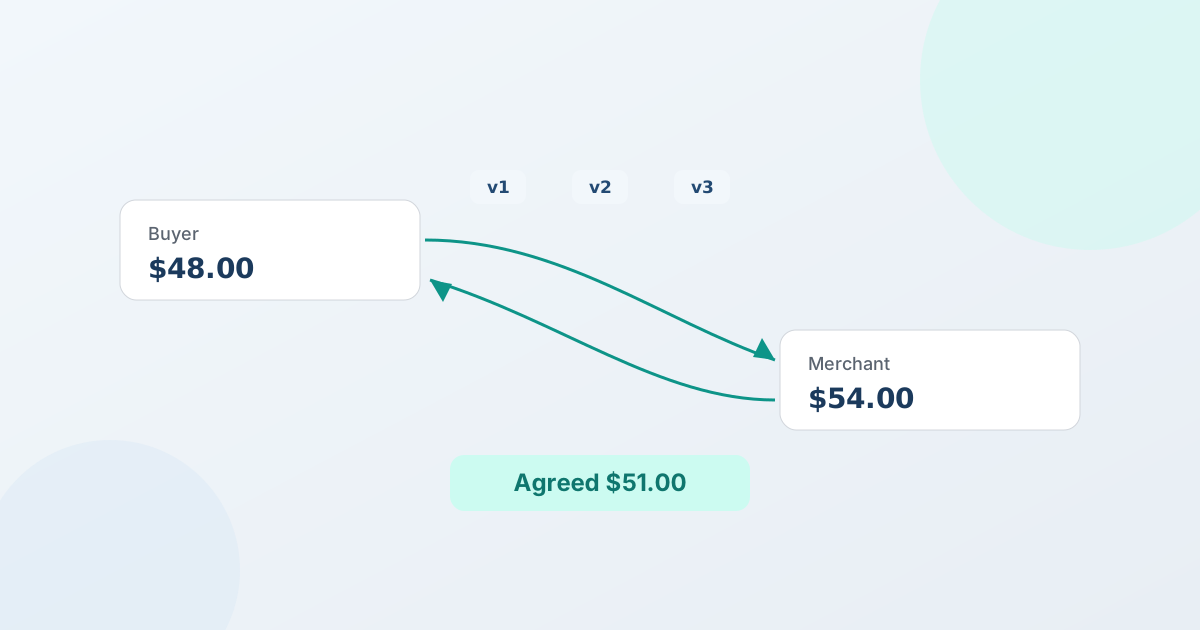
To negotiate B2B prices on Shopify, you replace the back-and-forth email thread with a structured quote: the buyer requests a price, you reply with a versioned proposal, both sides counter-offer until you agree, and the accepted price converts straight into a Shopify order. The difference from email isn't the haggling - it's that every round is recorded, the price stays inside the limits you set, and nothing has to be re-keyed at the end.
This guide walks through how a B2B price negotiation actually works, where the email-and-spreadsheet version quietly costs you deals, and how to run the whole thing inside the Shopify store you already have.
Why the email chain breaks down
For a one-off quote, email is fine. The trouble starts when quoting becomes a regular part of how you sell. A negotiation that lives in an inbox has three structural problems, and they get worse with volume:
- Prices drift. Each number is retyped - from a spreadsheet into an email, then into Shopify when the buyer says yes. Every hop is a chance for a stale discount or a typo, and two salespeople can quote the same account differently.
- Follow-ups slip. A quote is one message in a long reply chain. It's easy to lose track of which buyer is waiting on you and which proposal is the current one, so deals that were ready to close go quiet.
- There's no shared record. "Did they accept?" and "what did we actually agree to?" are hard to answer from a thread. Disputes, approvals, and audits all suffer when the only record is scattered across replies.
None of this is anyone's fault - it's just what happens when a process that needs structure runs on a tool that doesn't have any.
What structured negotiation actually means
A structured negotiation captures each step of a price conversation as a discrete, recorded round instead of a free-text email. Each proposal is a snapshot - line prices, discounts, shipping, and an expiry - and each counter-offer creates a new version, so there's always one current state and a clear history of how you got there.
The practical effect: instead of reconstructing a deal from your sent folder, you read it off a timeline. That's the foundation everything else in this guide builds on.
The anatomy of a B2B price negotiation
Most B2B price negotiations follow the same five beats. Here's how each one works when it's structured rather than emailed.
- The request. A buyer asks for a price - ideally from a Request a Quote button on your storefront, with the quantities and details you need to price the deal. (You can also start a quote yourself for an existing account.)
- The proposal. You reply with a complete, priced offer: per-line unit prices, a volume or deal discount, shipping, and an expiry date (how long should it be valid?). This is version 1.
- The counter-offer. The buyer proposes a different price. In a structured workflow they do this from their account or a buyer portal, not by writing a new email - and it lands as version 2, with the change highlighted.
- The counter-back. You respond with a revised price. Version 3. Both sides can see exactly what moved each round.
- Acceptance. The buyer accepts. The agreed version is sealed, and it becomes the basis for the order.
The email version technically does the same five things - but without versions, a floor price, or a record, each beat is slower and riskier than it needs to be. QuotWay runs this loop as a real negotiation engine: merchant counter-offers are on every plan, and buyer counter-offers are on Starter and above.
Set a floor price so a fast deal never costs you margin
The fear with quick negotiation is that speed leads to a price you'd regret. The fix is a floor price - the lowest number you're willing to take on a deal. With a floor in place, you (or an automated rule) can move quickly on a counter-offer without ever dropping below the margin you need.
A floor price turns "how low can we go?" from a judgment call made under pressure into a guardrail decided in advance. It's what lets you say yes fast and still protect the deal. (In QuotWay, the floor price lives in the negotiation settings.)
Keep a record of every round
This is the part email can't do well, and it's the part that matters most as deals get bigger. When every proposal is an immutable version and every action is written to an append-only log, you can always show what was offered, who countered, who approved, and what was finally agreed.
That record is useful in three places:
- Internally, so a different team member can pick up a quote and know exactly where it stands.
- With the buyer, so a disagreement about "what we agreed" is settled by the record, not a memory.
- For approvals and compliance, where a clean, ordered history is the whole point.
If you're weighing this against your current setup, the QuotWay vs. email & spreadsheets comparison lays out the trade-offs in detail.
Where sign-off fits
Bigger deals often need someone to approve the price before it goes out - or the buyer's own organization needs to approve it before they can accept. In an email chain, that's a forwarded message and a verbal "ok." In a structured workflow, it's a routed step that's recorded with the quote.
QuotWay handles approval workflows on both sides of a deal - your team's sign-off and the buyer organization's - on the Professional and Enterprise plans, with advanced routing (parallel steps, timeouts, escalation, and delegation) on Enterprise. The point isn't more process; it's that the sign-off that was always happening informally now has a place to live.
Turn the agreed price into an order
A negotiation isn't done when both sides agree - it's done when there's an order. This is where the email-and-spreadsheet approach loses the most time: someone re-enters the agreed quote into Shopify by hand.
In a structured workflow, the accepted price converts directly. With QuotWay, an accepted quote becomes a native Shopify draft order with the negotiated prices carried over exactly - on every plan. On Professional and above, a buyer can even accept part of a quote and you convert only those lines, leaving the rest open. Invoicing, payment, and fulfillment then run in Shopify like any other order.
How to run B2B price negotiation on Shopify
You don't need a separate system to do any of this. QuotWay is a B2B quote and negotiation app for Shopify, built by EFOLI, that runs the whole loop - request, propose, negotiate, approve, convert - inside the store you already operate. It reads your real products and customers and writes back real draft orders, so there's no parallel silo to reconcile.
A practical way to start:
- Add a Request a Quote button and decide which products and buyers see it.
- Set your discounts and a floor price so counters stay inside your limits.
- Respond to requests with versioned proposals, and let buyers counter from their account or the buyer portal.
- Convert the accepted quote to a Shopify draft order.
The free Lite plan runs that complete loop (up to 10 quotes a month), so you can move your next negotiation out of your inbox before you pay anything. Paid plans add buyer counter-offers, approvals, automation, and more - see pricing for the details.
FAQ
How do you negotiate B2B prices on Shopify?
Use a quote workflow instead of email: the buyer requests a price, you send a versioned proposal (line prices, discount, shipping, expiry), both sides counter-offer until you agree, and the accepted price converts to a Shopify draft order. A floor price keeps counters inside your margin, and every round is recorded. QuotWay runs this natively on Shopify - merchant counter-offers on every plan, buyer counter-offers on Starter and above.
What is a floor price?
A floor price is the lowest price you're willing to accept on a deal. Setting it in advance means you (or an automated rule) can respond to a counter-offer quickly without ever going below the margin you need - so fast negotiation doesn't cost you money.
Can buyers counter-offer, or just request a quote?
Buyers can counter-offer. They propose a price from their Shopify customer account or a hosted buyer portal, you counter back, and each round is saved as its own version. Buyer counter-offers are available on Starter and above; merchant counter-offers are on every plan, including the free Lite plan.
What happens to the agreed price after the buyer accepts?
The accepted quote becomes a native Shopify draft order with the negotiated prices locked in - no CSV export and no manual re-entry. On Professional and above, a buyer can accept only some lines and you convert just those, leaving the rest open. Invoicing and payment then happen in Shopify.
Do I need Shopify Plus to negotiate B2B prices?
No. QuotWay's quoting and negotiation work on standard Shopify plans. Shopify's native B2B features (Companies, Locations, and payment terms on conversion) require a B2B-capable store and are on QuotWay's Enterprise plan, but you don't need Plus to capture requests, negotiate, and convert quotes to orders.
Related articles
See how QuotWay handles this on your store.