Quoting & negotiation
Why the tax on a quote doesn't match the Shopify order: trace each input
By Jahangir Alam · October 23, 2026 · 9 min read
- Last verified
- Shopify API
- 2026-10
- Audience
- Shopify merchants, agencies and developers explaining why an order's tax differs from the quote
- Scope
- Tax on draft orders, invoice checkout and orders created from a quote at API 2026-10: the shipping and billing address, customer and company location exemptions, product and shipping taxability, overrides, tax-included market pricing, discounts before tax, line-item rounding, tax apps, and recalculation after the order
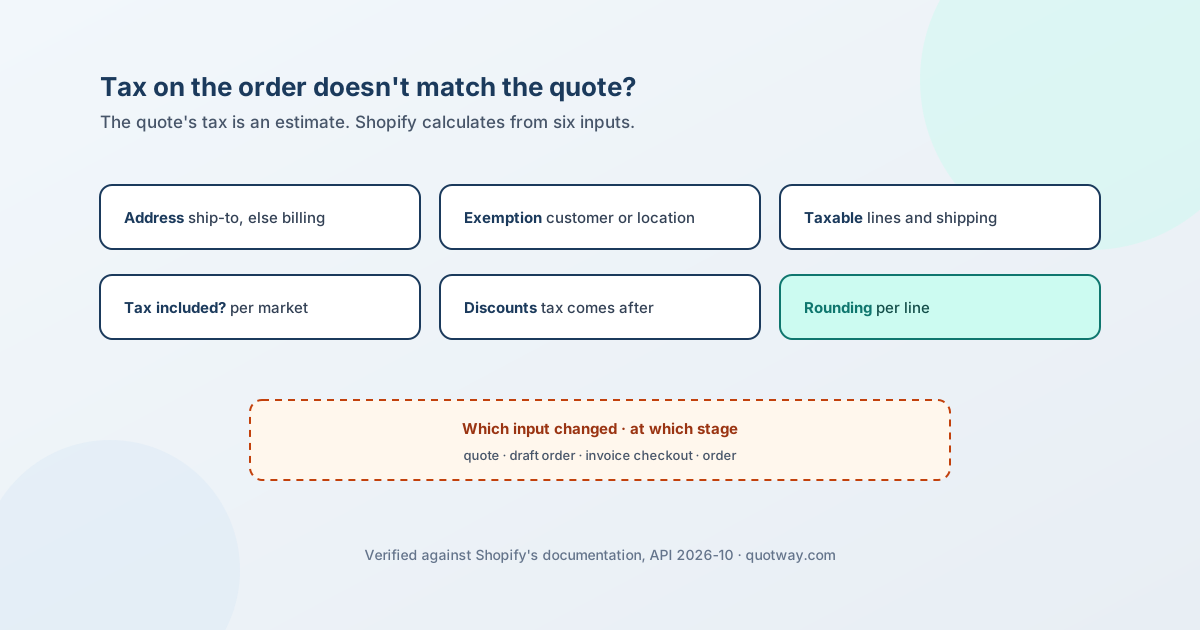
The tax on a quote is an estimate. Shopify calculates the real tax itself, when the draft order is created and again at checkout, from inputs the quote may not have had: the address the goods ship to, the buyer's exemption, which products and charges are taxable, whether prices include tax, the discounts, and how each line is rounded. Even the order isn't always final - Shopify's order record carries an estimatedTaxes flag that only turns false "when taxes on the order are finalized and aren't subject to any changes".
So when a buyer asks why the tax on the order doesn't match the quote, don't look for a bug first. Find which input changed, and at which stage. This page traces each input through quote, draft order, checkout and order, with the Shopify rule behind each difference and what to put on the quote so the difference stays small. Why a quote converts at the wrong price sorts a difference by its shape; this is the tax-only deep dive behind that table.
Everything about Shopify below was checked against Shopify's own pages on 23 October 2026 at API version 2026-10; sources are at the end. It explains how Shopify calculates tax, not what you owe - confirm your obligations with a tax adviser.
The tax trace: what Shopify reads, and when
| Input | Where Shopify reads it | Where it can change | What the difference looks like |
|---|---|---|---|
| The address | The draft's shipping address; the billing address if there is no shipping address | A shipping address added or changed on the draft, at the invoice checkout, or - from 2026-10 - on an unfulfilled order | A different rate on the same base |
| The buyer's exemption | The customer's tax setting, or the company location's tax settings | Applying a customer or a company location to the draft; editing either before checkout | The whole tax line appears or disappears |
| What is taxable | Each product's "Charge tax" setting, overrides, product categories, the shipping setting, the custom item's "Item is taxable" | A product or override edited before the draft is created or the buyer checks out | Tax on one line or on shipping that the quote didn't have, or the other way round |
| Whether prices include tax | The market's tax setting | The market on the draft | Line prices move by (1 + the rate) |
| Discounts | Tax lines are calculated after discounts | A discount added or removed at checkout | Tax higher or lower by rate × the discount |
| Rounding | Each line's tax is rounded separately | Never - it is how the total is built | A cent or two |
Two stages decide the tax: Shopify's calculation when the draft order is built, and the checkout. If the draft already differs from the quote, the input was different when the draft was built. If only the checkout or the order differs, something changed after the draft was created - usually the address or a discount.
The address decides the rate
Shopify's help is direct: "By default, draft orders include taxes based on your store's tax settings and the customer's shipping address. If you don't have a shipping address on file, then taxes are based on the customer's billing address instead."
That gives three ways for the rate to move:
- The quote had no ship-to address. Whatever tax it showed was a guess, and the draft uses the shipping address - or the billing address, which may be a head office in another state or country.
- The buyer changed the address at checkout. If the new address is outside the draft's market, "the correct tax rate for the customer's shipping address is charged", while the market's tax-included or tax-excluded setting stays as it was.
- The address changed on the order. From API version 2026-10, changing the shipping address of an unfulfilled order with
orderUpdaterecalculates its tax for the new destination and can leave a balance to collect or refund. Older API versions, and orders already fulfilled, don't recalculate.
The fix is on the quote: ask for the ship-to address before you send it, and quote to that address.
The buyer's exemption
An exempt buyer pays no tax only if Shopify knows about the exemption at the moment it calculates.
- On the customer. A customer's tax setting is one of "Collect tax", "Don't collect tax" or "Collect tax unless exemptions apply". The specific exemptions come from a fixed list - Canadian provincial exemptions, US state reseller exemptions and the EU reverse-charge rule among them. Tax-exempt customers on Shopify covers the customer settings, checkout and POS.
- On a company location. A B2B company location has its own tax settings: tax-exempt or not, the list of exemptions, and a tax registration ID. Tax exemption on Shopify B2B covers where they live and what Shopify doesn't store.
- The customer's setting wins over the draft's. A draft order has its own tax-exempt switch, but "if a customer is applied to the draft order, then Shopify will use the customer's tax exempt field instead".
- Exemptions beat overrides. "Customer tax exemptions always take precedence over tax overrides."
- Tax-included prices don't drop for an exempt buyer. "If you set a customer to be tax exempt, but you use tax-included pricing, then the customer is still charged the full listed product price." That is Shopify's rule, not a fault - quote exempt buyers on tax-included stores at an explicit price.
For EU and UK VAT, the reverse charge removes VAT on eligible cross-border orders, but Shopify's VAT number validation at checkout "isn't currently available for B2B-specific checkouts". On a B2B order the exemption has to be on the company location before the draft is created.
What is taxed: products, overrides, shipping and custom lines
The rate can be right while the base is wrong, because a line or a charge was taxed when the quote assumed it wasn't, or the other way round.
- Products. A product is taxed unless "Charge tax on this product" is off. Tax overrides change the rate for products in a collection - but only for products "that you manually add to collections". An override takes precedence over Shopify Tax's product-category calculation. With US tax features, a product override "appl[ies] at the state level and [doesn't] include local taxes", so it can undercharge where local rates exist.
- Overrides and draft orders. Shopify's overrides page says overrides "apply to online sales and to Shopify POS sales" and doesn't mention draft orders. If a quoted product relies on an override, check the tax on a test draft order before you rely on it.
- Duties. In a region where duties and import taxes are active, Shopify doesn't use your overrides.
- Shipping. Whether shipping is taxed is a store setting, and a shipping override by region applies "regardless of whether you have a tax policy in place". A quote that showed shipping untaxed can meet a draft order that taxes it.
- Custom lines. A custom item on a draft order is taxable only if "Item is taxable" is selected. A service, a fee or a one-off part entered as a custom line takes whatever that flag says, not your product settings.
Prices with or without tax
Tax inclusion is set per market. In a tax-included market the price already contains the tax - Shopify's formula for the tax part is (rate × price) ÷ (1 + rate) - and the subtotal and total are the same. In a tax-excluded market tax is added on top. Japan is one where "merchants are required to use tax-inclusive pricing".
A quote written tax-excluded for a buyer in a tax-included market, or the other way round, will differ from the draft on every line by (1 + the rate). Shopify also deducts the home tax rate from tax-inclusive prices when you sell to another tax-inclusive country or region. The wrong-price post works through that shape; the rule for the quote is to use the same tax basis as the buyer's market, and say which one on the document.
Discounts and rounding
Tax comes after discounts. Shopify's tax lines are "the tax amount ... after applying discounts". On a quote with a whole-quote discount, tax belongs on the discounted amount: 1,000.00 less a 100.00 discount at 20% is 180.00 of tax, not 200.00. A quote that taxes the subtotal before the discount overstates the tax by the rate times the discount. What breaks between quote time and conversion time explains why the quote's figures stay estimates until Shopify calculates them, and how to compare the two.
Each line is rounded on its own. With Shopify's US and EU tax features, "tax amounts are rounded at the line-item level" - previously they were rounded once on the order's subtotal. Three lines of 3.33 at a rate of 8.875%:
| Method | Calculation | Tax |
|---|---|---|
| Per line, then added (Shopify) | 3.33 × 8.875% = 0.2955 → 0.30, three times | 0.90 |
| Once on the subtotal | 9.99 × 8.875% = 0.8866 → 0.89 | 0.89 |
A quote that rounds once on the subtotal will be a cent or two away from Shopify on an order with many lines. That is not an error to fix on the order; round per line on the quote if you want the figures to match.
Some tax systems require the opposite. Japan's qualified invoice rules require rounding once per tax rate per invoice and don't allow per-item rounding added up; Shopify's Japan help page doesn't say how it rounds. If you issue invoices under such rules, check the figure on the invoice you issue, not only the order total.
Tax apps
If a third-party tax service calculates your tax, the quote, Shopify's own calculation and the service can each produce a different figure. Shopify's help doesn't document how such services handle draft orders, so test a draft order end to end - create it, send the invoice, check out - and compare the tax at each stage with what the service reports.
After the order exists
Read three things on the order before you explain a difference to the buyer:
estimatedTaxes. While it is true, Shopify may still change the tax.taxLines. Each line'srate,titleandsourceshow which rate was charged and what calculated it.- The original and current totals.
totalTaxSetis the tax before returns; thecurrent*fields include refunds, returns and edits - and, from 2026-10, a tax recalculated after an address change.
When the quote and the Shopify order disagree covers everything else that drifts once the order exists.
What to put on the quote
- The ship-to address, before you send - the rate depends on it.
- The buyer's exemption on the customer or the company location, before the draft order is created - not after.
- The tax basis: "prices include tax" or "prices exclude tax", matching the buyer's market.
- The taxable flag on each custom line, set to what the line really is.
- Tax after the discount, and per-line rounding if you show a tax figure at all.
- A plain sentence that tax is an estimate, calculated by Shopify at checkout - and no promise of a tax figure to the cent.
- A comparison at conversion: read Shopify's calculated tax before the draft order is created and explain any difference before the buyer sees it.
Never sum the total from the rows is the same discipline for the totals on the quote itself.
Where QuotWay fits
QuotWay doesn't calculate tax on a proposal: the proposal says "Final tax calculated at checkout", or your own tax note, and Shopify calculates the tax on the draft order. Custom lines have a taxable flag (on by default) that travels to the draft order; variant lines use the product's own settings (custom and manual line items). A company-aware quote passes the company location's tax exemption to the draft order. Before the draft order is created, the convert screen shows Shopify's calculated subtotal, tax, shipping and total, and a tax difference above your threshold needs your acknowledgement - see converting a quote to a draft order.
Conversion is described on convert quotes to orders. Company-aware quoting needs the Enterprise plan and a Shopify store with B2B; plans are on the pricing page.
FAQ
Why is the tax on my Shopify draft order different from the quote?
Shopify calculated it from inputs the quote didn't have or had differently: the shipping address (or the billing address if there was none), the buyer's exemption, which lines and charges are taxable, whether prices include tax, the discounts and per-line rounding. Compare those on the draft with what the quote assumed.
Why did Shopify charge tax to a tax-exempt customer?
Either the exemption wasn't on the customer or the company location when Shopify calculated, or the store uses tax-included pricing - in which case Shopify charges an exempt customer the full listed price by design. A customer applied to the draft order also overrides the draft's own tax-exempt switch.
Why is the tax off by a cent?
Shopify rounds tax on each line and adds the results; a quote that rounds once on the subtotal can differ by a cent or two. Round per line on the quote if the figures have to match.
Is tax calculated before or after discounts on Shopify?
After. Shopify's tax lines are calculated on the discounted amount, so a whole-quote discount lowers the tax by the rate times the discount.
Does Shopify recalculate tax when the address changes after the order?
From API version 2026-10, changing the shipping address of an unfulfilled order with orderUpdate recalculates the tax for the new destination and can leave a balance to collect or refund. Fulfilled orders and older API versions don't recalculate. At checkout, a new address outside the market is charged its own rate.
Why is shipping taxed on the order but not on the quote?
Whether shipping is taxed is a store setting, and a shipping tax override for a region applies regardless of your tax policy. Check both under Settings > Taxes and duties, and quote shipping on the same basis.
Sources
Shopify pages, read on 23 October 2026 at API version 2026-10:
- Creating draft orders - taxes from the shipping address, billing fallback, markets and checkout address changes, "Item is taxable"
- Include or exclude taxes from prices - per-market tax inclusion, exempt customers on tax-included pricing
- Tax overrides and exemptions - product and shipping overrides, exemptions over overrides, online and POS sales
- Manage your US taxes and Manage your EU taxes - line-item rounding, state-level overrides, shipping tax, reverse charge
- Japan taxes - required tax-inclusive pricing
- Managing customers - customer tax settings
- VAT validation in checkout - not available for B2B-specific checkouts
- DraftOrderInput -
taxExemptreplaced by the customer's field - Order, TaxLine and CompanyLocationTaxSettings -
estimatedTaxes,taxesIncluded, tax after discounts, location exemptions - Updating an order's shipping address recalculates taxes - API 2026-10
Japan's qualified invoice rounding rule: National Tax Agency, invoice Q&A question 57 (Japanese).
QuotWay behaviour is described from its public documentation and the app's source, read on 23 October 2026.
Related articles
See how QuotWay handles this on your store.