Shopify B2B
Shopify draft orders: the limits and gotchas the docs bury
By Jahangir Alam · September 9, 2026 · Updated October 7, 2026 · 9 min read
- Last verified
- Shopify API
- 2026-10
- Audience
- Shopify merchants and developers who build or receive draft orders
- Scope
- Draft-order behaviour at API 2026-10: inventory reservation, completion, the 500 line-item ceiling (499 per create/update call), the Scripts sunset and what Functions do and do not reach, currency and deferred terms, the one-year deletion, and what changes for B2B
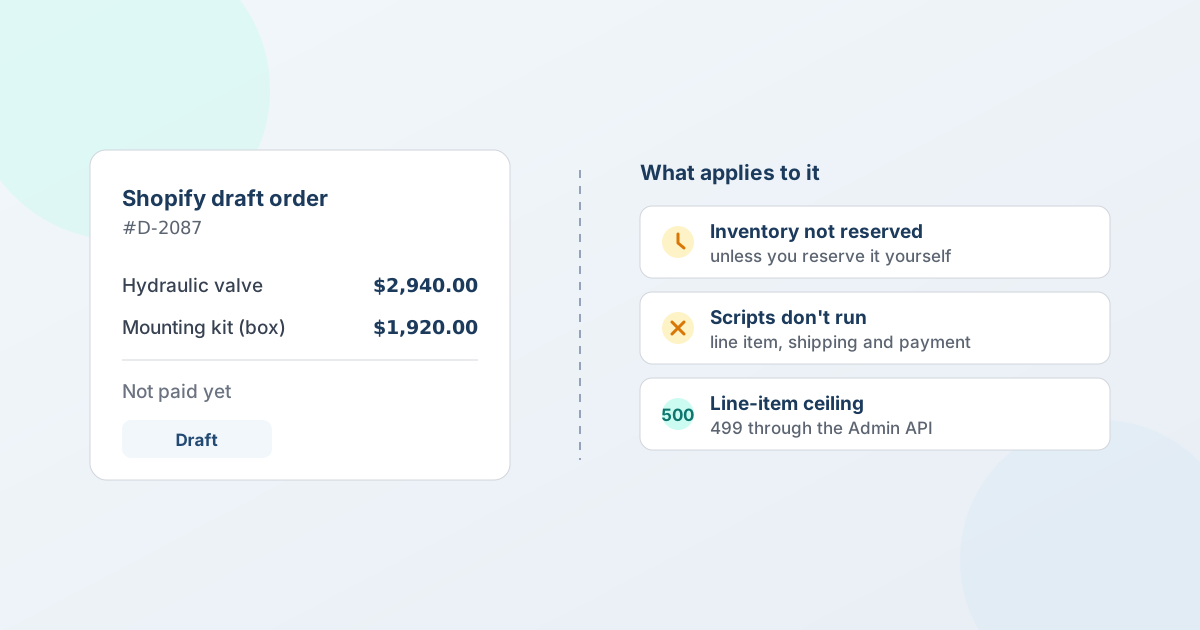
A draft order is the order you build before it's paid - you set the lines, apply your own prices, send an invoice, and it becomes a real order once the money lands. That much is well documented. What isn't obvious is where the edges are.
Every fact in this guide comes from Shopify's own documentation. The problem is that it's spread across six pages, and the limit that catches you is rarely on the page you happened to open - the inventory behaviour is on one page, the line-item ceiling is buried in a B2B considerations list, and the fact that your scripts stop working is in the Scripts documentation, where nobody quoting a customer would think to look. This is those edges, collected, with the sources next to each one.
Draft orders don't hold stock unless you ask
This is the one that costs money. Creating a draft order does not reserve inventory by itself. Reserving is an explicit, optional step: you choose to reserve the products, and you set the date and time the reserve expires.
When you do reserve, those units move into Shopify's Committed state and other customers can't buy them. One prerequisite: inventory tracking has to be switched on for the product, or you can't reserve it at all.
The practical consequence for anyone selling by quote: a quote that sits open for two weeks holds nothing. If the buyer accepts on day thirteen and the last twelve units sold on day four, that's your problem to explain. Either reserve at the point the deal becomes real, keep the quote's validity short enough that the risk is small, or price the risk in. Deciding not to reserve is a legitimate choice - reserving stock for a deal that never closes has its own cost - but it should be a decision rather than a surprise.
A draft order becomes an order only when it's paid
There are three ways to get there, and they suit different situations:
- Send the invoice. The customer gets an email with a secure checkout link, enters billing details, picks a shipping method, and pays. This is the default.
- Process a card manually. For phone orders where you're taking the details yourself.
- Mark it as paid. For money that already arrived some other way - a bank transfer against a purchase order being the common B2B case.
Until one of those happens it stays a draft, which is exactly why negotiated deals are built this way: a draft is editable in ways a real order isn't. On the Shopify Plus plan, Shopify also supports partial payments, which move an order to a Partially paid status - useful when a deposit lands first and the balance follows. (Corrected on 7 October 2026: this page previously didn't say that partial payments are Plus-only.)
The line-item ceiling is 500, and 499 through the API
A draft order maxes out at 500 line items. Shopify's B2B considerations put it plainly: if you receive or create a draft order with more than 500 different products or variants, the draft order fails.
If you're building draft orders programmatically, the API limit is a different number. The draftOrderCreate and draftOrderUpdate mutations accepted 250 line items until API version 2025-07 raised the ceiling to 499.
For most stores this never comes up. For distributors quoting a full catalogue line-by-line, or anyone importing a large reorder sheet, it does - and it fails at creation rather than degrading gracefully, so it's worth knowing the number before you design around it.
Your pricing logic probably doesn't reach a draft order
This section used to be about Shopify Scripts. Scripts are gone: Shopify stopped letting merchants edit or publish them on 15 April 2026 and deprecated them on 30 June 2026 - "any Scripts that were still published on your store have been deactivated and no longer work" - with the Script Editor left read-only until 30 July 2026 and a customisations report in the admin listing what had been active. Shopify Functions replaced them. Scripts sit in a longer list of retired surfaces - checkout.liquid, legacy customer accounts, old API versions - dated in Shopify B2B technical debt.
The warning survives the platform change, because the reason it existed still applies. Functions "execute in a specific sequence during checkout", and the one Function API that documents a draft-order surface documents it as partial: "discount functions with network access aren't supported on draft orders." For the customisations that used to live in a script - the tiered discount, the freight rule, the payment method restricted to approved accounts - do not assume any of it fires on a draft you build in the admin or through the API.
The practical instruction is unchanged: put it on the draft explicitly. Set the price on the line, add the shipping charge yourself, and don't assume a payment restriction is enforced. If you are rebuilding a script as a Function, test it against a draft order specifically rather than against checkout, because those are two different surfaces.
A non-store currency plus deferred terms narrows how you can get paid
Draft orders can be written in a currency other than your store's - the market, and with it the currency, follows the customer's shipping address, and you can override it on the draft. The exchange rate is fixed when the draft is created and used on the invoice whatever the rate does afterwards; edit a saved draft and the whole order re-prices at the rate current at the edit.
The restriction to know is narrower than it is often repeated. Shopify states it as: if you set payment terms to defer payment on a draft order in a currency other than your default store currency, you can only collect by credit card or by marking the order as paid. A cross-currency draft you are collecting on immediately can still go out as an invoice with a checkout link; a cross-currency draft on net terms cannot. If you quote internationally on terms and expect buyers to pay from the invoice, check this before you promise it. (Corrected on 22 September 2026: this page previously applied the restriction to every non-store-currency draft.)
What changes when the draft order is B2B
B2B draft orders are a different animal, with rules of their own.
- The company location must be set at creation. A B2B draft order needs a B2B customer linked to a company location at the time it's created to get that company's contracted rates. Miss it and the order takes D2C pricing - and the fix is not a later edit, it's creating it correctly.
- Prices are locked by default, and the lock cuts both ways. Drafts submitted for approval have their prices locked. Worth understanding: a price lock prevents prices being raised, but it also prevents them being automatically lowered. If a better price becomes available between draft and payment, the locked price stands.
- Price locks don't cover bundles. Include a product bundle in a draft order and its price can't be locked.
- Deposits are Plus-only, and Shopify gives two bases for them. You can require a percentage deposit on a draft order on the Shopify Plus plan. Shopify's B2B draft-order help puts the percentage on the order subtotal only - excluding taxes and shipping, which are paid later with the balance - while the Admin API's
DepositInputdescribes it as a percentage of the order total. Check which figure your store actually produces. On the help page's reading a "50% deposit" is not half the invoice total, and that's worth stating to the buyer before they see the number. - Some B2B drafts need manual capture. Shopify's B2B considerations say B2B orders and draft orders "must be manually captured when they don't have a valid authorization and due on fulfillment payment terms". The sentence can be read either way on whether due-on-fulfillment terms are present, so check the capture status of your own orders on those terms rather than relying on a reading. (Corrected on 7 October 2026: this page previously presented one reading of that sentence as the rule.)
- Local delivery and pickup work here. Unlike standard B2B checkout, local delivery and pickup-in-store are supported as shipping options on B2B draft orders created in the admin - a rare case where the draft order route can do more than the normal one.
Drafts are deleted after a year of silence
Draft orders created on or after 1 April 2025 are automatically deleted after one year of inactivity, and any edit resets the timer.
A year is long enough that this rarely bites, but it does mean a draft order isn't an archive. If a draft is standing in for a record you need to keep - a quote you might revisit, an approval you may have to evidence - keep that record somewhere it isn't subject to housekeeping.
A quote layer that still points at a purged draft has drifted from Shopify; when the quote and the Shopify order disagree lists how to detect it and the other drifts after conversion.
What this means if you sell by quote
Most of the above only matters because draft orders are where quoting ends up on Shopify. An agreed price isn't a Shopify concept; a draft order is the nearest thing, which is why quote apps convert into one - and why a draft order is not a quote: its three statuses all begin after the price is settled. What can move between acceptance and the draft order - stock, tax, shipping, price, the API call itself - is the subject of what breaks between quote time and conversion time.
Three of these edges change how you should quote:
- Reserve deliberately. An open quote holds no stock. Decide whether a given deal warrants a reserve, and tell the buyer which it is.
- Say what the deposit is a share of. "50% up front" reads as half the total to a buyer looking at a total that includes tax and freight, and Shopify's help (subtotal) and API reference (order total) don't agree on the base.
- Don't rely on scripts to price a quote. Whatever logic your storefront applies at checkout, the draft order won't apply it.
QuotWay converts an accepted quote into a native Shopify draft order with the negotiated prices carried over, re-checking tax and shipping at conversion so the order reflects current rules rather than the numbers from when the quote was drafted. The workflow side of that - partial acceptance, splitting one quote into several orders, invoicing on terms - is covered in the B2B draft order workflow guide, and the deposit mechanics in taking deposits on negotiated quotes. Conversion works on every plan, including the free Lite plan - see pricing for what each tier adds.
The Shopify facts in this post are kept current in the Shopify B2B reference (Checkout and draft orders), re-verified at every Shopify Edition and quarterly API release.
FAQ
Does a Shopify draft order reserve inventory?
Only if you tell it to. Reserving is optional on a draft order: you reserve the products explicitly, and you set the date and time the reserve expires. Reserved units move into Shopify's Committed state and can't be bought by other customers, and inventory tracking has to be switched on for the product before you can reserve it at all.
What is the difference between a draft order and an order?
A draft order is one you build in the admin before it's paid: you can edit lines, apply custom prices, reserve stock, and send an invoice. It becomes a regular order on your Orders page once it's paid - either the buyer pays through the checkout link, or you mark it as paid because payment already arrived another way. Until then it's editable in ways a real order is not.
Can I mark a draft order as paid, or invoice it for later?
Both. Mark it as paid when the money already reached you outside Shopify, and it converts to a regular order. Or send the invoice with its secure checkout link and let the buyer pay online. If the quote set payment terms, they carry onto the order rather than demanding payment up front - Shopify lets any draft order carry terms, B2B or not.
How many line items can a Shopify draft order have?
- A draft order with more than 500 different products or variants fails. Through the Admin API, the
draftOrderCreateanddraftOrderUpdatemutations accept 499 line items as of API version 2025-07, up from 250 before that.
Do Shopify Scripts or Functions run on draft orders?
Shopify Scripts no longer run anywhere: they were deprecated on 30 June 2026 and any that were still published were deactivated. They never worked on draft orders either. Shopify Functions replaced them and execute during checkout; the Discount Function API lists draft orders as partial support and states that discount functions with network access aren't supported on draft orders. Treat pricing, shipping and payment logic as something to apply to the draft explicitly rather than something that fires on it.
Do draft orders expire?
Shopify automatically deletes draft orders created on or after 1 April 2025 after one year of inactivity, and any edit resets the timer. That is separate from a quote's own expiry date, which governs the offer to the buyer rather than the draft order it becomes.
Sources
Every limit in this guide was re-verified against Shopify's own pages on 7 October 2026, unless marked otherwise:
- Shopify Help Center: Draft orders and invoices
- Shopify Help Center: Creating draft orders
- Shopify Help Center: Creating B2B orders using draft orders
- Shopify Help Center: Requirements and considerations for using B2B
- Shopify Help Center: Shopify Scripts requirements and limitations - the 30 June 2026 deprecation (read 22 September 2026)
- Shopify Function APIs and the Discount Function API - what replaced Scripts, and its draft-order limit
- Shopify Help Center: guidelines and restrictions for selling in local currencies - the deferred-terms currency restriction
- Shopify Help Center: Collecting and recording partial payments - available on the Shopify Plus plan
- Shopify Admin API: DepositInput (2026-10) - the API's wording of the deposit base
- Shopify developer changelog: Increase draft order line item limit from 250 to 499
Related articles
See how QuotWay handles this on your store.