Shopify B2B
Wholesale account applications on Shopify: from form to approved buyer
By Jahangir Alam · August 23, 2026 · 10 min read
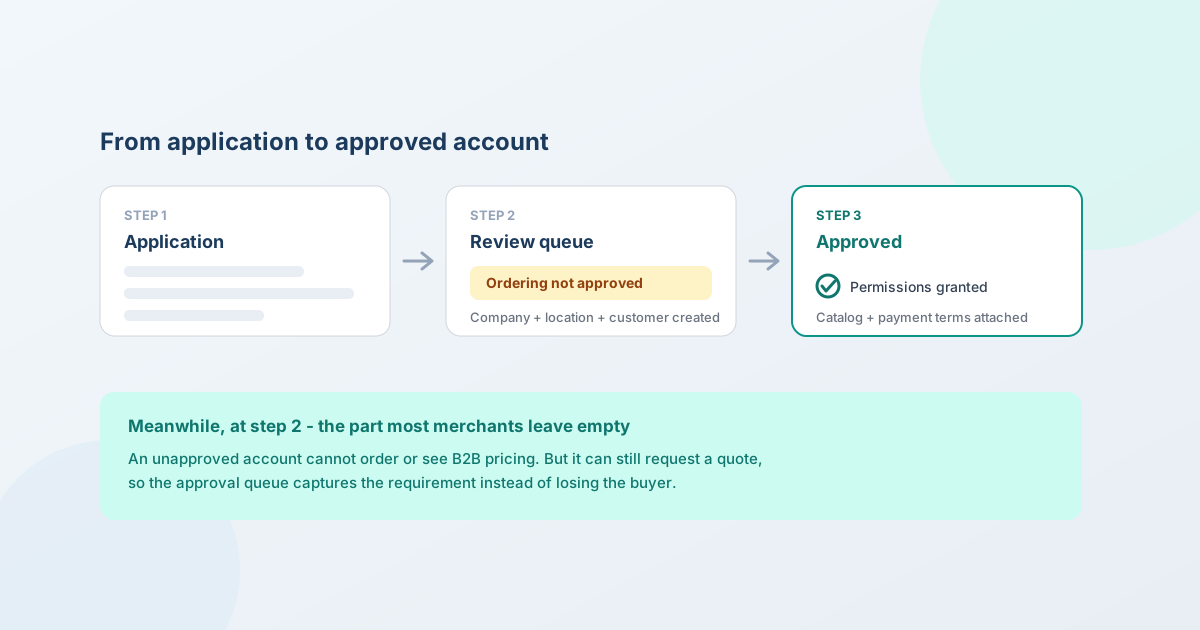
To take wholesale applications on Shopify, install the free Shopify Forms app and add an account-request form to your store. When someone submits it, Shopify automatically creates a company, a company location, and a customer, and the account appears under Customers → Companies in the "Ordering not approved" tab. You review it, then approve by granting permissions - or delete it to reject.
That's the mechanic, and it's well documented. What almost nobody covers is the part that actually costs you money: what an applicant can do while they wait. By default, nothing. This guide covers the whole flow, and how to stop the approval queue being a dead end.
Why gate wholesale behind an application
Not every visitor should get trade pricing, and the reasons aren't only commercial:
- Price integrity. Wholesale rates leaking to retail buyers undercuts your own storefront and, if you sell through stockists, theirs.
- Tax and resale status. In many jurisdictions a tax-exempt sale needs a valid resale certificate on file. That's a document you have to see.
- Credit. Payment terms are credit. Deciding who gets Net 30 requires knowing who they are.
- Channel fit. A new applicant may compete with an existing stockist, or sit in a territory you've already committed.
An application form is where all four decisions get their inputs. It's also, incidentally, a qualification filter - the buyers who won't fill in six fields were rarely going to place a real order.
What Shopify gives you natively
The whole intake flow is built in, and free.
Build the form. Install the Shopify Forms app and create an account-request form - popup or inline - and place it on your store. A /wholesale or /trade page is the usual home.
Shopify creates the records for you. On submit, a company, a company location, and a customer are created automatically in your admin. You aren't stitching together a contact form and a spreadsheet.
Review the request. Go to Customers → Companies and open the "Ordering not approved" tab. Whatever the applicant entered in your custom fields appears in the Metafields section of the record.
Approve or reject. Approving means granting the company's ordering permissions - and you can notify the customer at the same time. Rejecting means deleting the company. Approvals can also be automated with Shopify Flow if your criteria are genuinely mechanical.
Three limits worth knowing before you design around this:
- The form only creates new companies. It cannot add a contact to a company that already exists - so a second buyer from an account you already serve can't self-serve through it. You add them manually.
- It's not available on gated B2B-only stores (stores where the whole storefront is already behind a login).
- Theme-editor customizations that hide content from unapproved visitors need the Advanced or Plus plan.
By default, a company created this way can't place orders or see B2B pricing until you approve it. That default is correct - and it's also the problem, as we'll get to.
What to ask on the application
Enough to make the decision, and nothing else. The full treatment is in which fields to ask for; the wholesale-application shortlist:
| Field | Why it's there |
|---|---|
| Company name | The account you're creating |
| Contact name, email, phone | Who you'll deal with |
| Business type | Retailer, distributor, installer, end user - drives which pricing applies |
| Tax / reseller ID | Required if you're going to sell tax-exempt |
| Business website or registration number | The cheapest way to check they're real |
| Delivery location(s) | Territory and freight |
| Estimated annual volume | As bands in a dropdown, never free text - don't make an applicant do arithmetic |
| How they'll sell your products | Catches channel conflict before it happens |
Resist the urge to ask for a full credit application at this stage. You can request that from the applicants you're minded to approve, and asking everyone costs you the ones who were just curious about trade pricing.
Reviewing an application
Four checks, in the order that saves the most time:
- Is the business real? Website, registration number, an address that isn't residential. Thirty seconds, and it filters most of what you'd otherwise agonise over.
- Does the tax or resale ID check out? Verify it against the relevant authority's register. No app does this for you - not Shopify, not QuotWay. It's a manual check and the liability for getting it wrong is yours. Once verified, the exemption itself is set on the company location - see B2B tax exemption on Shopify.
- Do they fit the channel? Territory, existing stockists, whether they'll sell at a price that undercuts your own storefront.
- What terms, if any? Approving an account and extending Net 30 are two separate decisions. You can approve someone for trade pricing and still require payment up front until they've established a history.
Speed matters more than the checklist. An applicant who filled in your form is, at that moment, actively shopping - and they will have applied to two of your competitors as well. A week to approve is a week for someone else to close them.
Approving, and what happens next
On approval you grant the company's ordering permissions and attach their pricing. That last step is where the plan you're on starts to matter.
On Shopify Plus, you can assign a catalog directly to a company or company location - so each account can have genuinely bespoke pricing. On Basic, Grow, and Advanced you can't: catalogs attach to B2B markets, with a limit of three active catalogs. If your approved accounts sort into a few tiers, that's fine. If each one negotiated its own rates, it isn't. (Do you need Shopify Plus for B2B? has the full plan split, including where quoting fills that gap.)
Payment terms attach to the company too, so the credit decision you made in step 4 becomes a property of the account rather than something to remember each order. (Shopify B2B payment terms covers those.)
The gap: what applicants can do while they wait
Here's the part worth changing.
An unapproved company can't order and can't see B2B pricing. So a merchant who applied on Tuesday and gets approved on Friday spends three days on a storefront that shows them nothing they can act on. Some of them don't come back.
They don't have to be stuck. A pending applicant can still request a quote - guest quoting works without an approved account, on every QuotWay plan including the free Lite plan. So the same visitor who can't yet buy at trade prices can tell you exactly what they want to buy, in what quantity, and by when. You now have their requirement and their application, and the approval conversation has something concrete in it.
Two supporting pieces:
- Hide price (Starter and up) controls what an unapproved visitor sees in the meantime - a "Request a quote" path instead of a retail price they're not meant to be anchored on.
- Targeting rules decide who gets that path: guests explicitly, or buyers carrying a particular customer tag, so an applicant tagged
pending-tradesees the quote route while everyone else sees the normal storefront.
One honest note: quoting a buyer before you've approved their account is a commercial choice, not a loophole. You can quote a price without extending payment terms - and for a first order, that's often the right shape anyway.
Rejecting without burning the lead
Most rejection advice assumes the answer is permanent. It usually isn't:
- A rejected wholesale applicant is frequently still a perfectly good retail customer - don't send them away from the store entirely.
- "Not yet" is more often true than "no". A buyer below your minimum this year may not be next year.
- If the reason is channel conflict, say so plainly and point them to the stockist who serves their territory. That's a better outcome for everyone than silence.
A short, specific decline that leaves the door open costs nothing and occasionally comes back as an order.
What to automate, and what not to
Automate the mechanical parts: acknowledging the application immediately so they know it arrived, routing it to whoever reviews applications, and - if your criteria really are clear-cut - approving with Shopify Flow. On the quoting side, a new request can be auto-assigned to an owner the moment it lands, and a quiet quote can get one automated follow-up (Professional and up).
Keep human the judgement: verifying a tax ID, deciding channel fit, and setting terms. These are the parts that carry liability, and they're exactly the parts an automation makes fast and wrong.
Common mistakes
- Asking for a credit application up front. Ask the approvable ones.
- Free-text volume questions. Use bands. Nobody knows their annual spend to the dollar.
- Leaving applicants with a dead storefront. The single biggest fixable loss in this flow.
- Treating approval and terms as one decision. Approve the account; earn the terms.
- Slow review. They applied to your competitors on the same afternoon.
- Assuming the form can add people to existing accounts. It can't - that's manual.
- Taking a tax ID on trust. Verify it. No app does this for you.
FAQ
How do I create a wholesale registration form on Shopify?
Install the free Shopify Forms app, build an account-request form with the fields you need, and place it on your store as a popup or inline form - usually on a /wholesale or /trade page. When someone submits it, Shopify automatically creates a company, a company location, and a customer, which then appear in your admin awaiting approval.
Where do wholesale applications appear in Shopify?
Under Customers → Companies, in the "Ordering not approved" tab. Open the record to review it - anything the applicant entered in your custom fields shows in the Metafields section. From there you approve by granting the company's ordering permissions, or delete the company to reject the request.
Can customers self-register for a wholesale account on Shopify?
Yes, through a Shopify Forms account-request form - but with one limitation worth planning around: the form only creates new companies. It can't add a contact to a company that already exists, so a second or third buyer from an account you already serve has to be added manually in the admin.
Do I need Shopify Plus for wholesale account applications?
No. Company account requests work on any plan that supports Shopify B2B, which since April 2026 means Basic, Grow, Advanced, and Plus. What differs by plan is what you can do after approval: assigning a catalog directly to a company is Plus-only, and below Plus you have up to three active catalogs across your B2B markets.
How long should wholesale approval take?
As fast as your checks genuinely allow, and same-day where you can. An applicant is actively shopping at the moment they submit, and will typically have applied to competitors too. If your review is a real-business check plus a tax-ID verification, that's minutes of work - the delay is usually queueing, not checking.
What should I do with applicants while they wait for approval?
Give them something to do. An unapproved account can't order or see B2B pricing, which leaves them on a storefront with no action available. Letting them request a quote in the meantime - guest quoting works without an approved account, on every QuotWay plan - captures their requirement while the application is reviewed, so the approval conversation starts with a real order in it.
Can I automate wholesale account approval?
Shopify Flow can approve company account requests automatically if your criteria are genuinely mechanical. Be careful what you hand over: verifying a resale certificate, judging channel conflict, and deciding payment terms all carry consequences and none of them is a rule an automation can safely evaluate. Automate the acknowledgement and the routing; keep the judgement.
Where QuotWay fits
QuotWay is a B2B quote and negotiation app for Shopify, built by EFOLI. It doesn't build your application form or approve accounts - that's Shopify Forms and your admin. What it covers is the window either side: an unapproved or guest visitor can request a quote (every plan, including free Lite), hidden prices keep trade rates off the storefront while they wait (Starter and up), targeting rules decide which buyers see the quote path at all, and once they're approved the same flow handles negotiated orders end to end - versioned proposals, counter-offers, approvals, and conversion to a native Shopify draft order with the buyer's payment terms applied (every plan). See quote requests and forms, Shopify B2B quoting, the plans and pricing, or add QuotWay on Shopify.
Sources
Related articles
See how QuotWay handles this on your store.