For Shopify agencies
Migrating wholesale customers to Shopify Companies: an agency playbook
By Jahangir Alam · September 23, 2026 · 14 min read
- Last verified
- Shopify API
- 2026-07
- Audience
- Shopify agencies and developers scoping a move from tag-based or legacy wholesale to native Companies
- Scope
- Migrating existing customers into Shopify Companies at API 2026-07: the admin migration and its constraints, order import through orderCreate, the company-location-contact-role-catalog dependency chain, rate-limited throughput, identity mapping, piloting and reversal
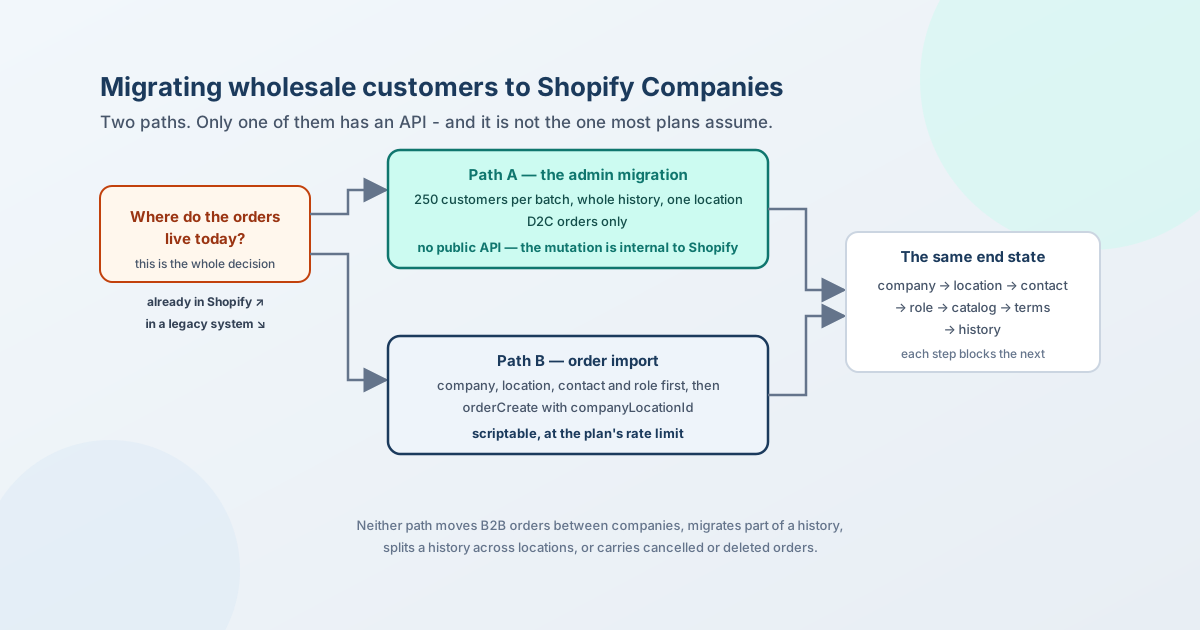
There are two ways wholesale customers become Shopify Companies, and the difference between them decides your whole plan. If the orders are already in Shopify as D2C orders, they move through the admin, 250 customers at a time, all of a customer's history or none of it, onto exactly one company location - and there is no API for it, because the mutations that do it are internal to Shopify. If the orders live in a legacy system, they come in as imported orders through orderCreate with a company location on them, which is scriptable but requires every company, location, contact and role to exist first.
Most migration plans that go wrong assume the first path has an API. It does not, and finding that out after the statement of work is signed is an expensive discovery.
This page is the playbook for the agency scoping the move: what the two paths are and how to tell which one you are on, the dependency chain that decides the order of work, a constraints table for the statement of work, what throughput to expect at each plan's rate limit, how to pilot, and what can and cannot be undone. Where it describes how a quote layer behaves during a migration, that is one implementation, labelled as such.
Everything about Shopify below was checked against Shopify's own pages on 23 September 2026 at API version 2026-07; sources are at the end.
The two paths
One question decides it: are the orders you want on a company already Shopify orders, or do they live somewhere else? The first path runs through the admin and cannot be scripted; the second runs through orderCreate and can.
Path A - the orders are already Shopify D2C orders. This is the store that has been selling to trade buyers through ordinary customer accounts, with tags or a discount code doing the work - the shape that replaced the Wholesale Channel, and now wants Companies. Shopify's admin does it: you select customers on the customers page - "up to 250 B2B customers at the same time, or complete the process in smaller batches" - and add them to a new or existing company. Their past D2C orders move with them.
The thing to know before you quote the work: there is no public API for this. A Shopify staff member confirmed it on the developer forum in December 2025 - "CompanyLocationMigrateOrdersMutation and CompanyLocationRevertMigratedOrders are internal-only and not exposed in the public API", checked with the B2B product team. You can create the companies, locations and contacts through the Admin API all day; the step that carries the order history is a person clicking in the admin, 250 customers at a time.
Path B - the orders live somewhere else. A legacy ERP, an old platform, a wholesale channel that has been retired. Here you are not migrating within Shopify, you are importing into it, and there is an API: orderCreate with companyLocationId and customer.toAssociate, which Shopify documents specifically for historical order data. The requirement that trips builds: "the customer must have a role assignment to the specified company location. If the customer doesn't have a role assignment to that location, then an error is returned" - and more broadly, "a B2B merchant must import or create all relevant companies, company locations, company contacts, and products in Shopify before they can import B2B orders."
Most real projects are a mix: some accounts have Shopify history, some have history in the old system, and a few have both. Sort the list by path before you sequence anything, because the two paths have different throughput, different people doing the work, and different failure modes.
The dependency chain
Every step blocks the next, which is why migrations that run steps in parallel produce orphans.
- Decide the company tree. One company per buying organisation; one location per place that has its own prices, terms, tax status or ship-to. This is the decision that is expensive to change later, because every catalog, term and order attaches to a location.
- Create companies and locations, with
externalIdset on both from the source system's customer and ship-to identifiers. That field is your only join back to the old data, and everything downstream - the sync that follows, the reconciliation, the audit - keys on it. - Attach contacts.
companyAssignCustomerAsContactturns an existing Shopify customer into a company contact; afterwards "the customer becomes a company contact who can place orders on behalf of the company with access to any catalogs, pricing, and payment terms configured for the company's locations".companyCreatecan also create the company, one location and one contact in a single call, which is the efficient shape for a fresh tree. - Assign roles at the location. Ordering only, or location admin. Nothing downstream works without this: not ordering, not order import.
- Attach catalogs. A location needs a catalog before its buyers see prices at all. Off Plus that is through a B2B market, with three active catalogs across all markets as the cap; on Plus a catalog can be assigned directly to a company or location. Where an RFQ's starting price comes from sets out how the catalog resolves for a signed-in buyer.
- Set payment terms and tax. Both live on the location - a head office on Net 60 and a branch on Net 30 is a normal setup, not a workaround. Shopify B2B payment terms has the enumerated types and how they behave on an order.
- Then history, by whichever path applies. Last, because it is the step you cannot partially undo.
The buyer-facing consequence of doing it in this order is that steps 1 to 6 already give you a working B2B store. Prices, terms and ordering work before a single historical order has moved. That matters for the cutover plan: history is reporting, not function.
Constraints for the statement of work
| Constraint | Detail | Consequence for the plan |
|---|---|---|
| Which orders can move | D2C orders only. "B2B orders remain with the company they were created for and can't be migrated to another company" | A wrong company assignment is not fixable by re-migrating. Get the tree right first |
| How much history | "You can only add a customer's full order history to a company, partial order history migration isn't supported" | You cannot bring two years and leave the rest. All or nothing, per customer |
| Where history lands | "Orders can't be split across multiple locations" | A customer who bought for three branches lands on one location. Decide which, and record the decision |
| Excluded orders | "You can't migrate canceled or deleted orders" | Reconciliation counts will not match the source unless you exclude those first |
| Batch size | "Up to 250 B2B customers at the same time" | 20,000 customers is 80 admin batches, by hand |
| Automation | The migrate-orders and revert mutations are internal to Shopify | Budget admin time, not script time, for path A |
| What travels with the customer | Past orders, tax exemptions, "allow customers to ship to any address", "submit all orders as draft for review", payment terms | These are migrated settings, so set them on the source customer first where you can |
| What does not travel | Tax exemptions "set by deactivating Collect tax aren't migrated" | Re-apply those as proper exemptions on the location |
| Reversal - new company | Delete the company | Clean undo while the company is new and empty of B2B orders |
| Reversal - existing company | Remove the customer, with "an option to remove the original orders that you migrated" | The undo is per customer, not per order |
| Prerequisite | Existing D2C customers in the admin | Path A does not apply to accounts that were never Shopify customers |
Throughput: what 20,000 customers actually costs
Two different answers, one per path.
Path A is people, not throughput. 250 customers per batch is the only lever. Twenty thousand customers is eighty passes through the admin, each needing someone to select the right customers and pick the right company - which means the real constraint is how well your mapping file is prepared, not how fast Shopify is. Build the mapping as a spreadsheet keyed on the same externalId you put on the companies, sort it so each batch is one company's customers, and the clicking becomes mechanical rather than a judgement call 20,000 times.
Path B is rate limits. The company mutations are not in the bulk-operations supported list, so there is no JSONL import for companies: they are ordinary API calls against the plan's point budget. The GraphQL Admin API restores 100 points per second on Standard, 200 on Advanced, 1,000 on Plus and 2,000 on Commerce Components, no single query may cost more than 1,000 points, and exceeding the budget returns 429 Too Many Requests. Work out your cost per company - one companyCreate that also makes a location and a contact, plus a role assignment, plus a catalog assignment - multiply, and divide by the restore rate. That gives a defensible figure for the plan; anything more precise is a guess until you have measured your own mutation costs on a development store.
Order import in path B has the same arithmetic per order, and orders are the big number: a store with 20,000 customers and five years of history is importing hundreds of thousands of records, which is a scheduled job over days, with idempotency keyed on the source order id so a retry cannot double-post.
Identity: the part nobody budgets for
The migration is a data-cleaning project wearing an API's clothes. Three questions decide how long it takes, and none of them is technical:
- What is one company? The source system's customer records are usually a mix of organisations, branches and ship-tos, and the answer to "is this one company with four locations or four companies?" changes the catalogs, the terms and the reporting. Agree it with the merchant's finance and sales sides before building.
- Who is a contact, and at which location? One person often buys for several branches. Shopify's model allows a contact to hold a role at a location; whether your source data can tell you which locations each person buys for is the question to answer early, because the role assignment gates order import.
- Which duplicates are real? Two customer records with the same email are one person; two with the same company name and different emails may be two branches or one branch and a typo. Resolve on
externalIdfrom the source system rather than on name matching, and keep the rejected matches in a file - you will be asked about them.
A practical rule that saves rework: decide nothing in the migration script that a person should decide. The script creates what the mapping file says; the mapping file is where the judgement lives, and it can be reviewed by someone who knows the accounts.
Pilot, then cut over
Pilot with one company that has at least two locations and one contact who buys for both. That single fixture exercises every constraint in the table: the history can only land on one of the two locations, the terms may differ per location, the contact needs a role at each, and the reversal has to be tested from a state where orders have already moved.
Run it on a development store first, then on the production store with a real but low-volume account. Check, in this order: the buyer signs in and sees their prices; a test order carries the right terms; the historical orders appear under the right location; the reversal returns the customer and their migrated orders; and your reconciliation query matches, after excluding cancelled and deleted orders.
Only then start the batches. Keep a log of which customers went in which batch and to which company - the admin does not give you one, and it is the artefact you need when someone asks in three months why an account's history looks short.
Where a quote layer sits during all this
Labelled as one implementation. A quote layer that reads Shopify rather than keeping its own copy of the customer list is unaffected by the migration in one direction and dependent on it in the other: it needs the company tree and catalogs to exist (steps 1 to 6) before it can quote a company-aware price, and it needs nothing at all from the history step. So quoting can go live as soon as identity and pricing are in place, which is usually weeks before the last admin batch is done.
QuotWay works that way: a logged-in company contact's proposal starts from their company-location catalog price, resolved at request time, and the accepted quote converts to a draft order carrying purchasingEntity and the location's payment terms. The company-aware side is on the Shopify B2B quoting feature page. It stores no customer list or price list of its own, so there is nothing on its side to migrate. Company-aware quoting is on the Enterprise plan; the architecture behind the choice is in what lives in Shopify and what belongs in the quote layer, and the plan lines are on the pricing page.
The Shopify facts in this post are kept current in the Shopify B2B reference.
FAQ
Can I migrate wholesale customers to Shopify Companies through the API?
You can create the companies, locations and contacts through the Admin API, but not move an existing customer's Shopify order history: Shopify staff confirmed in December 2025 that the migrate-orders and revert-migration mutations are internal and not exposed publicly. That step is done in the admin, up to 250 customers at a time. Historical orders coming from outside Shopify are a different job and do have an API - orderCreate with a company location on the order.
Does order history move when a customer becomes a company contact?
Only if you migrate it deliberately. Adding a customer to a company through the admin migration brings their D2C order history; assigning a customer as a contact through the API does not carry history by itself. B2B orders never move between companies.
Can I migrate part of a customer's order history?
No. Shopify's documentation is explicit: "you can only add a customer's full order history to a company, partial order history migration isn't supported." Cancelled and deleted orders are excluded entirely.
Can one customer's history be split across two company locations?
No. Orders can't be split across multiple locations, so a buyer who ordered for three branches lands on one location. Record which one you chose and why - reporting by location will otherwise look wrong to whoever inherits the store.
How do I migrate 20,000 wholesale customers?
Split the list by path first. For accounts whose orders are already Shopify D2C orders, it is eighty admin batches of 250, so the work is in preparing a mapping file that makes each batch mechanical. For accounts whose history lives in a legacy system, it is scripted: create the tree through the Admin API within your plan's rate limit, then import the orders with orderCreate, idempotent on the source order id.
Can a migration be undone?
Partly. A newly created company can be deleted, which returns the customer and their migrated orders. Removing a customer from an existing company offers to take the migrated orders back with them. Neither gives you a per-order undo, which is the reason history goes last.
Do I need Shopify Plus to migrate to Companies?
No. B2B is on every Shopify plan, so companies, locations, contacts and payment terms are available regardless. Plus changes the catalog side - unlimited active catalogs and direct assignment to a company or location, against three active catalogs across all B2B markets below it - and the plan also sets your API rate limit, which affects how fast a scripted import runs.
Sources
Shopify pages, all read on 23 September 2026 at API version 2026-07 unless dated otherwise:
- Migrating customers to B2B - the D2C-only rule, full-history-or-none, no splitting across locations, the 250-customer batch, what travels with the customer, the reversal routes, and the exclusion of cancelled and deleted orders
- Historic orders linking to Company / Customer - Shopify Staff, 2 December 2025: the migrate-orders and revert mutations are internal-only
- Import B2B orders -
orderCreatewithcompanyLocationIdandcustomer.toAssociate, and the role-assignment requirement - companyCreate and companyAssignCustomerAsContact
- Start building for B2B - the creation order and the catalog prerequisite
- GraphQL Admin API rate limits - the per-plan restore rates and the 1,000-point query ceiling
- Bulk operation imports (read 22 September 2026) - the supported-mutation list that does not include the company mutations
- Catalog, payment-terms and tax rules: the Shopify B2B reference, re-verified 22-23 September 2026
QuotWay's behaviour during a migration is described from its own architecture and the docs linked above.
Related articles
- For Shopify agenciesBuilding a Shopify B2B portal on customer accounts: what to know first15 min read
- For Shopify agenciesERP, CRM and PIM integration patterns for Shopify B2B quoting18 min read
- For Shopify agenciesWhat breaks between quote time and conversion time: 17 failure modes of converting a Shopify B2B quote16 min read
See how QuotWay handles this on your store.