Shopify B2B
Do you need Shopify Plus for B2B? What every plan includes in 2026
By Jahangir Alam · August 22, 2026 · Updated October 7, 2026 · 12 min read
- Last verified
- Shopify API
- 2026-10
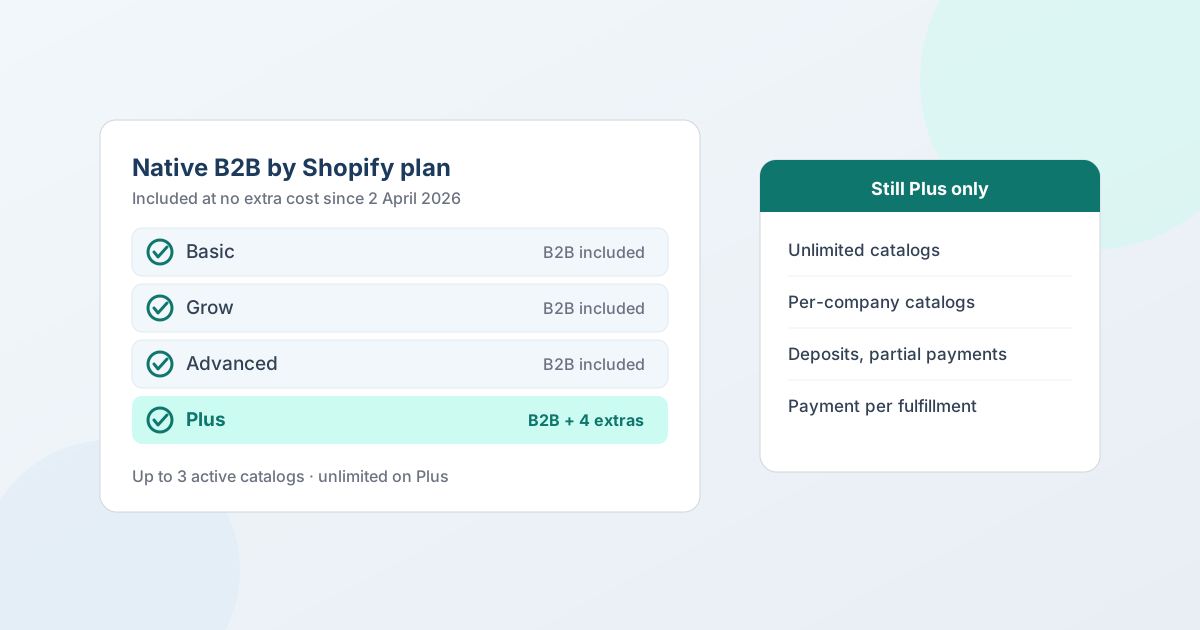
No - you don't need Shopify Plus for B2B. Since 2 April 2026, native B2B is included on Basic, Grow, Advanced, and Plus at no extra cost: company profiles, catalogs with tailored pricing, volume discounts and quantity rules, vaulted credit cards, and payment terms. Plus still buys you a few specific things, and it's worth knowing exactly which ones before you upgrade.
That last part is where most advice goes wrong. Running Shopify B2B without Plus simply wasn't possible before 2026, so "you need Plus for wholesale" was true for years and is still repeated everywhere - and the version that replaced it ("B2B is on every plan now") is too loose to plan against. Three capabilities really are Plus-only, one of them matters more than merchants expect, and there's a separate set of things that stop working the moment you turn B2B on. This guide covers all of it: what changed, what every plan includes, what Plus still gets you, the limits that shape how you structure accounts, and how to decide.
Plan details verified against Shopify's documentation on 22 August 2026 and re-verified on 20 September 2026 and 7 October 2026. Shopify has changed B2B plan gating more than once - check the B2B features by plan page before making an upgrade decision on this, or our maintained Shopify B2B technical reference, which is re-verified at every Shopify Edition and API release. Taking a B2B store live? The 50-test launch plan is the verification pass.
What changed on 2 April 2026
Shopify extended native B2B to merchants on Basic, Grow, and Advanced at no additional cost. Before that date, B2B - Companies, catalogs, payment terms, the whole model - was exclusive to Shopify Plus, which is why so much of the wholesale advice written before 2026 tells you to upgrade.
The features named in that rollout: company profiles for wholesale buyers, up to three custom catalogs with tailored pricing, volume discounts and quantity rules, vaulted credit cards, and payment terms.
Two things follow. First, "do I need Plus for wholesale?" is now the wrong question - the right one is "which of the Plus-only pieces do I actually need?" Second, any guide, forum answer, or agency post dated before April 2026 is describing a different product boundary. Check the date on wholesale advice before you act on it.
What every paid Shopify plan now includes
On Basic, Grow, Advanced, and Plus, with B2B enabled:
- Companies and company locations. A company is the buying organization; a location is the actual entity that places orders, with its own addresses, tax details, payment terms, and contacts. Location-level permissions for admin and ordering roles are included on every plan.
- Catalogs with tailored pricing. A catalog pairs a product selection with a price list, so business buyers see their own products and their own prices - no duplicate SKUs, no separate wholesale store.
- Volume discounts and quantity rules. Price breaks at quantity thresholds, and rules that restrict how many units a buyer can order.
- Payment terms. Net 7, 15, 30, 45, 60 or 90, due on fulfilment, or a fixed date on a draft order, plus payment reminders. Terms are set per company location (or for all of a company's locations at once), so an invoiced order follows the account rather than the checkout.
- Vaulted credit cards and ACH transfers (US).
- Draft orders, reorders, quick order lists, and PO numbers at checkout.
- B2B sales-staff permissions. Assign staff to company locations and scope their admin access to just those accounts. Up to 10 sales staff per company location.
- Shopify Flow automations for B2B, and the Trade theme.
That's a genuinely complete wholesale operation. For a large number of merchants, the honest answer is that Plus adds nothing they'd use.
What Shopify Plus still gets you
Four things, and only one of them tends to be decisive:
| Capability | Basic / Grow / Advanced | Plus |
|---|---|---|
| Active catalogs | Up to 3 across all B2B markets | Unlimited |
| Catalogs assigned directly to a company or location | No | Yes |
| Deposits and partial payments | No | Yes |
| Payment requests per fulfillment | No | Yes |
| Contextual checkout and storefront customization via Markets | Advanced only | Yes |
Deposits and partial payments matter if you take money up front on large or made-to-order deals - a 50% deposit with the balance on Net 30 is a Plus-only flow on Shopify's side. It's the single Plus-only capability that most often decides the question for made-to-order sellers (see quoting custom and made-to-order products).
Payment requests per fulfillment matter if you ship a large order in stages and invoice each shipment.
Contextual checkout customization is available on Advanced as well as Plus, so it's rarely the reason to jump the whole way.
And then there's the catalog limit, which deserves its own section, because it's the one that quietly decides the question for a store with more than three price lists.
The three-catalog limit is the one that bites
On Basic, Grow, and Advanced you can assign up to 3 active catalogs across all your B2B markets. On Plus you get an unlimited number, and you can assign a catalog directly to a specific company or company location.
Three catalogs is plenty for tiered pricing. If your accounts sort into bronze, silver, and gold - or distributor, dealer, and direct - you have exactly what you need, and the ceiling never comes up.
Three catalogs stops working the moment pricing is per-account rather than per-tier. Say you have 40 wholesale accounts and 12 of them have negotiated something specific: a better rate on one product line, a flat percentage off their category, a price locked in when the contract was signed. On Plus you'd give each of those 12 its own catalog and be done. Without Plus you can't - not because of the number 3 alone, but because direct catalog assignment to a company is itself a Plus feature. Below Plus, catalogs attach to B2B markets, and companies get pricing by virtue of the market their location sits in.
So the real test isn't "how many price levels do I have?" It's "is my pricing structural or is it negotiated?"
- Structural pricing - a small number of tiers, every account assigned to one. Three catalogs is fine. You don't need Plus.
- Negotiated pricing - accounts on individually agreed rates, changing as deals get renegotiated. This is what per-company catalogs are for, and it's the genuine reason to consider Plus.
One more detail worth knowing before you design around it: when more than one catalog applies to the same product at the same level, the lowest price displays to the customer. Overlapping catalogs don't stack - the cheapest one wins. If two catalogs tie on that lowest price, quantity rules and volume pricing come from "the first catalog that was created". The one precedence rule sits on Plus: a catalog assigned directly to the company location is "the most specific" and beats one that reaches the location through a B2B market, even if the market catalog is cheaper. When a buyer sees no B2B price at all, the price diagnostic starts with the location being in a B2B market.
The limits worth knowing before you structure your accounts
These apply across plans and are easy to design past if you know them up front:
| Limit | Value |
|---|---|
| Company locations per company | 10,000 |
| Customers per company | 10,000 |
| Customers per company location | 50 |
| Companies per customer | 1 (a customer can be on several locations of that company) |
| Catalogs per company location | 25 |
| Line items per order | 500 |
| Line items per draft order | 500 (499 through the API's create and update mutations) |
The one to watch is the 500-line-item cap on draft orders - 499 when the draft is created through the API - because draft orders are how quoted and manually-created B2B orders reach Shopify. If you sell a deep catalog and a buyer regularly orders hundreds of distinct SKUs in one go, that ceiling is real and you'll want to plan for splitting the order. The rest of the draft-order gotchas are in Shopify draft orders: the limits the docs bury.
The 50-customers-per-location cap catches larger organizations - a company with 300 buyers needs them distributed across locations rather than piled into one.
What you have to turn on, and what stops working
This is the part that surprises people, and it has nothing to do with your plan. B2B changes how checkout behaves.
Required: you must activate customer accounts. Legacy customer accounts are not compatible with B2B, and Shopify deprecated them platform-wide on 26 February 2026 - if your store still runs them, that migration comes first.
Does not work with B2B checkout:
- Accelerated checkouts - Shop Pay, Apple Pay, Google Pay, Amazon Pay
- Subscriptions
- Local delivery (still available on B2B draft orders created in the admin) and pickup points
- Tipping
- Legacy customer accounts
- Agentic storefronts
checkout.liquidcustomizations
Available only by request to Shopify Support: pickup in store, line item scripts, abandoned checkouts, and gift cards at checkout.
If you run a blended store - retail and wholesale on one storefront - none of this touches your DTC checkout; the constraints apply to B2B checkout. But if accelerated payment buttons are doing heavy lifting for your retail conversion, know that your B2B buyers won't have them.
Where negotiated pricing fits when you can't assign a catalog per company
If your pricing is negotiated rather than tiered, and Plus isn't on the table, there's a path that doesn't involve catalogs at all: agree the price on the deal itself.
A quote is a priced offer on a specific set of lines for a specific buyer. It doesn't need a catalog, a price list, or a market - and when the buyer accepts, it becomes a native Shopify draft order carrying the agreed prices. The account-specific rate lives on the deal, not in a catalog you weren't able to create.
Being precise about what this is and isn't:
- It does not raise Shopify's catalog limit or add per-company catalog assignment. Nothing outside Plus does.
- It is a different mechanism for the same commercial outcome: this buyer, this price, recorded and converted into a real order.
- It works on any Shopify plan, including stores with no native B2B at all - because the quote and the draft order don't depend on Companies.
- It suits negotiated and periodic pricing, not high-frequency self-serve reordering at a standing rate. If a buyer reorders weekly at a fixed price, that's a catalog's job, and three catalogs may well cover it.
The practical shape for a lot of stores: standing tiers in your three catalogs for the accounts that fit them, and quotes for the exceptions. Volume and tiered pricing on Shopify B2B covers where that line falls.
What QuotWay gates by plan - a separate question
Merchants routinely conflate "what does Shopify's plan give me?" with "what does the app's plan give me?" They're independent, and two QuotWay capabilities depend on both.
| Lite (free) | Starter | Professional | Enterprise | |
|---|---|---|---|---|
| Quote button, quote form, guest quoting | Yes | Yes | Yes | Yes |
| Versioned proposals, counter-offers, draft-order conversion | Yes | Yes | Yes | Yes |
| Hide prices | - | Yes | Yes | Yes |
| Custom form fields | - | Up to 5 | Unlimited | Unlimited |
| Approval workflows | - | - | Yes | Enterprise adds parallel, escalation, delegation |
| Automation rules | - | - | Yes | Yes |
| Deposits at checkout | - | - | Yes, on Shopify Plus stores | Yes, on Shopify Plus stores |
| Payment terms on any quote, applied on conversion | Yes | Yes | Yes | Yes |
| Companies, Locations (company-aware quoting) | - | - | - | Yes, on a B2B-capable store |
The two rows in bold are the ones with a Shopify-side dependency:
- Deposits are a Shopify Plus platform capability. QuotWay makes the percentage negotiable and carries it onto the converted order from Professional up - but the store has to be on Plus. On non-Plus stores the option doesn't appear.
- Companies and Locations (company-aware quoting) need a B2B-capable store and QuotWay's Enterprise plan. Since B2B is no longer Plus-exclusive, a Basic, Grow, or Advanced store with B2B enabled qualifies. Payment terms are not in this row: they work on any quote, on every plan, without B2B.
Everything else - quoting, negotiating, hiding prices, approvals, payment terms, converting to a draft order - runs on a standard Shopify store with no native B2B at all.
So which plan do you actually need?
If the question is whether Shopify fits your B2B business at all - punchout, EDI, buyer approvals, account hierarchies - start with is Shopify good for B2B?.
Three honest cases:
You can run B2B without Plus if your wholesale pricing sorts into a handful of tiers, you invoice on payment terms rather than collecting deposits, and you ship orders complete. Basic, Grow, or Advanced with B2B enabled covers this fully. Advanced adds contextual checkout customization if you need it.
Consider Plus if you have accounts on individually negotiated standing rates that you want buyers to self-serve against - that's per-company catalogs, and there is no way to reach it below Plus. Also if deposits or per-fulfillment payment requests are core to how you sell.
Consider a quote app first if your negotiated pricing is deal-by-deal rather than standing, you want gated prices and a request-a-quote path, or you're not on native B2B at all. This is the case where an upgrade often solves the wrong problem: you don't need per-company catalogs if the price is agreed per deal anyway.
The mistake worth avoiding: upgrading to Plus for catalog headroom you don't need, when what you actually have is a negotiation problem. If the question behind the plan question is really which architecture to run - native only, a quote app, a custom build or CPQ - the decision guide scores the four against eighteen requirements.
FAQ
Do I need Shopify Plus for B2B?
No. Since 2 April 2026, native Shopify B2B is included on the Basic, Grow, Advanced, and Plus plans at no additional cost. That covers company profiles, catalogs with tailored pricing, volume discounts and quantity rules, vaulted credit cards, and payment terms. Shopify Plus adds unlimited catalogs, direct catalog assignment to companies and locations, deposits and partial payments, and payment requests per fulfillment.
Is Shopify B2B available on the Basic plan?
Yes. B2B is included on Basic, Grow, Advanced, and Plus at no extra cost. On Basic you can create companies and company locations, assign up to 3 active catalogs across your B2B markets, set volume discounts and quantity rules, and offer payment terms such as Net 30. You need customer accounts activated - legacy customer accounts aren't compatible with B2B.
How many B2B catalogs can I have on Shopify?
On Basic, Grow, and Advanced you can assign up to 3 active catalogs across all your B2B markets. Shopify Plus allows an unlimited number. A single company location can have up to 25 catalogs assigned. Where more than one catalog applies to the same product, the lowest price is the one shown to the buyer.
Can I set per-company pricing on Shopify without Plus?
Not as a standing catalog. Assigning a catalog directly to a company or company location is a Shopify Plus feature; below Plus, catalogs attach to B2B markets. You can still reach an account-specific price by negotiating it on the deal - a quote carries the agreed prices onto a native draft order without needing a catalog, on any plan.
Is Shopify B2B free?
There's no separate charge for B2B - it's included in the Basic, Grow, Advanced, and Plus subscriptions. You pay your normal plan fee. The cost question is really whether the Plus-only capabilities (unlimited catalogs, per-company catalog assignment, deposits, per-fulfillment payment requests) are worth the difference in plan price for your business.
What still needs Shopify Plus for B2B in 2026?
Four things: an unlimited number of catalogs (versus 3 on other plans), assigning catalogs directly to companies and company locations, deposits and partial payments, and payment requests per fulfillment. Contextual checkout and storefront customization through Shopify Markets is available on Advanced as well as Plus.
What stops working when I turn on Shopify B2B?
B2B checkout doesn't support accelerated checkouts (Shop Pay, Apple Pay, Google Pay, Amazon Pay), subscriptions, tipping, local delivery and pickup points, legacy customer accounts, agentic storefronts, or checkout.liquid customizations. Pickup in store, line item scripts, abandoned checkouts, and gift cards at checkout need a request to Shopify Support. Your retail checkout on a blended store is unaffected.
Can I sell wholesale on Shopify without native B2B at all?
Yes. Gated prices, a request-a-quote flow, negotiated pricing, approvals, and conversion into a Shopify draft order all work on a standard store with no Companies or catalogs involved. Native B2B adds self-serve ordering at standing prices with payment terms attached - valuable when buyers reorder frequently, unnecessary when every deal is quoted.
Where QuotWay fits
QuotWay is a B2B quote and negotiation app for Shopify, built by EFOLI. Its role in the plan question is the negotiated deal: it captures the request, prices it, records each counter-offer as a version, and converts the accepted quote into a native Shopify draft order carrying the agreed prices - on any plan, with or without native B2B. It applies Shopify payment terms such as Net 30 on conversion on any quote and every plan, quotes against Companies and Locations on a B2B-capable store (Enterprise), and on a Shopify Plus store it makes deposits negotiable (Professional and up). It doesn't raise Shopify's catalog limits or add per-company catalog assignment - it's a different route to the same account-specific price. The free Lite plan runs the full quote → negotiate → draft-order loop. See Shopify B2B quoting, B2B on Shopify Plus, the plans and pricing, or add QuotWay on Shopify.
Sources
- Shopify Help Center: B2B features by plan
- Shopify Help Center: Requirements and considerations for using B2B
- Shopify Help Center: Creating and managing B2B customers using companies
- Shopify Help Center: Adding customers to companies
- Shopify Help Center: Setting up payment terms in B2B
- Shopify Help Center: B2B catalogs and creating and managing B2B catalogs with Markets
- Shopify Help Center: Orders, data, and admin access for B2B sales staff
- Shopify: B2B for all (announcement, 2 April 2026)
Related articles
See how QuotWay handles this on your store.