Shopify AI & integrations
Ask Shopify Sidekick about your quotes - then let it set up the next step
By Jahangir Alam · August 31, 2026 · 5 min read
You have eleven open quotes. One of them is the one you meant to chase on Tuesday. You know roughly who it's for and roughly what it's worth, and you're now typing fragments of a company name into a search box to find it again.
Shopify Sidekick - the AI assistant built into your admin - could already answer questions about your QuotWay quotes. As of this release it can do the part that actually saves you the minute: take you to the quote - and set the work up for you when you get there.
Ask, click, you're on it.
What changed
Sidekick has been able to read your quotes since July. Ask "which quotes are waiting for approval?" and it answers from QuotWay directly, without you opening the app.
The gap was what happened next. The answer named quotes - QW-1042, QW-1017 - and then you went off to find them yourself.
Now every quote reference in a Sidekick answer is a link. One click opens that exact quote in QuotWay, on the screen you need, with everything loaded.
Three things you can do
Open any quote from an answer
Ask Sidekick something like:
- "Show me my open quotes"
- "Which quotes are waiting for approval?"
- "What's the status of QW-1042?"
- "Show open quotes over $5,000"
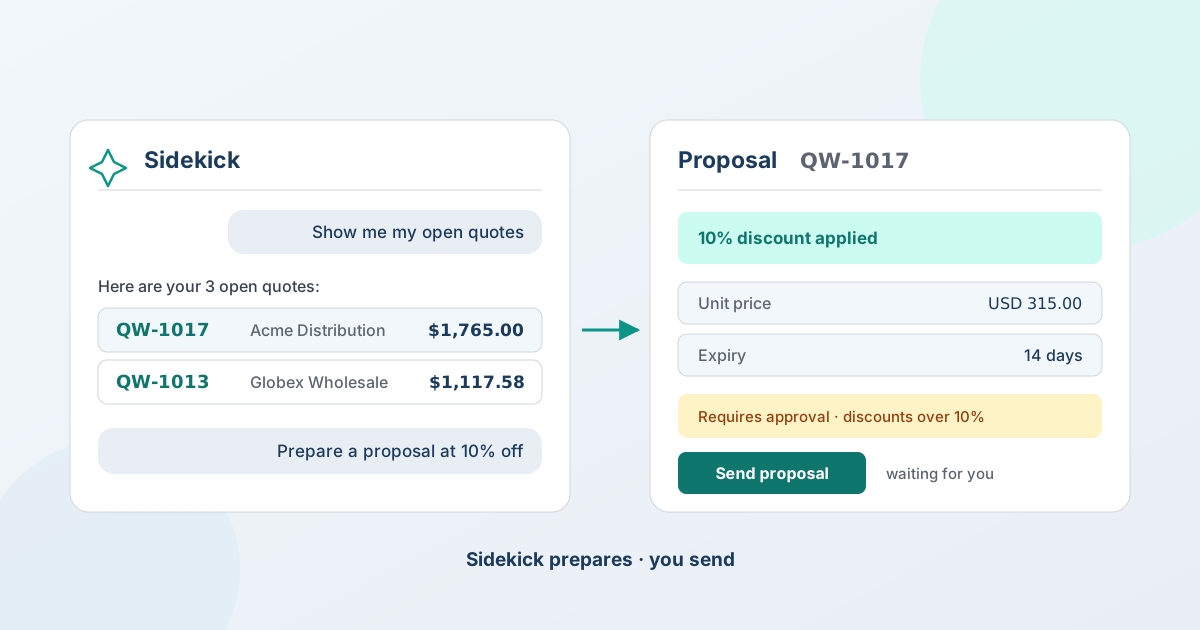
You get a table: one row per quote, with the reference, the buyer, the status (submitted, in review, awaiting info) and the total. Underneath it, Sidekick calls out which quote is worth the most and which are furthest along - so the list arrives already triaged, rather than as something else for you to sort. Click any reference and QuotWay opens that quote.
The useful part isn't the click. It's that you never had to hold the reference number in your head while you moved between two screens.
Have the proposal set up before you get there
With a quote open, ask:
- "Prepare a proposal at 10% off"
QuotWay's proposal editor opens with the discount already applied - and then it waits. You review the line prices, adjust anything you want, and press Send proposal when you're happy.
It sets up the whole-quote terms: the discount, the expiry, a covering message. It never touches an individual line price - that's your call, every time.
And your own rules still run. In our testing, a 10% discount tripped the store's "discounts over 10%" approval policy, and the editor said so before anything could go out. Sidekick doesn't route around your approval chains, your price floors, or anything else you've set up. It gets the work ready; the guardrails still guard.
Start a quote without leaving the conversation
Ask:
- "Create a quote for buyer@example.com"
QuotWay's new-quote form opens with the buyer's email already filled in. Add your products, set your prices, send it - the normal flow, minus the retyping.
What Sidekick will not do
This matters more than the feature itself, so we'll be direct about it.
Sidekick never sends anything to a buyer, and never commits a change on its own. It reads your quotes, takes you to them, and sets work up for you to review. It does not set individual line prices, send proposals, or convert anything into an order. Every one of those is still a button you press.
That's deliberate, and it matches how Shopify designed the capability: an AI assistant hands you off to the right place with the right context loaded, and your app - and you - own what happens next. For quoting, where a wrong price goes to a real customer with your name on it, that's the only design we'd have been comfortable shipping.
So: every price, every send, every conversion is still a decision you make in QuotWay, with the same confirmation steps as before. Nothing new can happen behind your back.
Why this didn't exist until now
Sidekick apps plug in through a fixed vocabulary of "intent types" - a published list of the kinds of thing an app can be asked to open. Products, orders, customers, campaigns, returns, reviews.
There was no entry for a quote. Not for us, and not for any quoting app on Shopify.
So we wrote up the case and proposed one. In August 2026 Shopify added application/quote to the platform - for the whole ecosystem, not just for us. Any quote or RFQ app on Shopify can build on it now, and we think that's the right outcome; a healthier category is worth more than a temporary edge.
QuotWay is the first app shipping on it. If you build Shopify apps yourself, the technical write-up of how the intent type got approved has the RFC, the wiring and the two traps that cost us a deploy.
Which plan do I need?
Any of them. Opening and starting quotes from Sidekick works on every QuotWay plan, including the free Lite plan.
Some answers reflect what your plan includes - ask about approval workflows on a plan without approvals and there's nothing to report - but the navigation itself isn't gated.
Getting started
Nothing to switch on. If you have QuotWay installed and Sidekick in your admin, open Sidekick and ask about your quotes.
If nothing comes back, check that QuotWay is installed on the store you're asking from - Sidekick only reaches apps installed on that shop.
→ How the Shopify Sidekick integration works
Frequently asked questions
Can Shopify Sidekick open my quotes?
Yes. With QuotWay installed, ask Sidekick about your quotes and every quote reference in the answer is clickable - one click opens that quote in QuotWay.
Can I create a quote with Shopify Sidekick?
Yes. Ask Sidekick to create a quote for a buyer's email address and QuotWay's new-quote form opens with that email already filled in. You add the products and prices.
Does Sidekick change my quotes?
Not on its own. It can prepare a proposal for you - opening the editor with a discount applied, for example - but it stops there for you to review and send. It never sends anything to a buyer, sets an individual line price, or converts a quote to an order.
Do my approval rules still apply?
Yes. A discount Sidekick prepares goes through exactly the same approval policies as one you set yourself. In our own testing a 10% discount tripped the store's "discounts over 10%" approval chain before the proposal could be sent.
Which Shopify plan do I need?
Any. This works on every QuotWay plan. Some answers depend on which features your plan includes, but opening and starting quotes is not gated.
Do I need to set anything up?
No. If QuotWay is installed and you have Sidekick in your admin, it works.
Related articles
See how QuotWay handles this on your store.