Shopify how-to
Request a quote form: which fields to ask for (with 5 examples)
By Jahangir Alam · August 22, 2026 · Updated August 23, 2026 · 13 min read
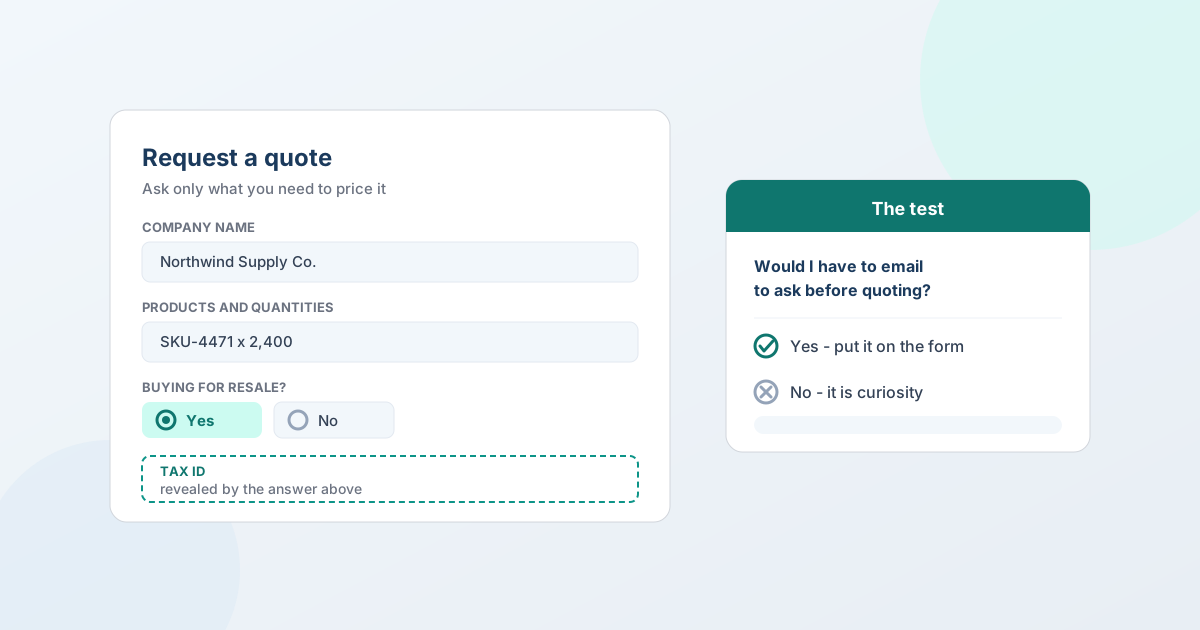
A request a quote form should ask for the fewest fields that let you price the request without sending a follow-up email. For most B2B stores that's five things: who they are, what they want and how many, where it's going, when they need it, and anything that changes the price. Every field you add costs you completed requests; every field you leave out costs you a round trip.
That trade-off is the whole design problem, and it has a usable test. This guide gives you the test, the built-in fields worth turning on, five worked field sets for different kinds of B2B seller, how to keep a longer form short with conditional logic, and when to ask for a file instead of a paragraph.
(This is about what the form asks. For where the button goes and how to put it on your theme, see how to add a request a quote button on Shopify.)
The test for every field
Before a field goes on the form, ask:
Would I have to email this buyer to ask for this before I could price their request?
If yes, it belongs on the form - you're going to spend the round trip anyway, and asking up front costs a few seconds instead of a day. If no, it's curiosity, and curiosity is expensive: it's paid for in abandoned forms by the buyers who couldn't be bothered.
Then a second test:
Can I get this without asking?
A signed-in buyer's name and email are already known. The product and quantity come from the page they were looking at. A company's payment terms are on their account. Anything you can infer, infer - the shortest form is the one that doesn't ask what it already knows.
Two things worth being clear about, because they get conflated with field design:
- Don't require an account. Forcing a sign-up before someone can ask for a price is a bigger drop-off than any field. Guest quoting works on every QuotWay plan including the free one, and a guest can claim their quote by email afterwards.
- Field count isn't the only cost. A form of eight easy fields beats a form of four that each require the buyer to go and look something up. And a form no longer has to be perfect, because a quote can be fixed after the request arrives. "What's your annual volume?" is one field and ten minutes of work.
The built-in fields, and which to turn on
QuotWay's form starts with three fields that are always on, because a quote can't exist without them:
| Always on | Notes |
|---|---|
| Name | Pre-filled for signed-in buyers |
| Pre-filled for signed-in buyers; format checked before submit | |
| Products and quantities | Pre-filled from the product the buyer was viewing |
Then eight you can toggle:
| Field | Turn it on when |
|---|---|
| Company name | You sell to businesses at all. Procurement teams expect to identify their company, and it's how you match a request to an account. |
| Phone number | Your deals involve a call - freight, custom work, anything urgent. |
| Shipping address | Shipping is a real line on the quote. You can't price freight without a destination. |
| Purchase order number | Your buyers raise POs before ordering, and you want the reference on the deal from the start. |
| Custom message / notes | Almost always. It's where buyers tell you the thing your form didn't think to ask. |
| File attachment upload | Buyers arrive with drawings, BOMs, artwork, or a spreadsheet of SKUs. |
| Requested delivery date | Lead time affects whether you can bid at all, or what it costs to bid. |
| Requested price per line | You expect to negotiate. |
Two of those are consistently under-used, and both change how the deal runs:
Requested price per line lets the buyer name their number at intake. It feels uncomfortable - you're inviting a lowball - but it's information you'd otherwise spend two rounds discovering, and it tells you immediately whether the deal is workable. A buyer asking for 8% off is a different conversation from one asking for 40%.
Requested delivery date is the field that most often decides whether to quote. If they need 4,000 units in three weeks and your lead time is eight, you want to know before you price it, not after.
Five worked field sets
Start from the one closest to how you sell, then cut anything that fails the test above.
1. Wholesale reorder (existing trade account)
The shortest form on this page, because you already know almost everything.
| Field | Type | Required |
|---|---|---|
| Name, email | Built-in | Always on (pre-filled) |
| Products and quantities | Built-in | Always on |
| Company name | Built-in | Yes |
| Purchase order number | Built-in | Optional |
| Requested delivery date | Built-in | Optional |
| Notes | Built-in | Optional |
That's it. A returning buyer reordering known SKUs shouldn't be re-qualified every time - it reads as though you don't recognise them.
2. Manufacturing and made-to-order
Here the spec is the price, so the form does real work. (Quoting custom and made-to-order products covers what happens after the form.)
| Field | Type | Required | Why |
|---|---|---|---|
| Company name | Built-in | Yes | Match to account and terms |
| Products and quantities | Built-in | Yes | Volume drives the unit cost |
| Drawing / specification | File upload | Yes | The single most useful field on the form |
| Material or finish | Dropdown | Yes | Usually a step change in cost |
| Tolerance or grade | Short text | Optional | Ask only if it genuinely varies |
| Required-by date | Date | Yes | Decides whether you can bid |
| Certification required | Checkbox | Optional | ISO, mill cert, food-safe, compliance |
| Is this a repeat part? | Radio | Optional | An existing part number saves you the estimating work |
| Notes | Built-in | Optional |
3. Custom branded and decorated goods
The variables are artwork and decoration method, and both need a file.
| Field | Type | Required | Why |
|---|---|---|---|
| Company name | Built-in | Yes | |
| Products and quantities | Built-in | Yes | Decoration is priced in bands |
| Artwork | File upload | Optional | Optional at enquiry; required before production |
| Decoration method | Dropdown | Yes | Print, embroidery, engraving, etching - different setups |
| Number of colours / positions | Number | Optional | Setup cost driver |
| In-hands date | Date | Yes | Decoration lead times are the usual constraint |
| Sample required? | Radio | Optional | Changes both timeline and cost |
| Notes | Built-in | Optional |
4. International and export
Everything here is about landed cost and whether you can legally and practically ship it.
| Field | Type | Required | Why |
|---|---|---|---|
| Company name | Built-in | Yes | |
| Shipping address | Built-in | Yes | Destination drives freight, duty, and restrictions |
| Products and quantities | Built-in | Yes | |
| Preferred currency | Dropdown | Optional | Quote in the currency the buyer will pay in |
| Tax ID / VAT number | Short text | Optional | Reveal it conditionally for business buyers |
| Incoterms preference | Dropdown | Optional | EXW, FOB, DAP, DDP - who arranges and pays |
| Required-by date | Date | Optional | Ocean and air freight are different quotes |
| Import documentation needed | Checkbox | Optional | Certificates of origin, packing declarations |
| Notes | Built-in | Optional |
5. First-time trade enquiry (unknown buyer)
The only case where qualification is fair - you don't yet know whether this is a business at all. (If you're gating trade access properly, this belongs on a wholesale account application rather than the quote form.)
| Field | Type | Required | Why |
|---|---|---|---|
| Name, email | Built-in | Always on | |
| Company name | Built-in | Yes | |
| Business type | Dropdown | Yes | Retailer, distributor, installer, end user - drives which pricing applies |
| Buying for resale? | Radio | Yes | The qualifying question, and it drives the tax-ID field |
| Tax ID / reseller certificate | Short text | Conditional | Only shown when they answer yes above |
| Products and quantities | Built-in | Yes | |
| Estimated annual volume | Dropdown | Optional | Bands, not a free-text number - never make them calculate |
| How did you hear about us? | Dropdown | Optional | Cut this one first if the form feels long |
| Notes | Built-in | Optional |
The field types, and what each is really for
| Type | Use it for | Watch out |
|---|---|---|
| Short text | References, codes, tax IDs | Free text can't be filtered or automated against reliably |
| Paragraph | The "anything else" note | Don't use it for structured data you'll want to sort by |
| Number | Quantities, budgets, colour counts | Set a min and max so a typo doesn't reach your inbox |
| Date | Required-by, in-hands date | Better than asking for "timeline" as free text |
| Date and time | Scheduling, delivery windows | Rarely needed at enquiry stage |
| Dropdown | One choice from a defined list | The workhorse - structured, filterable, drives conditions |
| Radio buttons | One choice from two or three | Faster than a dropdown for short sets |
| Checkbox | Yes/no opt-ins, or multi-select options | Good for certifications and add-ons |
| File upload | Drawings, BOMs, artwork, SKU spreadsheets | Frequently replaces four other fields |
| Section heading | Grouping a longer form | Not an input - can't drive or receive a condition |
The general rule: prefer a choice field over free text wherever the answers are knowable. "Material: [dropdown]" gives you something you can filter, route, and build an automation condition on. "Material: [text]" gives you alu, Aluminium, aluminum 6061, and not sure.
Custom fields are available from the Starter plan (up to 5); Professional and Enterprise are unlimited.
Keep a long form short with conditional logic
The best forms are long in capability and short in experience: a manufacturing buyer sees the spec questions, a reseller sees the tax-ID question, and neither sees the other's.
Conditional logic shows or hides a field based on an earlier answer. Two examples that earn their place:
- "Buying for resale?" → yes → reveal "Tax ID". Nobody else is asked for a number they don't have.
- "Do you have a drawing?" → no → reveal "Describe the part". The buyers with a file upload it; the buyers without one describe it. Neither sees a blank field they can't use.
Three practical constraints:
- The controlling field must sit above the conditional one.
- A section heading can't drive a condition or be hidden by one - it has no answer.
- The three contact built-ins are always visible and never conditional.
Conditions can also be driven by built-ins - company name, phone, shipping address, delivery date, or whether an attachment was added - and the operators depend on the type: text offers is filled / is empty / equals / contains and their negations, number adds greater than / less than, choice fields match on the option selected.
Conditional logic requires the Professional plan or above. On Starter you can add fields but not show/hide rules, which is a reason to keep the Starter form to the five that matter rather than five that sometimes matter.
When to ask for a file instead of a field
The form is one end of the document; the quote you send back is the other. What a B2B quote must contain covers that side field by field, and several of the fields below exist purely so that document can be filled in without a follow-up.
A file upload often replaces four questions. If the buyer has a drawing, a bill of materials, or a spreadsheet of SKUs, letting them attach it is faster for both sides than making them retype it into your form.
What you can accept: PDF, PNG, JPG, JPEG, DOCX, and XLSX. Limits are per-plan ceilings rather than settings you configure - Starter 3 files × 5 MB, Professional 5 files × 10 MB, Enterprise 5 files × 25 MB. Each file is checked in the browser for size and type before upload, and QuotWay validates the file type and rejects files with malicious or active content.
Two field-design notes: make the upload optional at enquiry stage unless a quote is genuinely impossible without it, and pair it with a conditional text field for the buyers who don't have a file yet - otherwise you lose the buyer who's still at the "roughly what would this cost?" stage.
Required, optional, and validating the answers
Mark a field required only when you cannot price the request without it. Everything else is optional - you'll be surprised how much gets filled in anyway when the buyer isn't being blocked.
Where a field is required, use the validation to keep the answers usable: short-text and paragraph fields can set a minimum and maximum length, and number fields can set a minimum and maximum value. Both are checked in the buyer's browser before submit, so mistakes get fixed by the buyer rather than by an email from you.
One useful behaviour to know: if a buyer enters a requested price above your catalog price, the quote arrives with a warning badge - which is usually a sign the buyer misread the field rather than an unusually generous offer.
Common mistakes
- Asking for annual volume from a first-time enquiry, as free text. Use bands in a dropdown, or don't ask.
- Making everything required. A required field the buyer can't answer is an abandoned form, not a completed one.
- Free text where a dropdown belongs. You lose filtering, routing, and any chance of automating the routine ones.
- Asking for a company name but not a delivery destination, then quoting freight blind.
- Collecting information you never look at. If nobody has read the "how did you hear about us" answers in three months, that field is costing you quotes for nothing.
- A different form for every product. Targeting rules control where the button appears; conditional logic keeps one form relevant. Two mechanisms, one form.
FAQ
What fields should a request a quote form have?
At minimum: name, email, and the products and quantities being requested. For B2B, add company name and a notes field, then add only what you'd otherwise have to email the buyer to ask before you could price the request - typically a delivery destination, a required-by date, and whatever variable drives your pricing (spec, material, decoration method, or volume).
How many fields is too many on a quote form?
There's no fixed number - what matters is how much work each field is. Eight fields a buyer can answer from memory will out-convert four that require them to look something up. Use the test: if you'd have to ask before quoting, keep it; if you're merely curious, cut it. Conditional logic lets you ask more without every buyer seeing more.
Should a request-a-quote form require a customer account?
No. Requiring sign-up before someone can ask for a price loses more requests than any individual field. Accept guest requests and let the buyer claim the quote by email afterwards - QuotWay supports guest quoting on every plan, including the free Lite plan, and links the quote to a customer record when they claim it.
Should you ask the buyer for their target price?
Usually yes. A requested price at intake tells you immediately whether the deal is workable and starts the negotiation from a real number instead of two speculative rounds. The discomfort is misplaced: you aren't obliged to meet the number, and a buyer asking for 8% off is a very different prospect from one asking for 40%.
Can I show different quote form fields to different buyers?
Yes, with conditional logic - one form that reveals or hides fields based on earlier answers, so a reseller sees the tax-ID question and a retail buyer doesn't. This requires the Professional plan or above. It's separate from targeting rules, which control which products and buyers see the quote button in the first place.
What file types can buyers attach to a quote request?
PDF, PNG, JPG, JPEG, DOCX, and XLSX. Counts and sizes are plan ceilings - Starter allows 3 files at 5 MB each, Professional 5 files at 10 MB, Enterprise 5 files at 25 MB. Files are checked for size and type in the browser, and QuotWay validates the file type and rejects files carrying malicious or active content.
How do I collect a tax ID or VAT number on a quote form?
Add it as a short-text custom field, and reveal it conditionally from a qualifying question such as "Are you buying for resale?" so only business buyers ever see it. Asking every visitor for a tax ID is a reliable way to lose the ones who don't have one. Custom fields start on the Starter plan; the conditional reveal requires Professional.
Where QuotWay fits
QuotWay is a B2B quote and negotiation app for Shopify, built by EFOLI. The quote form is where its work starts: built-in fields you toggle to match how you sell, custom fields from the Starter plan (5 on Starter, unlimited on Professional and Enterprise), conditional show/hide logic on Professional and up, file uploads validated for type and active content, and guest requests on every plan including the free Lite plan. Answers travel with the quote - into your inbox, onto the proposal you send back, and into the automation conditions that decide which requests can be priced without you. See quote requests and forms, the form setup guide, the plans and pricing, or add QuotWay on Shopify.
Sources
- QuotWay docs: Configure the quote form - built-in fields, validation, and pre-fill.
- QuotWay docs: Custom fields and conditional logic - field types, validation limits, and condition operators.
- QuotWay docs: File attachments - allowed types, per-plan limits, and validation.
- Shopify Help Center: Customer accounts
Related articles
See how QuotWay handles this on your store.