Shopify B2B
Shopify B2B features explained: Companies, payment terms, and draft orders
By Jahangir Alam · June 20, 2026 · Updated August 22, 2026 · 10 min read
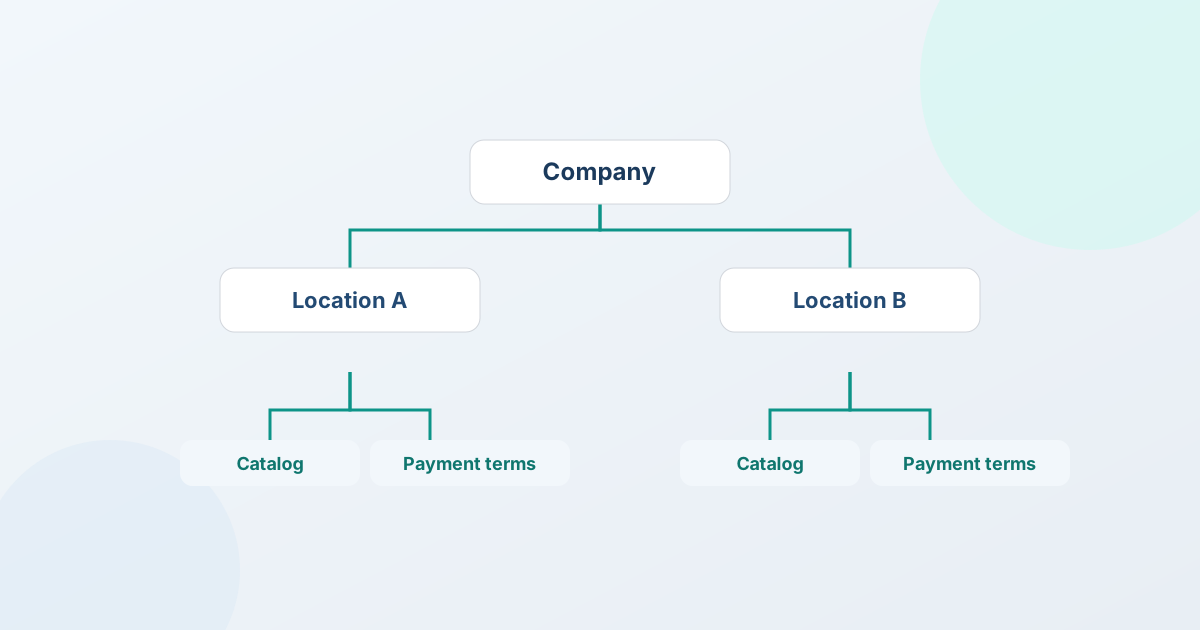
Shopify B2B is the set of features that let you sell to other businesses the way they actually buy: Companies group a buyer's organization, locations, and contacts; B2B catalogs and price lists show each company its own pricing; payment terms let you invoice on Net 30 instead of collecting at checkout; and accepted B2B orders are created as draft orders rather than ordinary cart checkouts. Together they turn a store built for one-shopper, one-card retail into one that can handle organizations, negotiated pricing, and invoicing.
This guide explains each of those pieces in plain language - what it does, whether you need Shopify Plus to use it, and where native Shopify B2B stops and a quote app starts.
What "Shopify B2B" actually means
Shopify B2B is a native part of Shopify, not a separate product. It adds a business-buyer layer on top of your existing store, so the same catalog, inventory, and admin can serve both retail shoppers and business accounts.
The defining idea is the Company. In retail, Shopify knows about individual customers. In B2B, it knows about organizations: a Company has one or more Locations (think branches, franchises, or ship-to addresses) and one or more contacts (the people authorized to buy for that company). Pricing, tax treatment, and payment terms attach to the company and its locations, not to a single email address - which is exactly how purchasing works in the real world.
Everything else in Shopify B2B builds on that model. So the most useful way to understand the features is to walk through them in the order a B2B sale touches them: who the buyer is, what price they see, how the order is created, and how they pay.
Is Shopify B2B still Plus-only?
No. Shopify's B2B features started as Plus-exclusive, but since the 2026 rollout native B2B is included on Basic, Grow, Advanced, and Plus at no extra cost - Companies, catalogs, quantity rules, and payment terms among them. A few capabilities stay on Plus, chiefly unlimited catalogs, assigning catalogs directly to a company or location, and deposits; do you need Shopify Plus for B2B? breaks that down plan by plan.
That distinction matters because a lot of older advice still says "B2B requires Plus." If you're evaluating whether you can sell wholesale on your current store, don't assume you're locked out - confirm whether B2B is available on your store, and remember that a large amount of wholesale selling (gated prices, a request-a-quote flow, a hosted buyer portal) needs no native B2B at all and works on any Shopify plan. More on that distinction below.
Companies, Locations, and contacts
The Company model is the foundation, so it's worth understanding what each layer does:
- Company - the organization you're selling to ("Northwind Supply"). It holds the account-level settings: which catalog and price list apply, the default payment terms, and tax status.
- Location - a place that company buys for or ships to. A company can have several locations, each with its own address, tax treatment, and even its own assigned catalog or terms. A restaurant group with ten kitchens is one company with ten locations.
- Contacts - the individual people who can place orders for the company. A contact signs in and shops in their company's context, so they automatically see company pricing and check out under the company's terms.
The payoff is that a buyer's identity carries their entire commercial relationship. When a contact from Northwind logs in, Shopify already knows their price list, their location, and their payment terms - nobody has to look anything up or retype a discount.
B2B catalogs and price lists
Retail shows everyone the same price. B2B doesn't. Shopify B2B lets you assign catalogs - a curated set of products plus a price list - to your B2B markets, or, on Shopify Plus, directly to specific companies or locations. One company sees its negotiated wholesale rate; another sees a different tier; a third sees only the products it's allowed to order.
Price lists can be set as fixed prices or as a percentage off your retail prices, and quantity rules (minimums, increments, and case quantities) can be attached so a buyer orders in the units you actually ship. This covers the common wholesale need: standing, account-specific pricing that's published in advance.
Where catalogs stop is negotiation. A price list is a fixed, pre-set number. It doesn't handle the back-and-forth of a buyer asking for a better rate on a large one-off order, or a deal that needs a counter-offer before both sides agree. That gap - published pricing versus negotiated pricing - is the single biggest reason B2B merchants add a quote app on top of native B2B. We'll come back to it.
Payment terms and net invoicing
Businesses rarely pay by card at checkout. They expect an invoice and a window to pay it. Shopify B2B supports payment terms - Net 15, Net 30, Net 60, or due on receipt - assigned to a company. When that company orders, the order can be placed against terms instead of an immediate charge, and the buyer pays the invoice within the agreed window.
This is the feature that makes Shopify feel like a real B2B system rather than a retail cart with a discount. It's also the one most tied to the order-creation flow, because terms are applied when the order is created - which brings us to draft orders.
A caution worth stating plainly: payment terms are a Shopify capability for invoicing on terms. They aren't a credit product. Shopify isn't underwriting the buyer or guaranteeing payment - you're choosing to extend terms to a business you trust, and Shopify records and tracks the invoice.
Draft orders: how B2B orders actually get created
A draft order is an order a merchant (or an app) builds in Shopify before the buyer pays - you assemble the line items, set the prices, apply terms, and then send the buyer an invoice to complete it. Retail uses the standard checkout; B2B leans heavily on draft orders, because they let you set the exact agreed prices and terms on the order rather than relying on whatever the cart calculated.
Draft orders are the connective tissue of B2B on Shopify:
- They carry negotiated or account-specific prices, line by line, instead of standard catalog prices.
- They can have payment terms applied, so the resulting order is invoiced on Net 30 rather than charged immediately.
- They become real Shopify orders once accepted or paid - so fulfillment, inventory, taxes, and reporting all run through the same Shopify pipeline as every other sale. There's no separate system to reconcile.
This last point is the quiet advantage of doing B2B inside Shopify: the B2B order isn't a second copy of your data living in another tool. It's a native Shopify order. For a deeper walkthrough of turning an agreed quote into one of these, see convert to Shopify draft orders.
Multi-currency and international B2B
If you sell across borders, Shopify Markets lets you present prices in a buyer's local currency. For B2B, the wrinkle is that a negotiated deal can take days, and exchange rates move in that window. Native Markets handles presentment currency well; what it doesn't do on its own is lock a rate to a specific quote so the total a buyer agreed to is the total you bill.
That's a quoting concern more than a catalog one, and it's covered in multi-currency quoting with Shopify Markets: the exchange rate is captured when the quote is created and held for the life of that quote, so a long negotiation settles on the number both sides agreed to.
Where native Shopify B2B ends - and a quote app begins
Native Shopify B2B is genuinely strong at standing relationships with published pricing: a known company, an assigned price list, terms on file, repeat orders. Where it leaves a gap is everything that involves a price conversation before the order exists:
- A buyer wants to request a price rather than see one - or you want to hide prices and show "Request a quote" instead.
- A large order needs a real negotiation - a proposal, a counter-offer, a counter-back - before anyone commits.
- A deal needs sign-off on your side or the buyer's before it's accepted.
- A buyer is ready to accept some lines now and keep negotiating the rest.
- A wholesale buyer isn't set up as a Company at all, and you still want to quote them.
None of those are catalog or price-list features - they're quoting and negotiation features. That's the layer a B2B quote app adds on top of Shopify's native B2B, and it's worth understanding the boundary before you assume native B2B alone covers your workflow. (For the broader picture of running a wholesale operation, the complete guide to selling wholesale on Shopify covers the operational side.)
How QuotWay fits on top of Shopify B2B
QuotWay is a B2B quote and negotiation app for Shopify, built by EFOLI, that adds exactly that quoting layer - without creating a parallel system. It reads your real Shopify products, customers, and companies, and writes accepted quotes back as native Shopify draft orders. Because it builds on Shopify's own model, it works two ways depending on what your store supports:
- With native Shopify B2B, QuotWay quotes against your Companies, Locations, and contacts, and applies the buyer's Shopify payment terms (Net 30, Net 60, due on receipt) when the accepted quote converts to a draft order. This company-aware mode is on QuotWay's Enterprise plan and needs a B2B-capable store. See Shopify B2B quoting.
- Without native B2B - standard wholesale and DTC - QuotWay still works on every plan, including the free Lite plan: hide prices and show "Request a quote" (Starter and up), target buyers by customer, tag, or segment, let guests quote, and give buyers a hosted portal with magic-link access. No Shopify Plus and no native B2B required.
A single store can run both at once - quote your Companies and your tag-based wholesale buyers side by side - and QuotWay detects which applies per quote, so there's no toggle to get wrong. On top of either approach you get the negotiation features native B2B doesn't have: versioned proposals and counter-offers (see how to negotiate B2B prices without the email chain), approval workflows on both sides of a deal (Professional and up), and partial line-item acceptance (Professional and up). Company- and location-based targeting is on Professional and up; customer-segment targeting is on Starter and up; targeting by customer, tag, and logged-in-versus-guest is on every plan.
You can start free: the Lite plan runs the full quote → negotiate → draft-order loop (up to 10 quotes a month), so you can layer quoting onto your Shopify B2B setup before paying anything. Paid plans - Starter at $29/mo, Professional at $79/mo, and Enterprise at $199/mo, each with a 14-day trial - add buyer counter-offers, approvals, automation, company-aware quoting, and payment-terms support. The full breakdown is on the pricing page.
FAQ
Is Shopify B2B still Plus-only?
No. Since April 2026, native B2B is included on Basic, Grow, Advanced, and Plus at no extra cost, so a store on any of those plans can use Companies, catalogs, and payment terms. Unlimited catalogs, per-company catalog assignment, and deposits remain Plus-only. Separately, a lot of wholesale selling - gated prices, a request-a-quote flow, and a hosted buyer portal - needs no native B2B at all and works on any Shopify plan.
What is a Company in Shopify B2B?
A Company is the organization you sell to. It groups one or more Locations (branches or ship-to addresses) and one or more contacts (the people who can buy for that company), and it holds account-level settings like the assigned price list, tax treatment, and payment terms. When a company contact signs in, they shop in their company's context and automatically see that company's pricing and terms.
What are payment terms in Shopify B2B?
Payment terms let a business order on invoice instead of paying at checkout - for example Net 30, Net 60, or due on receipt - with the buyer paying within the agreed window. Terms are assigned to a company and applied when the order is created. They're a way to invoice on terms, not a credit product: Shopify records and tracks the invoice, but you choose which businesses you extend terms to.
What is a draft order, and why does B2B use them?
A draft order is an order a merchant or app builds in Shopify before the buyer pays - you set the line items, prices, and terms, then send an invoice to complete it. B2B relies on draft orders because they let you put exact negotiated or account-specific prices and payment terms on the order, and they become native Shopify orders once accepted, so fulfillment, taxes, and reporting all stay in Shopify.
What does native Shopify B2B not do?
Native Shopify B2B handles standing relationships with published pricing - Companies, price lists, terms, and repeat orders - very well. What it doesn't do on its own is the price conversation: letting a buyer request a price, running a structured negotiation with counter-offers, routing a deal for approval, or accepting part of a quote. Those are quoting and negotiation features that a B2B quote app like QuotWay adds on top of Shopify's native B2B.
What are the main Shopify B2B features?
The core Shopify B2B features are Companies (grouping a buyer's organization, its Locations, and its contacts), B2B catalogs and price lists (company-specific pricing without duplicate SKUs), payment terms (invoicing on Net 30 or Net 60 instead of a card charge at checkout), and draft orders (how B2B orders are created, carrying the agreed prices and terms). Together they let a Shopify store sell to organizations on account-specific pricing and terms. B2B is capability-based rather than Plus-exclusive, so stores beyond Shopify Plus with B2B enabled can use these features; the price conversation - requesting a quote, negotiating, and approvals - is the layer a quote app adds on top.
Sources
The time-sensitive Shopify facts in this guide are verified against Shopify's official documentation:
Related articles
See how QuotWay handles this on your store.