Quoting & negotiation
Shipping and freight on B2B quotes: how to price it on Shopify
By Jahangir Alam · August 22, 2026 · Updated October 7, 2026 · 10 min read
- Last verified
- Shopify API
- 2026-10
- Audience
- Shopify merchants quoting freight or negotiated shipping
- Scope
- Shipping on a B2B quote at API 2026-10: why checkout-calculated rates fail for freight, live rates in a proposal and the carrier-calculated plan gate, what happens to shipping at conversion, and split shipments
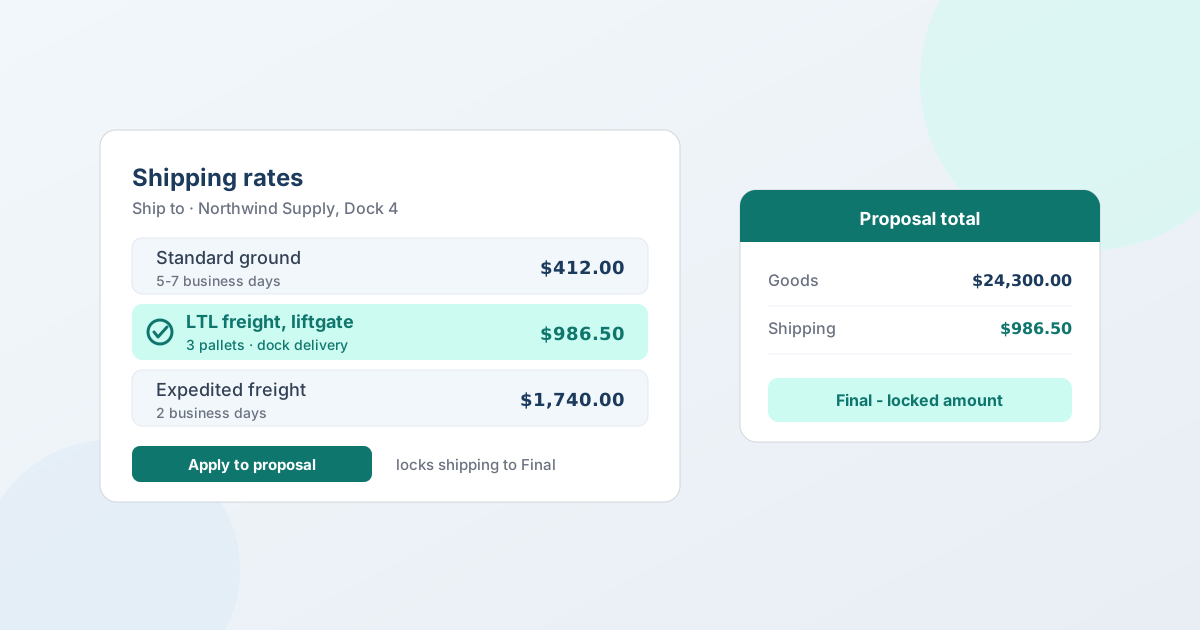
On a B2B order, shipping belongs in the quote - not at checkout. You either lock a final amount on the proposal, optionally pulled from live rates for the buyer's address, or mark shipping pending and quote it separately once you've had it costed. A locked amount rides onto the Shopify draft order when the buyer accepts; a pending one gets set at draft-order time.
That sounds like a small mechanical choice. It isn't. Freight is often the difference between winning a wholesale bid and losing it, and "calculated at checkout" was designed for a parcel going to a house, not a pallet going to a loading dock. This guide covers why checkout rates break down on B2B orders, the two shipping states on a quote and when to use each, how live rates work, what buyers will ask about freight terms, and exactly what happens to the number at conversion.
Why checkout-calculated shipping breaks on B2B orders
Standard Shopify shipping is rate-per-order against a shipping zone, or live rates by weight and destination. It works well for parcels. Business orders routinely break every assumption in it:
- The order palletizes. Once a shipment moves from parcel to LTL freight, the price stops being a function of weight and destination alone. Freight class, density, pallet count, and how the goods are packaged all move the number.
- The destination has a dock - or doesn't. Delivering to a warehouse with a dock and a forklift costs one thing. Delivering to a small shop with no dock costs another, because it needs a liftgate.
- Accessorials exist. Liftgate, inside delivery, residential delivery, limited access, appointment scheduling, notify-before-delivery. Each is a real line on a freight invoice, and none of them are visible to a checkout rate calculator.
- The buyer may not want you to ship it. Plenty of business buyers have their own freight accounts and better rates than yours. They want the goods ready and their carrier to collect.
- The buyer is comparing delivered cost. Procurement isn't comparing your unit price to a competitor's unit price - it's comparing the landed total. A quote that says "shipping calculated later" is harder to evaluate than one that doesn't.
There's also a plain sequencing problem: on a negotiated deal the buyer accepts the quote and then an order exists. If shipping is only computed at checkout, it arrives after the commercial conversation is over - which is exactly the wrong time for a number the buyer hasn't agreed to.
The two shipping states on a quote
A proposal in QuotWay carries a shipping status, and there are exactly two:
Pending - quote on request. The amount is genuinely to-be-determined. The buyer sees that shipping is provided separately rather than a zero, which matters: a blank or zeroed shipping line reads as "shipping is free," and that misunderstanding surfaces at the worst possible moment.
Final - locked amount. You set the number, and it's part of the agreed total the buyer accepts. It carries onto the draft order at conversion.
Alongside the amount there's a shipping label - a short free-text description such as "Standard ground, 5-7 business days" or "LTL freight, dock delivery, liftgate included." Use it. Two quotes with the same shipping amount and different transit times are not the same offer, and on freight the label is where the accessorials get stated so nobody argues about them later.
The practical rule:
| Situation | State |
|---|---|
| Parcel shipment, known destination, rates configured | Final |
| Freight you can cost now (broker quote in hand, known pallet count) | Final |
| Freight you need to have brokered before you can commit | Pending |
| Buyer is using their own carrier and account | Pending, and say so in the label |
| Oversized, hazmat, or made-to-order work needing a specialist quote | Pending |
Pulling live rates into a proposal
Rather than typing a number you half-remember, you can fetch the rates that actually apply to this buyer's address and this set of lines. In the proposal editor, Calculate live rates sits directly under the ship-to address it prices against. Fetch, review the options, apply one - and the proposal's shipping status locks to Final with the amount and label filled in from the rate you chose.
Two conditions:
- The quote needs the buyer's shipping address. Without one there's nothing to price against, and the calculator says so instead of guessing.
- Live rates are a Starter-plan feature and above. On the free Lite plan you enter the shipping amount manually.
If you change the lines after fetching - add a product, change a quantity - QuotWay flags that the rates are stale and prompts you to refresh, because the quantities are what the rate was calculated from.
What "live rates" actually returns, precisely: the rates Shopify itself would offer for that address and those items. That means your own configured shipping-zone rates, Shopify Shipping rates, and - if your store has third-party carrier-calculated shipping enabled - real-time rates from your connected carrier accounts. If those rates come from an app's carrier service, check they're in a shipping profile: since Admin API 2026-10, a newly created carrier service no longer has its rates added to the General shipping profile automatically. If you haven't configured any rates that reach that destination, the list comes back empty, which is information too.
That third-party piece has its own plan gate on Shopify's side: carrier-calculated shipping is included on Advanced and Plus, and Grow stores can add it for a monthly fee or by switching to annual billing. It supports UPS, FedEx, USPS, Canada Post, and Australia Post. So "my live rates only show my own zone rates" is usually a Shopify plan-and-configuration answer, not an app one. (Do you need Shopify Plus for B2B? covers the wider plan question.)
Freight terms your buyers will raise
Once you're quoting freight rather than parcels, buyers start using procurement vocabulary. (If you'd rather carry the cost than quote it, absorbing freight without advertising what it costs you covers that case.) You don't need to adopt any of it as a system - but your quote should be unambiguous about the four things it encodes:
- Who arranges the shipment. You, or the buyer's own carrier collecting from you.
- Who pays. Prepaid (you pay and it's on the quote), collect (the buyer's carrier bills them directly), or prepaid-and-added.
- Where responsibility transfers. Incoterms such as EXW, FOB, DAP, or DDP are the international shorthand for this; domestically buyers often just say "FOB origin" or "FOB destination."
- What's included at delivery. Liftgate, inside delivery, appointment - the accessorials.
The honest, low-effort way to handle this is the shipping label plus your proposal notes: state the term you're quoting on, and if the buyer's carrier is collecting, leave the amount pending and say why. QuotWay records what you agreed - it doesn't manage carrier accounts, book freight, or calculate duties, and no quote app should imply otherwise.
What happens to shipping at conversion
When the buyer accepts and you convert, QuotWay creates a native Shopify draft order. Shipping goes one of two ways:
- Locked (Final) - the agreed rate is forwarded onto the draft order, so the number the buyer accepted is the number they're invoiced for.
- Pending - there's no amount to carry, and you set shipping on the draft order in Shopify before you invoice.
Shopify recalculates tax and shipping when it builds the draft order, so the calculated figures can differ from what you proposed. QuotWay compares them and records the difference:
- Any drift at all - tax, shipping, or inventory - is recorded on the quote's event log, so there's a trail of what moved between agreement and order.
- Tax drift past your threshold is blocking. If recalculated tax differs from the quoted tax by more than your configured percentage (2% by default), the conversion needs your explicit acknowledgement before it proceeds, and an automated conversion halts for a human. A buyer whose exemption isn't set on their company location is a common cause - see B2B tax exemption on Shopify.
- Shipping drift is surfaced, not blocking. You see it and decide.
The usual cause of drift is that the ship-to address changed between the proposal and the conversion - which is worth knowing, because it's fixable by re-checking the address rather than by adjusting a threshold.
Split shipments and partial acceptance
Large B2B orders frequently don't ship as one consignment: part is in stock, part is on a six-week lead time, or lines go to three different sites.
When a buyer accepts only some lines, or you split an accepted quote into several draft orders (Professional plan and above), each group reconciles its own shipping. That's the right behaviour when the buyer is content to pay freight per shipment. If they want a single consolidated shipping charge, convert the groups together rather than separately.
Groups can also carry different shipping addresses, which is how a distributor ordering for three branches gets one negotiation and three deliveries. (Partial order acceptance covers the rest of that flow.)
Quoting freight across currencies
If you're quoting an international buyer in their own currency, the shipping figure has the same exchange-rate exposure as the goods. Rates fetched during a proposal are normalized into the currency the quote is presented in, so the buyer sees one coherent total rather than a mixed-currency document.
Freight also tends to be the more volatile half of an international quote - fuel surcharges and capacity move faster than your product costs. That's an argument for a shorter expiry on international freight-inclusive quotes, or for quoting the goods firm and the freight pending. (Multi-currency B2B quoting goes into the FX side.)
Common mistakes
- Leaving shipping at zero instead of pending. A zero says free. Say pending.
- Quoting freight from memory. Freight pricing moves. A rate you remember from a similar order two months ago is a guess with a decimal point on it.
- Forgetting the accessorials. Liftgate and inside delivery are the two that most often turn a profitable order into a break-even one.
- Not stating transit time. Buyers with a required-by date are buying the date as much as the price.
- Fetching rates and then changing the lines. The rate was calculated from the quantities you had at the time - refresh it.
- Treating one big drift as an app problem. Recalculated tax or shipping that moves sharply at conversion almost always means the address changed.
The Shopify facts in this post are kept current in the Shopify B2B reference (Known limitations), re-verified at every Shopify Edition and quarterly API release.
FAQ
How do I add shipping to a quote on Shopify?
With a quote app, shipping is a field on the proposal rather than something computed at checkout. In QuotWay you set the proposal's shipping status to Final and enter the amount and a label, or fetch live rates for the buyer's address and apply one. When the buyer accepts and you convert, the locked amount is forwarded onto the Shopify draft order.
Can I quote freight rather than parcel shipping on Shopify?
Yes, but the number has to come from you or your freight broker rather than from a checkout calculator. LTL pricing depends on freight class, pallet count, dock access, and accessorials that Shopify's rate calculation doesn't model. Quote the freight amount as a locked shipping line with the terms stated in the shipping label, or leave shipping pending until you've had the load costed.
Should shipping be included in a B2B quote?
Usually yes, because business buyers compare delivered cost, not unit price - a quote with an unresolved shipping figure is harder for procurement to evaluate against a competitor's. The exception is when the freight genuinely can't be priced yet, or the buyer is collecting on their own carrier account. In those cases mark it pending explicitly rather than leaving it blank or zero.
What are live carrier shipping rates on a quote?
They're the shipping rates Shopify would offer for the buyer's address and the items on the quote, fetched into the proposal so you don't have to guess. That includes your configured zone rates, Shopify Shipping rates, and real-time carrier rates if your store has third-party carrier-calculated shipping enabled. In QuotWay this is available from the Starter plan; below that you enter the amount manually.
Why don't my live rates show real carrier prices?
Most often because third-party carrier-calculated shipping isn't enabled on your store. Shopify includes it on the Advanced and Plus plans, and Grow stores can add it for a monthly fee or by moving to annual billing. Without it you'll see your own configured shipping-zone rates instead. An empty list usually means no rates are configured that reach the buyer's destination.
What happens if shipping changes between the quote and the order?
Shopify recalculates shipping and tax when the draft order is created, and QuotWay records any difference on the quote's event log. Shipping drift is surfaced for you to review but doesn't block the conversion; tax drift beyond your configured threshold (2% by default) does require acknowledgement before the order goes out. A change of ship-to address is the usual cause.
How do I handle shipping when an order ships in several parts?
Convert the quote into separate draft orders per shipment, and each group reconciles its own shipping - appropriate when the buyer accepts freight per consignment. If they want one consolidated shipping charge, convert the groups together instead. Groups can carry different shipping addresses, which covers a buyer ordering for several sites in one negotiation. Splitting requires the Professional plan or above.
Where QuotWay fits
QuotWay is a B2B quote and negotiation app for Shopify, built by EFOLI. On shipping its job is to make freight part of the agreed deal instead of a surprise after it: a proposal carries a shipping amount and label, live rates can be pulled in for the buyer's address (Starter and up), each round of counter-offers records what shipping was on it, and the accepted amount is forwarded onto a native Shopify draft order at conversion, with any recalculation drift recorded. It doesn't book freight, manage carrier accounts, or calculate duties - it records and carries the number you and the buyer agreed. The free Lite plan runs the full quote → negotiate → draft-order loop with manual shipping amounts. See negotiation and proposals, converting quotes to orders, the plans and pricing, or add QuotWay on Shopify.
Sources
Shopify pages re-verified on 7 October 2026, unless marked otherwise:
- Shopify Help Center: Shipping rates (read 23 September 2026)
- Shopify Help Center: Third-party carrier-calculated shipping
- Shopify Help Center: Draft orders and invoices
- Shopify Help Center: Requirements and considerations for using B2B
- Shopify developer release notes: API 2026-10 - carrier services and the General shipping profile
Related articles
See how QuotWay handles this on your store.