Engineering
We asked Shopify for a new Sidekick intent type. They shipped it.
By Jahangir Alam · August 31, 2026 · Updated October 7, 2026 · 9 min read
- Last verified
- Shopify API
- 2026-10
- Audience
- Shopify app developers whose core object is not in the Sidekick intent vocabulary
- Scope
- How an intent type gets added to Shopify/app-intent-types: the RFC we filed, why an intent is a handoff rather than a command, the create/edit contract for application/* types, and the per-app tool and intent budget
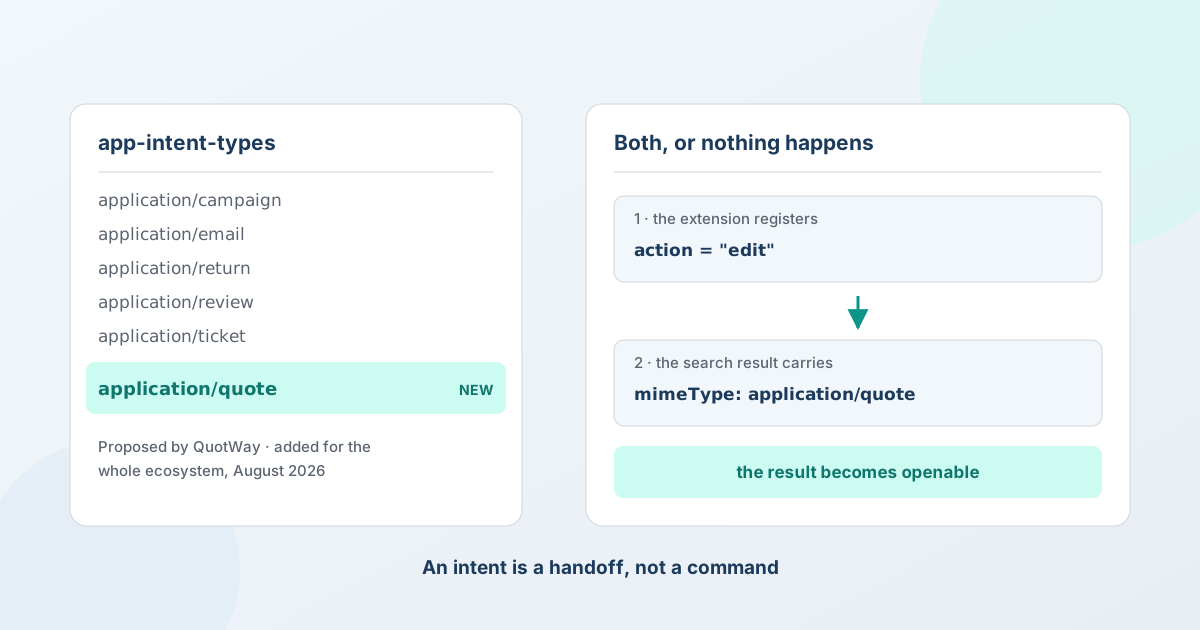
How to get an application/* intent type added for your category - and what we got wrong about intents on the first attempt.
If you build a Shopify app whose core object isn't a product, order or customer, you've probably hit this wall: Sidekick app extensions use a fixed intent vocabulary, and your thing isn't in it.
When we started wiring QuotWay into Sidekick, the supported list was application/{ad, campaign, email, faq, loyalty-program, return, review, shipment, ticket} plus shopify/{customer, order, product}. We build a B2B quote and negotiation app. There was no quote.
That isn't a soft limit you can work around. shopify app deploy is atomic and rejects an unsupported intent type outright - so one bad intent doesn't fail alone, it takes your whole app version with it. We shipped read-only data tools and parked the rest. (That first phase is written up separately in building Shopify Sidekick app extensions.)
Then we asked. Shopify added application/quote to the ecosystem - for every quote app, not just ours.
This is what we learned, including the part we had modelled completely wrong.
There is a front door, and it's a public repo
Intent types are governed in the open at Shopify/app-intent-types. You open a discussion, make your case, and a platform engineer answers. As of 7 October 2026 the repo lists fourteen types - eleven application/* (ad, campaign, email, faq, loyalty-program, optimization-plan, quote, return, review, shipment, ticket) and three shopify/* (customer, order, product) - and Shopify's app-actions guide adds a fifteenth, shopify/Discount, for discount apps built on a Shopify Function. It is still a short list, and yours is probably not on it yet.
What made ours land, in rough order of weight:
Argue for the category, not your app. We asked for quote because quote and negotiation apps are a recognisable class of Shopify app with a shared object, not because QuotWay needed it. A type added for one vendor is a maintenance liability; a type that serves a category is a platform feature. Write the request the way Shopify would have to justify it internally.
Bring the real object. We described what a quote actually is - a buyer request that gets priced, negotiated over several rounds, and converted into an order - and which fields carry meaning across every app in the category. That question ("what does the schema need to hold?") is the one that has to get answered before anything ships, so answering it up front removes the main reason to defer.
Propose concrete actions. We proposed open, send_proposal, counter and convert. Every one was declined. That was still the most useful part of the RFC, because the reasons they were declined taught us the model - see the next section. A wrong concrete proposal beats a vague one: it gives the platform team something specific to correct.
Offer to do the work. We offered to open the follow-up PR adding the types/ entry. They declined and did it themselves, but the offer signals you'll maintain what you're asking for.
Total elapsed: RFC filed early July, approved 27 August. Slower than a feature you control; far faster than building around the gap forever.
The thing we got wrong: an intent is a handoff, not a command
Here's the reply that reframed it, from the platform engineer who approved the type:
"We're not adding
open,send_proposal,counterorconvert: everyapplication/*type supports preciselycreateandedit. An intent is a handoff, not a command. Sidekick's job ends when the merchant is in your app with the right context loaded, and your UI owns the rest."
We had modelled intents as a remote-control API - one intent per verb our product supports. That's wrong, and once you see why, the whole surface gets simpler.
Two consequences worth internalising:
open is already what edit means. There's no separate "just show it" action, because edit is a navigation contract, not a mutation. You register edit:application/quote and Sidekick lands the merchant on your page. Whether that page is an editor or a read-only view is your business. Shopify's own reference extensions are literally named open-email and open-campaign - and both register action = "edit".
Your verbs aren't intents, they're in-page tools. send_proposal, counter and convert didn't get dropped, they got relocated. They're tools that run once the quote is open and stage into your own confirm UI. Which is where the merchant was always going to press the button anyway. We'd been trying to hoist our entire product surface into the intent vocabulary; the platform is telling you not to.
If you're about to file an RFC asking for six verbs, save yourself a round trip: ask for the type, and design the verbs as tools.
The half that's easy to miss
Registering the intent does nothing on its own. Both of these have to be true:
- You register an intent for
application/quote. - Your search results carry
mimeType: "application/quote".
"A resource link's
mimeTypematching an intent type is what makes a search result invokable."
That's the connection. Your data extension returns resource links; a link whose mimeType matches a registered intent becomes something the merchant can open, rather than a card they can only read.
We'd been emitting a vendor mime - application/vnd.quotway.quote - which was correct while no standard type existed, and became the thing blocking us the moment one did. The fix is two strings:
-const QUOTE_MIME = "application/vnd.quotway.quote";
+const QUOTE_MIME = "application/quote";

-  uri: `gid://application/quotway.quote/${q.id}`,
+  uri: `gid://application/quote/${q.id}`,
Keep vendor mimes for everything with no intent type. Our pipeline summaries and targeting rules still use application/vnd.quotway.*, because you can't open a pipeline summary. Marking them with a standard type would promise the merchant an action that doesn't exist.
The wiring, concretely
An intent extension is an admin_link, not a ui_extension:
[[extensions]]
name = "Open quote"
description = "Open a specific QuotWay quote, quote request (RFQ), proposal or counteroffer…"
handle = "quotway-open-quote"
type = "admin_link"

  [[extensions.targeting]]
  target = "admin.app.intent.link"
  url = "/app/quotes/{id}"
  tools = "./tools.json"
  instructions = "./instructions.md"

    [[extensions.targeting.intents]]
    type = "application/quote"
    action = "edit"
    schema = "./intent-schema.json"
And the schema, which is where the URL actually gets filled in:
{
  "$schema": "https://extensions.shopifycdn.com/shopifycloud/schemas/v1/intent.json",
  "value": {
    "type": "string",
    "description": "The GID of the quote to open.",
    "mapTo": "param",
    "fieldName": "id"
  },
  "inputSchema": {
    "$ref": "https://extensions.shopifycdn.com/shopifycloud/schemas/v1/application/quote.json",
    "type": "object",
    "properties": {
      "buyer_email": { "type": "string", "description": "…" },
      "company":     { "type": "string", "description": "…" },
      "total":       { "type": "number", "description": "…", "minimum": 0 },
      "message":     { "type": "string", "description": "…" }
    }
  }
}
Four things that will save you time:
mapTo: "param" + fieldName fills the {id} in your url. The names don't have to match - fieldName is the redirect.
GIDs get truncated for you. When a value mapped to a param is a GID, Sidekick substitutes only the segment after the final /. So gid://application/quote/clx123abc lands as clx123abc. Our existing route already expected that id, so no route change - but it does mean the tail of your GID must be whatever your router wants.
Published schemas are deliberately minimal. application/quote publishes id with additionalProperties: true. Everything domain-specific - buyer_email, company, total, message - you declare yourself under inputSchema.properties. The standard type is a handshake, not a data model.
Tools used to be required. Until 28 September 2026 Sidekick skipped an extension that declared intents without tools, so an intent-link target with no tools.json registered fine and never fired - which is what we hit. Shopify changed that: an extension is now eligible with tools, intents or both, and an intent-only extension needs an extensions_summary in shopify.app.toml or the next deploy fails. Tools are still what lets Sidekick act once the page is open.
Two traps
api_version is not allowed on an admin_link extension. We copied it from our ui_extension TOMLs and the config was invalid. Caught by:
shopify app config validate --json
Run that before every deploy. Deploy is atomic - an invalid extension doesn't fail by itself, it fails the version.
The budget is tighter than it looks: 5 intents, and 20 tools shared across every extension you ship. Our data extension already registered 15 tools. Adding three in-page staging tools plus one prefill tool put us at 19 of 20. If you're planning a rich data extension and actions, budget the tools first - you will run out of tools long before you run out of intents.
If you're in this position
You probably are, if your app's core object isn't in the list. Roughly:
- Check
Shopify/app-intent-types- someone may have asked already. - Open a discussion for your category, not your app. Describe the object, the fields that generalise, and what merchants ask for out loud.
- Ask for the type; design your verbs as tools.
createandeditare what you get. That's enough. - Ship the data extension meanwhile. Read-only tools don't touch the intent vocabulary, so they're never blocked. When your type lands, changing the mime is a two-line diff.
- Validate before you deploy.
The vocabulary looks like a wall. It's a queue.
Sources
Re-verified on 7 October 2026:
Shopify/app-intent-types- the published list, the two routes to propose a type, and thecreate/editsplit forapplication/*againstimport/import+bulkforshopify/Customer,shopify/Orderandshopify/Product- Shopify: build app actions for Sidekick - the full supported list, including
shopify/Discountwithcreateandedit, and the changelog entry of 28 September 2026 that made intents without tools eligible - Shopify: Sidekick app extensions - the per-app budget of 20 tools and 5 intents, the 4,000-token response limit, and the 1-second (data) and 3-second (action) response budgets
The RFC timeline, the quoted reply and the tool count are from our own build in July and August 2026.
QuotWay is a B2B quote and negotiation app for Shopify. The application/quote intent type is available to every app in the category - if you build one, it's yours too. If you're a merchant rather than a developer, the merchant-facing write-up covers what this actually does in the admin. QuotWay's Sidekick integration works on every plan, including free Lite - see plans and pricing.
Related articles
See how QuotWay handles this on your store.