Engineering
Building a Shopify Sidekick app extension: what the docs understate
By Jahangir Alam · July 4, 2026 · Updated October 7, 2026 · 10 min read
- Last verified
- Shopify API
- 2026-10
- Audience
- Shopify app developers building a Sidekick extension
- Scope
- Sidekick app extensions at API 2026-10: the three layers, the resource-link and deep-link contract, the per-app budget (20 tools, 5 intents, 4,000 tokens, 1s for data and 3s for actions), and the intent vocabulary as it stands
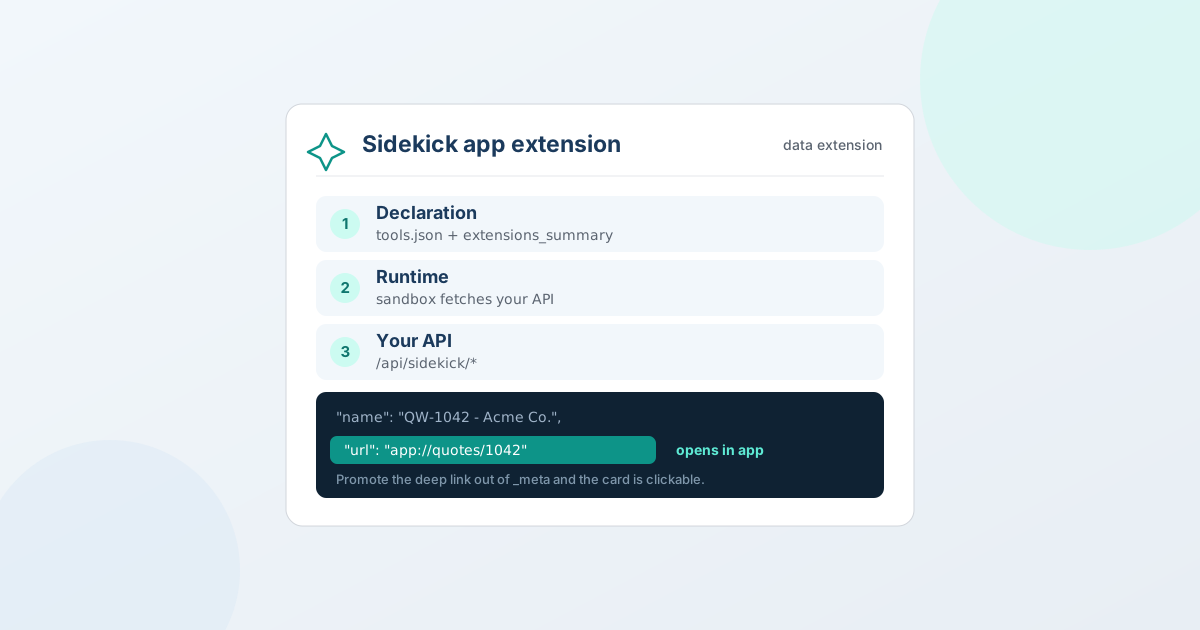
Short version: a Sidekick app extension is three layers - a declaration (tools.json + a one-line app-level summary), a thin runtime that registers tools and calls your backend, and your existing API. The docs explain the shapes; they understate the operational reality. The two things that cost us the most time: Sidekick only routes to your tools if your app-level extensions_summary fits inside a hard limit, and a result only becomes openable if its deep link is a first-class url field - not tucked inside _meta. This post is the walkthrough we wish we'd read first, from shipping the integration in QuotWay, our B2B quote app.
Update, 31 August 2026. The action-extension limitation described below has since been lifted. We filed an RFC, and Shopify added the
application/quoteintent type to the platform in August 2026 - so a quote in a Sidekick answer is now openable. The follow-up, including what we got wrong about how intents work, is in We asked Shopify for a new Sidekick intent type. The rest of this post is left as written in July 2026.
What a Sidekick app extension actually is
Sidekick is the AI assistant in the Shopify admin. An app extension lets Sidekick call your app to answer a merchant's question - "which quotes are waiting for approval?" - and render the result inline, without the merchant leaving the page.
There are two kinds, and the distinction matters before you write a line of code:
| Data extension | Action extension | |
|---|---|---|
| Target | admin.app.tools.data |
admin.app.intent.link / admin.app.intent.render |
| Does | Read: search, look up, summarize | Write: stage a change the merchant confirms |
| Intent vocabulary | None - free-form tools | Fixed Shopify vocabulary (email, ticket, review, …) |
| Ship today? | Yes, for any app | Only if a matching intent type exists |
We shipped a data extension with 15 read-only tools (search quotes, pipeline KPIs, pending approvals, company insights, and so on). At the time we did not ship an action extension - a limitation worth understanding early (more below), and one that has since been lifted.
The mental model: three layers
Almost every mistake we made came from conflating these. Keep them separate:
1. Declaration (what Sidekick reads to decide whether to call you). Two files plus one app-level string:
shopify.app.tomlgets a[sidekick]block with anextensions_summary- a plain-language description of what your app can answer. This is the router. Sidekick reads it to decide whether a given question belongs to your app at all.tools.jsondeclares each tool:name,description,inputSchema. The descriptions are how Sidekick picks which tool to call.instructions.mdis guidance handed to Sidekick on how to use the results.
# shopify.app.toml
[sidekick]
extensions_summary = "QuotWay answers questions about B2B quotes: search and filter by status/buyer/company/amount, look up a quote's status and next step, list quotes pending approval, report pipeline analytics, and summarize B2B companies."
# extensions/sidekick-data/shopify.extension.toml
api_version = "2026-04"

[[extensions]]
name = "QuotWay quote tools"
handle = "quotway-sidekick-data"
type = "ui_extension"

  [[extensions.targeting]]
  module = "./src/index.js"
  target = "admin.app.tools.data"
  tools = "./tools.json"
  instructions = "./instructions.md"
2. Runtime (the sandboxed glue). Your module runs headlessly in Shopify's sandbox. It registers each declared tool and, when Sidekick calls one, fetches your backend and maps the response into Sidekick's result shape. Keep it thin - no business logic here:
export default () => {
  shopify.tools.register("pending_approvals", async () => {
    const res = await fetch("/api/sidekick/quotes?status=awaiting_approval", {
      headers: { Accept: "application/json" },
    });
    const data = res.ok ? await res.json() : null;
    return { results: (data?.quotes ?? []).map(quoteLink) };
  });
};
3. Backend (your app's real API). The sandbox fetches your own endpoints on the same domain, and Shopify attaches the merchant's session token - so your existing auth, tenant scoping, and permission checks apply unchanged. We added a small family of /api/sidekick/* routes that reuse the same session-token auth and RBAC as the rest of the app:
export const loader = async ({ request }) =>
  withAdminShopContext(request, async ({ shopId, staff }) => {
    requirePermission(staff.role, "quote.view");
    // ...query, shape a plain DTO, return CORS-enabled JSON
  });
The sandbox calls are cross-origin, so every route answers a CORS preflight (OPTIONS → 204) and returns CORS headers. Shopify's guide asks you to add the sandbox's origin, https://extensions.shopifycdn.com, to your CORS allowlist; a wildcard Access-Control-Allow-Origin also works and is safe here because auth rides a Bearer session token, not cookies.
The result contract - and the one field that makes links open
Data tools return Model Context Protocol resource links:
{
  "results": [
    {
      "type": "resource_link",
      "uri": "gid://application/quotway.quote/123",
      "name": "QW-1042 — Acme Co.",
      "mimeType": "application/vnd.quotway.quote",
      "_meta": { "status": "Proposal sent", "total": "USD 5,000.00" }
    }
  ]
}
Here is the single most important thing we learned, and it is barely a sentence in the docs: _meta is display-only summary data. It is not a navigation target. We first put the deep link in _meta.url - the card rendered fine, but clicking it did nothing. Sidekick had no way to open the resource, because our uri was a synthetic gid://application/... it can't resolve, and the real URL was buried in metadata it treats as decoration.
The fix is a first-class url field on the result, using the app: protocol for an embedded app:
function quoteLink(q) {
  return {
    type: "resource_link",
    uri: `gid://application/quotway.quote/${q.id}`,
    name: `${q.reference} — ${q.buyerName}`,
    mimeType: "application/vnd.quotway.quote",
    url: `app://app/quotes/${q.id}`, // ← first-class, openable
    _meta: { status: q.statusLabel, total: q.total },
  };
}
Shopify resolves app://<path> against your embedded app's base URL and navigates straight into your app - no store handle, no API key, no absolute URL construction. (An absolute admin.shopify.com/store/<store>/apps/<client_id>/<path> works too, but app: is simpler and store-agnostic.) With the url promoted out of _meta, "show me quote QW-1007" now returns the summary and a link that opens that exact quote in the app.
Shopify's data-extension guide, re-read on 7 October 2026, now documents two separate result shapes: a resource link (uri, name, mimeType), which becomes actionable when its mimeType matches a registered intent type, and an embedded-app link, which is a url on its own. The combined result above is what we shipped when this post was written; now that application/quote exists, the intent route is the documented one - the intent-types post shows the two-line change.
The gotchas (the stuff that cost us a day)
| Symptom | Cause | Fix |
|---|---|---|
| Sidekick answers from generic knowledge; zero calls hit your backend | extensions_summary exceeds the deploy validator's limit and is silently dropped, so the [sidekick] block never registers |
Keep the summary within the enforced size (for us the real ceiling was 500 characters, not the "256 tokens" the docs imply). Confirm by checking your server logs for /api/sidekick hits - zero hits means not routed, not a backend bug. |
| The result card shows but the link doesn't open | Deep link is in _meta, or uri is an unresolvable gid://application/... |
Put an app://<path> (or absolute) URL in a first-class url field |
| "It's broken" right after deploying | Sidekick tool availability is per-session / propagation-delayed | Retry in a brand-new Sidekick chat; don't conclude it's broken from a stale session |
| Backend tool calls 404 / CORS-fail in production | You deployed the extension but not the backend routes (or vice-versa) | Deploy both together: extension via shopify app deploy, backend routes via your host |
| Push to your host silently doesn't deploy | (Host-specific) e.g. a "require verified commits" setting cancels unsigned pushes | Sign your commits so the backend actually ships alongside the extension |
| CLI preview behaves differently than expected | The tools route through the real admin | Test in the admin Sidekick, not CLI preview |
Two of those are worth expanding.
Diagnose routing with your own logs. When Sidekick "doesn't work," the fastest signal is whether your backend was called at all. We grepped production logs for /api/sidekick and saw zero hits - which immediately ruled out CORS, auth, and backend bugs and pointed us at the router (extensions_summary). Silence at the backend means the question never got routed to your app.
Descriptions are the product. Sidekick's routing is a language-model decision over your extensions_summary and tool descriptions. Vague descriptions get skipped. Load them with the exact words a merchant would use ("quotes", "RFQs", "pending approval", "conversion rate", "pipeline") - but stay factual. Shopify's content policy scans these at deploy and runtime and forbids upsells, competitor comparisons, and instructions that try to steer Sidekick's behavior. We had to delete an instructions.md line that told Sidekick what to say; describe your data, don't script the assistant.
Read is shippable today; write is gated
This is the strategic limitation to plan around. A data extension (read) works for any app right now. An action extension (write - create, edit, send, convert) binds to a fixed Shopify intent vocabulary, and shopify app deploy rejects an intent type that isn't in it. When this was written there was no application/quote type, so we could not ship a native "open this quote from Sidekick" action. Shopify added it in August 2026 after our RFC, and as of 7 October 2026 Shopify's app-actions guide lists fifteen types - eleven application/* (ad, campaign, email, faq, loyalty-program, optimization-plan, quote, return, review, shipment, ticket) and four shopify/* (Customer, Discount, Order, Product). application/* types support exactly create and edit; shopify/Customer, shopify/Order and shopify/Product take import and import+bulk, and shopify/Discount, added on 30 September 2026 for discount apps built on a Shopify Function, takes create and edit.
The pragmatic bridge - confirmed by Shopify staff on the dev forum - is the url field above: you can't act from inside Sidekick, but you can hand it an openable deep link so the merchant lands on the exact page to act, one click away. If you're in the same boat, the right move is to file a proposal for your intent type in Shopify's app-intent-types RFC repo and ship the read + deep-link experience now. We did both.
Constraints worth memorizing
- Response budget: keep each tool response under 4,000 tokens. A data extension has to answer within 1 second; an action gets 3 seconds. These are read tools answering a chat turn - return what was asked, not your whole object graph.
- Per-app budget: 20 tools across every extension you ship, and 5 intents. That is the whole allowance, and the tools run out first - a rich data extension plus a few action-staging tools will land you in the high teens. Model them around real merchant questions, not around your database tables, and budget the tools before you design the intents.
- Auth is free: the sandbox reuses your app's session, so lean on your existing tenant scoping and permission checks. A read tool should be exactly as locked-down as the page it mirrors.
A reasonable first milestone
- One data extension, two tools that map to real questions ("search X", "look up one X").
- A
[sidekick] extensions_summaryinside the size limit, plus keyword-rich, factual tool descriptions. - Thin sandbox glue that
fetches two/api/*endpoints reusing your existing auth + CORS preflight. - A first-class
urlon each result so it opens the right in-app page. - Deploy the extension and the backend together; test in the real admin in a fresh chat.
That's a day of work for a genuinely useful integration - most of which is reusing the API you already have. The hard part isn't the code; it's the three or four operational facts above.
If you're a merchant rather than a developer: the extension described here ships in QuotWay as Shopify Sidekick for B2B quotes, on every plan - see plans and pricing.
Further reading
Shopify pages re-verified on 7 October 2026 (the budgets above are from the first of them, the vocabulary from the app-actions guide):
- Shopify: Sidekick app extensions and surfacing app data
- Shopify: build app actions for Sidekick (the supported intent types and the two intent targets)
- Shopify: the
app-intent-typesRFC repo (propose your action-intent type) - The merchant-facing companion post: How to use Shopify Sidekick to manage your B2B quotes
Related articles
See how QuotWay handles this on your store.