Quoting & negotiation
Quote approval thresholds: building an approval matrix for B2B discounts
By Jahangir Alam · August 22, 2026 · Updated August 28, 2026 · 11 min read
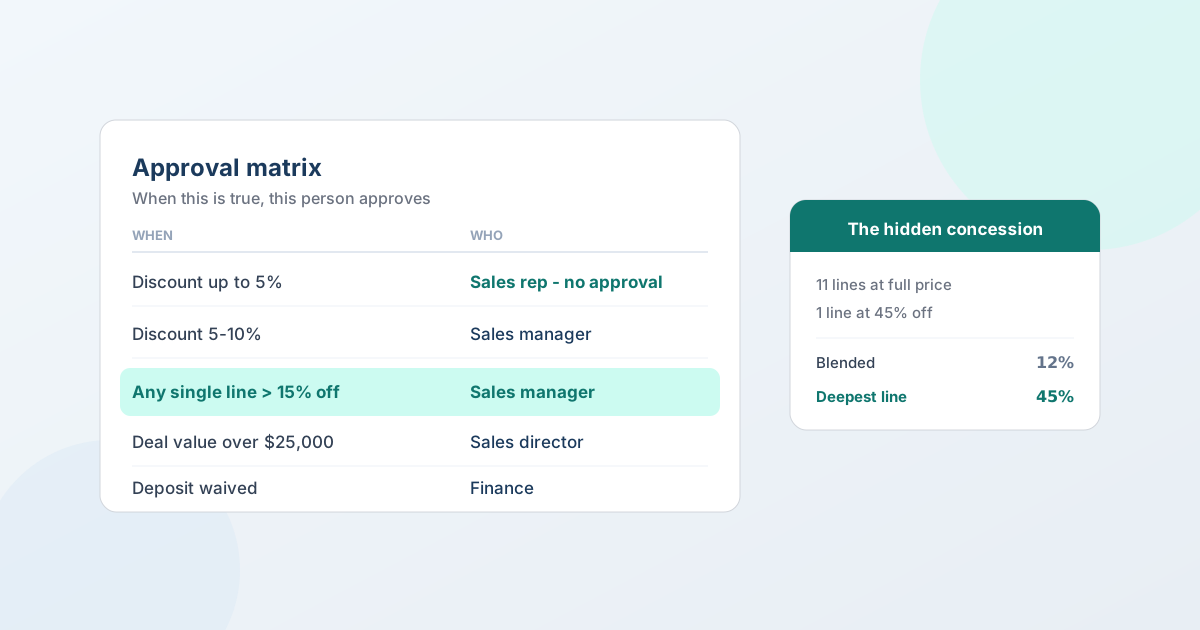
An approval matrix answers one question per row: which condition sends a quote for sign-off, and who signs it. Build it from the four things that actually predict risk on a B2B deal - size, blended discount, the deepest single line, and non-standard commercial terms - then put a named approver against each band. Everything else is decoration.
Most teams either have no matrix (every discount is a conversation) or one so detailed nobody can quote anything without three emails. This guide gives you a worked matrix you can copy, the reasoning behind each row, how to turn it into working approval policies on Shopify, and three traps that make a well-designed matrix fire on the wrong quotes.
(This is about what the policy should say. For how to build the policy itself - the canvas, steps, and actors - see setting up B2B approval workflows on Shopify.)
What an approval matrix actually is
A matrix is a policy document before it's a software setting. Each row has three parts:
WHEN a condition is true → WHO has to approve → THEN what happens once they do.
Written down, it does three jobs at once. It tells your sales team exactly how much room they have, so they stop asking. It tells your managers which decisions are genuinely theirs. And it gives you a defensible record of why a particular discount was allowed - which matters the first time a deal goes wrong and someone asks how it got signed.
The test of a good matrix isn't completeness. It's that a rep can look at it and know, in five seconds, whether they can send the quote themselves.
Quote approval process vs discount approval workflow
Two phrases get used interchangeably and mean slightly different things, which matters when you're designing one.
A quote approval process is the whole path a quote takes before it can reach the buyer: who reviews it, in what order, and what has to be true for it to move. A discount approval workflow is the subset of that concerned specifically with price - which discount bands a rep can grant alone, and where a deeper concession has to escalate.
The matrix is how you express either one. A row is a condition and an approver; a quote approval process is what you get when the rows cover value, terms and account status as well as discount. Most teams start with a discount approval workflow because price is where the money leaks, then widen it.
The same structure covers B2B order approvals on the buyer's side, where the chain belongs to the buying organization rather than to you - covered further down.
The four conditions that predict risk
Nearly every useful row comes from one of these.
1. Deal size. The simplest and least gameable. A big order is worth a second pair of eyes regardless of margin, because the downside of getting it wrong is proportional to the number.
2. Blended discount across the quote. The total discount as a percentage of catalog. This is what most matrices use, and on its own it's the weakest of the four - see the next one. (On quoting custom and made-to-order products there's no catalog price at all, so discount-based rows don't fire and your thresholds have to key off value and margin instead.)
3. The deepest single line discount. The largest discount on any one line, measured against that line's catalog price. This is the condition most matrices are missing, and it's the one that catches the failure mode blended discount can't:
A twelve-line quote where eleven lines are at full price and one line - the one the buyer actually cares about, at a third of the total value - is 45% off. The blended discount comes out at 12%. Your 15% threshold never fires. You just gave away the margin on the only line that mattered.
Blended discount describes the quote; deepest-line discount describes the concession. Buyers negotiate on lines, so guard on lines.
4. Non-standard commercial terms. Not price at all: a waived deposit, longer payment terms than you normally offer, a currency you don't usually quote in, an unusual delivery commitment. These have real cash-flow and risk consequences and frequently get agreed by whoever is closest to the deal, with no review at all.
A worked matrix to copy
Start here and change the numbers to yours. The bands are illustrative - what's transferable is the shape.
| When | Who approves | Why this row exists |
|---|---|---|
| Discount ≤ 5% | Sales rep - no approval | Rep autonomy. Most quotes should land here, or the matrix is too tight. |
| Discount > 5% and ≤ 10% | Sales manager | The routine concession band. |
| Discount > 10% | Sales director | Real margin exposure. |
| Any single line > 15% off | Sales manager | Catches the deep concession hiding in a full-price quote. |
| Deal value > $25,000 | Sales director | Size alone, independent of discount. |
| Deal value > $100,000 | Finance and sales director | Both must approve - not either. |
| Deposit waived, or below your standard % | Finance | Cash-flow decision, not a pricing one. |
| Payment terms longer than your standard | Finance | It's credit, and credit is finance's call. |
| Quote in a currency you don't normally sell in | Finance | FX exposure over the quote's validity period. |
| First order from a new account | Sales manager | One-time check that the account is real and terms fit. |
| Customer tagged for auto-approval | Nobody - skip the step | Your VIP roster, without a second parallel policy. |
Two structural notes. The >$100,000 row uses all approvers rather than any: on the biggest deals you want both signatures, not whichever one is at their desk. And the last row is a skip, not an approval - a conditional exemption on an existing step, which is how you handle a handful of trusted accounts without maintaining a duplicate policy.
Turning the matrix into policies
Each row becomes either a policy or a step inside one. In QuotWay a policy has a domain (your side or the buyer's), a trigger condition deciding which quotes it applies to, and an ordered chain of steps - each with its approvers and a mode of ANY (one approval clears the step) or ALL (everyone must approve).
The conditions you can build on map closely to the matrix above: quote amount, blended discount %, deepest line discount %, deposit %, product or collection membership, customer tags, company location, and currency - combined with and / or / not.
Two mechanics that decide whether your matrix behaves as written:
Policies evaluate in priority order, and the first match wins. So order matters as much as content. A broad "any quote over $25,000" policy sitting above a specific "over $100,000 needs finance and the director" policy means the second one never runs. Put the most specific policies first, general catch-alls last, and read your list top-down as a sequence rather than a set.
Conditional skips beat duplicate policies. When a row is an exemption rather than a new chain, add a condition to the step ("skip this step if the customer is tagged auto-approve") instead of building a second policy to compete with the first.
Approval policies require the Professional plan; parallel steps, conditional skips, timeout escalation, and delegation are Enterprise.
Three traps that make a good matrix fire wrong
1. Threshold currency. A step's amount condition compares the quote total in your shop's base currency, not the currency the buyer is being quoted in. If your base is USD and you quote a buyer €9,000, the condition sees the base-currency equivalent - which may be over your $10,000 threshold even though the number on the quote isn't. On a single-currency store this never comes up. On a multi-currency one it decides whether your thresholds mean anything, so set them in base currency deliberately rather than by accident.
2. Missing data skips a condition - it doesn't block the quote. If a condition references something the quote doesn't have, that part of the rule is skipped and the skip is recorded in the audit trail with the reason. The common case: guest quotes have no customer tags, so a rule built on a customer tag simply won't match a guest request. That's the right behaviour - failing open beats blocking legitimate deals on absent metadata - but it means a tag-based condition is a poor only guard on a high-value quote. Guard value with value.
3. Blended discount as your only pricing condition. Covered above, and worth repeating because it's the single most common design flaw: a matrix built purely on blended discount can be walked straight past by any buyer who concentrates their ask on one line.
Don't forget the buyer's side
An approval matrix usually gets designed for the seller. But large buyers have their own chains, and if you can't represent theirs, you'll spend the deal guessing why an accepted-in-principle quote hasn't come back.
Buyer-side policies use the same structure - steps, actors, ANY or ALL - but the approvers are contacts at the buying organization: purchasing manager, then finance, then a final sign-off. When their chain is running, the quote sits in a clearly-labelled waiting state and the buyer sees where it is ("Step 1 of 3 - purchasing manager review") rather than an unexplained pause. That's worth having for the same reason your own matrix is: everyone can see who owes the next move.
What happens when an approval stalls
Every matrix eventually meets someone on holiday. Two things to know:
- Stuck steps surface on their own. A step that stays active for more than seven days raises a "review or reassign" banner for the merchant, and the event is recorded so you can see how often it happens.
- Delegation is date-ranged. An approver going away can hand their pending approvals to a colleague for a set period, after which routing returns to them automatically - so nothing is left permanently reassigned by accident. Delegation is an Enterprise capability.
If you find yourself reassigning constantly, that's not an approvals problem - it's a sign a row in your matrix routes to someone who isn't really available for it.
Keep the matrix small
Every row is a delay. A quote awaiting sign-off is a quote your competitor might answer first, and response time is one of the few levers that reliably moves win rate.
Three ways to keep it honest:
- Aim for most quotes needing no approval at all. If the majority of your quotes trip a threshold, your rep autonomy band is too narrow and you've turned managers into a bottleneck rather than a control.
- Measure approval turnaround the same way you measure response time, and treat a slow step as a design problem, not a people problem.
- Review the thresholds when your costs move. A 10% band set against last year's margins is a different policy this year.
Common mistakes
- Setting bands with no autonomy at the bottom. If a rep can't approve anything, every quote is a queue.
- One threshold for every product. A 10% discount on a high-margin accessory and on your thinnest-margin line are not the same decision. Use product or collection conditions where the margin profile genuinely differs.
- Approvals that route to a role nobody owns. "Finance" has to resolve to a person who gets the notification - see sales reps: admin access vs quote ownership for how staff, roles, and assignment fit together.
- Never reviewing the audit trail. The record of what got approved, by whom, and on what basis is the whole point - and it's the first thing anyone asks for when a deal goes wrong.
- Building the matrix in the app first. Write it as a table, get agreement from sales and finance, then configure it. Policies built by trial and error in a settings screen tend to encode whoever was in the room.
FAQ
What is an approval matrix in B2B sales?
An approval matrix is a table that maps conditions to approvers: which discount, deal size, or commercial term requires sign-off, and who provides it. Each row reads when this is true, this person approves. It gives sales reps a clear autonomy band, routes genuine exceptions to the right decision-maker, and leaves a record of why a concession was allowed.
What discount level should require approval?
There's no universal number - it depends on your margins. A common shape is full rep autonomy up to around 5%, a sales manager between roughly 5% and 10%, and a director beyond that. What matters more than the exact bands is that most quotes fall inside the rep's autonomy: if the majority need approval, the threshold is too tight and you've made managers a bottleneck.
Why guard on the deepest line discount, not just the total?
Because buyers negotiate on lines, not on blended averages. A quote with eleven full-price lines and one line at 45% off can blend to around 12% and slip under a 15% threshold - while giving away the margin on the line the buyer actually cared about. A condition on the deepest single line catches the concession that a blended figure hides.
Can I set different approval rules for different customers?
Yes. Conditions can reference customer tags, company location, product or collection membership, and currency, so a trusted account can skip a step that everyone else goes through. Use a conditional skip on an existing step rather than a second policy - competing policies evaluate in priority order and the first match wins, so duplicates tend to shadow each other.
Do approval thresholds use the quote's currency or my store's?
A step's amount condition compares the quote total in your shop's base currency, not the currency the buyer sees. On a single-currency store this makes no difference; on a multi-currency store it means a foreign-currency quote is measured by its base-currency equivalent. Set your thresholds in base currency deliberately.
What happens if a condition references data the quote doesn't have?
That part of the rule is skipped and the skip is recorded in the audit trail with the reason. The common case is a guest quote, which has no customer tags, so a tag-based condition can't match it. This fails open rather than blocking the quote - which is why a high-value guard should be built on value, not only on a tag.
What is a quote approval process?
A quote approval process is the defined path a quote takes before it can go to the buyer: which conditions require sign-off, who provides it, and in what order. It exists so a rep knows what they can send alone, exceptions reach the right decision-maker, and there's a record of why a given price was authorised. In practice it's expressed as an approval matrix - one row per condition, each with a named approver.
What is a discount approval workflow?
A discount approval workflow is the pricing part of a quote approval process: the bands within which a sales rep can discount without asking, and the thresholds at which a deeper discount escalates. A common shape is full autonomy to around 5%, a sales manager to 10%, and a director beyond that - with a separate rule catching a deep discount on any single line, which a blended quote-level figure can hide.
What are best practices for B2B order approvals?
Keep most orders out of the chain entirely - if the majority trip a threshold, the bands are too tight and approvers become a bottleneck. Guard on the deepest single line as well as the blended total. Route to named people rather than roles nobody owns. Measure approval turnaround the way you measure response time, because a quote awaiting sign-off is one a competitor may answer first. And review the thresholds whenever your margins move.
Which plan do approval workflows need on Shopify?
Shopify has no native quote-approval feature, so this comes from a quote app. In QuotWay, approval policies require the Professional plan; parallel steps, conditional skips, timeout escalation, and delegation are Enterprise. Buyer-side approval chains additionally need a B2B-capable store, since the approvers are contacts on the buying company.
Where QuotWay fits
QuotWay is a B2B quote and negotiation app for Shopify, built by EFOLI. It turns a matrix into a working control: policies on your side or the buyer's, conditions on quote value, blended discount, deepest line discount, deposit percentage, products, tags, location, and currency, with steps that require any or all of their approvers. Automated sends respect the same policies, so a quote that would need sign-off never slips out because a rule fired first. Every decision - who, when, what changed, and any skips with their reason - is written to an append-only record. Approvals are on the Professional plan and up; advanced routing is Enterprise. See approval workflows, the setup guide, the plans and pricing, or add QuotWay on Shopify.
Sources
- QuotWay docs: Approval workflows - policy anatomy, worked examples, escalation, and delegation.
- QuotWay docs: Automation rules - how approvals take precedence over automated sends.
- QuotWay docs: Floor price and discounts - the per-line floor that works alongside approval thresholds.
- Shopify Help Center: B2B on Shopify
Related articles
See how QuotWay handles this on your store.