For Shopify agencies
Why B2B buyers can't see their prices on Shopify: a diagnostic by symptom
By Jahangir Alam · October 7, 2026 · 14 min read
- Last verified
- Shopify API
- 2026-10
- Audience
- Shopify agencies, developers and merchants handling a wholesale buyer who sees the wrong price
- Scope
- Online Store and headless storefronts on Shopify-native B2B at API 2026-10: sign-in and company contacts, location selection, catalogs through B2B markets or direct assignment, publications, price lists, quantity rules and volume pricing in themes, discounts and tax display, draft orders, POS, and price-hiding apps
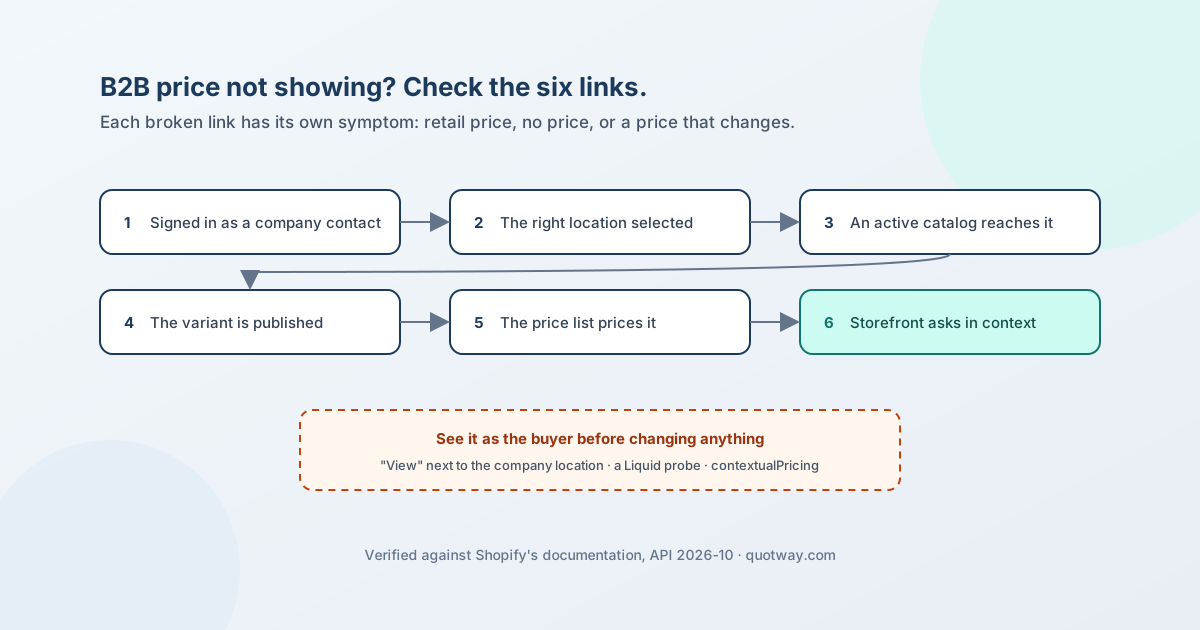
A Shopify B2B buyer sees their company's price only when six things line up: they are signed in as a company contact, the right company location is selected, an active catalog reaches that location, the catalog's publication includes the variant, the catalog's price list prices it, and the storefront asks Shopify for the price in that buyer's context. Break any one link and the buyer sees something else - the retail price, no price, no product, or a price that changes between the product page and checkout. Each broken link has its own symptom, so the fastest diagnosis starts from what the buyer reports, not from the catalog screen.
This page is that diagnosis: five symptoms, the causes behind each in the order worth checking, how to confirm every cause in the admin, in Liquid or through the API, and the fix. It also separates the results Shopify documents as expected - a volume price that switches off the catalog discount, a price lock, POS without company prices - from actual faults, because those look like bugs and aren't.
Everything about Shopify below was checked against Shopify's own pages on 7 October 2026 at API version 2026-10; sources are at the end. Shopify facts that appear on several of our pages are stated once in the Shopify B2B reference and linked from here.
The chain a B2B price depends on
The links come straight from Shopify's pages. A customer "who isn't associated with a company location or doesn't sign in is considered a D2C customer". A contact on more than one location must "select which location they want to order on behalf of before they can add items to cart", and the prices offered are "those that you specified in your catalog for that company location". A catalog is a publication plus a price list: without a publication, "customers logged into their B2B accounts won't see any products for that location"; without a price list, they "receive the initial variant prices converted to the market currency". And the price is resolved per buyer - in Liquid, variant.price is the price in the current customer's context; on the Storefront API, "without contextualization, your store's base pricing and product publishing will be used".
See it as the buyer first
Before changing any setting, look at the store the way the buyer does. Three methods, from quickest to most precise:
- View as the company location. In the admin, open the company and click the View icon next to the location - Shopify's own blended-store checklist uses this to "view your online store as the B2B customer". Or sign in as a test contact on that location.
- A Liquid probe. In a test theme, print
{{ customer.b2b? }},{{ customer.current_location.name }},{{ product.selected_or_first_available_variant.price | money }}and{{ product.selected_or_first_available_variant.quantity_rule.min }}.customerisnilwhen nobody is signed in;customer.b2b?is true only for a company contact;current_locationis the location prices follow. - An API probe. Query the variant's
contextualPricing(context: { companyLocationId: "gid://shopify/CompanyLocation/…" })forprice,quantityRuleandquantityPriceBreaks. From API 2026-10 the same object has anauditTrail- "the record of how the price was determined" - listing the adjustments behind the number, though not which catalog they came from. If the API returns the right price and the storefront doesn't, the problem is in the theme, an app or the storefront code (links 6 and below), not in catalogs.
Symptom A: the buyer sees the retail price
The report with the longest list of causes. Check them in this order - each one is cheap to rule out and later checks assume the earlier ones passed.
| Cause | How to confirm | Fix |
|---|---|---|
| Not signed in, or signed in as a customer who is not a company contact | Liquid probe: customer is nil or customer.b2b? is false. Admin: the customer has no company |
Assign the customer to a company location as a contact; Shopify requires customers to be assigned "to company locations before they can place orders" |
| The contact has no access to the location | Admin: the contact's permissions on the location show "No access" | Give the contact a role on the location (Ordering only or Location admin) |
| The store still uses legacy customer accounts | Settings > Customer accounts. "You can't use legacy customer accounts for B2B customers and orders"; legacy accounts are deprecated since 26 February 2026 | Switch to current customer accounts - see customer accounts for a B2B buyer portal |
| The wrong location is selected, or the theme has no location picker | Liquid probe: customer.current_location.name. Shopify says a theme "should give them the ability to choose the company location" with a picker |
Add a picker using customer.company_available_locations and location.url_to_set_as_current; two locations of one company can see two prices for the same SKU, because catalogs attach to the location |
| No active catalog reaches the location | Markets > the B2B market > included locations; the catalog's status; on Plus, the location's directly assigned catalogs. "A B2B market without company locations won't deliver B2B pricing" | Add the location to a B2B market (all locations, a region matched by shipping address, or specific locations), or assign the catalog directly on Plus; set the catalog to Active. Off Plus, catalogs reach locations only through B2B markets and the limit is three active catalogs across all B2B markets |
| The location left a region-matched market | The location's shipping address. Region matching is by shipping address, so an address change moves a location in or out of a market | Correct the address, or include the location in the market explicitly |
| The catalog has no price list | The catalog has products but no price adjustment or fixed prices: buyers get "the initial variant prices converted to the market currency" | Add a price list - an overall percentage adjustment, fixed prices, or both |
| The variant isn't published to the catalog | Markets > Catalogs > the product's variants. Variants not published to the catalog "don't receive the custom pricing adjustment" | Publish the variant: "both the parent product and the variant must be published to that channel or catalog" |
| A 0 percent adjustment and no fixed price | The price list's overall adjustment is 0 and the variant has no fixed price; Shopify calculates the price "using the percentage-based adjustment" - so it equals the base price | Set the adjustment or a fixed price for the variant |
| The theme or an app prints a price that isn't Shopify's contextual price | The API probe returns the B2B price; the storefront shows another number. Look in the theme for prices read from metafields, from customer.tags contains logic, or rendered by an app block |
Render variant.price (or the Storefront API's contextual price); remove tag-based wholesale logic that predates catalogs - the technical-debt post explains why it is a second pricing system |
| The storefront is headless and doesn't pass the buyer | See symptom E | Contextualise every product query with @inContext(buyer: …) |
| The order is taken in Shopify POS | "If a customer has access to B2B pricing for a company location, then they can't access those prices through Shopify POS" | Expected: company prices are for the online store; there is no POS fix |
Shopify documents the conditions above; it does not document exactly which price a signed-in contact sees when their location gets no B2B pricing at all - only that such a market "won't deliver B2B pricing". Test that case on a development store before telling a client what their buyers will see.
Symptom B: no price, or no product
| Cause | How to confirm | Fix |
|---|---|---|
| A price-hiding or "sign in to see prices" app or theme gate is hiding it | The price is in the page source or the API probe, but not on screen; or the gate message shows to a signed-in buyer | Check the app's targeting - see quote and price-hiding apps below |
| The catalog has a price list but no publication | "If a publication isn't associated with a B2B catalog, then customers logged into their B2B accounts won't see any products for that location" | Add the products to the catalog's publication |
| The product was unpublished from the Online Store to make it B2B-only, but isn't in any catalog | Shopify: "make sure that these products are still included in a catalog, so they're displayed to your B2B customers after they login". With Markets, products must be in a catalog assigned to the buyer's market, or the store shows its 404 page | Include the product in the B2B catalog; with Markets, unpublish it from the Region markets' catalogs instead of from the Online Store |
| The variant isn't published to the catalog | Variant-level publishing in the catalog | Publish the variant as well as the product |
| The store is restricted to B2B and the buyer is not a contact | A non-B2B customer "can't browse your online store" on a restricted store | Expected - make the buyer a contact, or lift the restriction |
Symptom C: the price changes between the product page, cart and checkout
| Cause | How to confirm | Fix |
|---|---|---|
| The quantity reached a volume break | The product has price breaks; the cart quantity crosses one | Expected. Breaks are per variant - "customers need to meet the required quantity for each variant" - and quantities don't combine across variants. Show the breaks on the product page (symptom D) |
| An automatic discount or code stacks on the catalog price | "Automatic discounts and discount codes apply as additional discounts on top of any price adjustments that you make using catalogs", and in a blended store existing discounts apply to B2B and D2C customers by default | Expected; if it is unwanted, limit the discount's eligibility to the markets it is meant for |
| Tax is included in one market's prices and not another's | Settings > Markets > the market's tax inclusion. "You set tax inclusion for each market that you sell to" | Expected; align tax inclusion across the markets a buyer can match, if the difference confuses buyers |
| A tax-exempt location buys from a market with tax-included pricing | "If you set a customer to be tax exempt, but you use tax-included pricing, then the customer is still charged the full listed product price" | Expected by Shopify's rule; use tax-excluded pricing in the B2B market if exempt buyers should pay the net price - see where B2B tax exemptions live |
| The buyer switched location mid-session | customer.current_location changed; the cart was built under the other location's catalog |
Re-check the cart after a location switch; Shopify documents that a headless cart drops products "not published for the current B2B customer" when its buyer identity changes, but does not document what an Online Store cart does - test it |
| Theme JavaScript re-renders the price from data that isn't contextual | The server-rendered price (view source, JavaScript off) differs from the price after the page script runs | Make the variant picker and quantity selector read the contextual price |
| Headless: the cart has no buyer identity | See symptom E. Cart cost is "estimated ... subject to change and changes will be reflected at checkout" | Set buyerIdentity with customerAccessToken and companyLocationId on the cart |
Symptom D: quantity rules or volume breaks don't show
| Cause | How to confirm | Fix |
|---|---|---|
| The theme is too old to display them | Online Store > Themes > the theme's version. "Quantity rules for B2B catalog are supported on free Shopify themes, version 8.0.0 or later. Volume pricing is supported on version 11.0.0 or later." Horizon is also compatible; Trade is Shopify's theme built for B2B | Update the theme, or add the Liquid manually (variant.quantity_rule, quantity_price_breaks) - Shopify calls that "an advanced tutorial" |
| The rules are on a catalog that lost the price comparison | List every catalog reaching the location. Shopify shows the lowest price "not including quantity rules or volume pricing breaks", and the rules and breaks come with the winning catalog | Put the rules on the catalog that wins, or remove the competing catalog |
| Two catalogs tie on the lowest price | "If two catalogs have the same lowest price for a product, then the quantity rules and volume pricing from the first catalog that was created are displayed" | Expected - make the prices differ or move the rules to the first-created catalog |
| Volume pricing switched off the catalog's percentage discount | "After you apply volume pricing to a product the price becomes fixed. Any overall adjustment discount set on the catalog won't apply." So the product can show a higher base price than its neighbours | Expected - set fixed prices on that product's catalog entry |
| Liquid shows the default rule | variant.quantity_rule returns min 1, max empty, increment 1 when no rule applies in the buyer's context |
Check the API probe for the same location; if the API has a rule and Liquid doesn't, raise it with Shopify Support |
Symptom E: only the headless storefront is wrong
| Cause | How to confirm | Fix |
|---|---|---|
| Queries aren't contextualised | Storefront API queries lack @inContext(buyer: { customerAccessToken, companyLocationId }). "Without contextualization, your store's base pricing and product publishing will be used" |
Pass the buyer on every product query; the companyLocationId comes from a Customer Account API query |
| Only the product page is contextualised | Product page right; collections, search and cart wrong. Shopify's own Hydrogen B2B recipe does exactly this and says: "For production, all product queries should be contextualized with buyer information" | Contextualise every query that returns a price or a product list |
| The cart has no buyer identity | cart.buyerIdentity lacks companyLocationId / customerAccessToken |
Set it with cartBuyerIdentityUpdate; products not published for the buyer are removed from the cart when it changes |
| Responses are cached across buyers | A shared cache in front of contextualised queries. Shopify warns: "If you cache these responses, other users could see another customer's B2B pricing" | Never cache buyer-contextualised responses in a shared cache; key them by buyer or bypass the cache |
Customer accounts for a B2B buyer portal covers the headless sign-in itself.
It's a B2B price, just not the one you expected
Sometimes the buyer is getting a B2B price - from a different catalog than the one the merchant edited. Shopify's resolution is deterministic: the most specific catalog wins (one assigned to the location, on Plus, beats market catalogs); otherwise the lowest price wins, comparing prices without quantity rules or breaks; on a tie, rules and breaks come from the catalog created first. The one case Shopify doesn't document is a location that matches two unrelated B2B markets, so keep market conditions from overlapping.
The diagnosis is to list every catalog that can reach the location - the directly assigned ones and every matched market's - and apply those rules by hand. Don't rely on CompanyLocation.catalogs alone for that list: its description is "catalogs associated with the company location", and it doesn't say whether market catalogs are included. The starting-price post has the full collision table, and the reference has the rules with their sources.
Draft orders created in the admin
A merchant-made draft order prices like a B2B order only when it knows the buyer's company: "If a draft order has a B2B customer and a company location assigned to it, then the prices, payment terms, and checkout options automatically reflect the settings for that company." In the API that is purchasingEntity.purchasingCompany with the company, location and contact; a purchasing entity is either a customer or a company, not both. So a draft created for the customer without the company location should be expected to price like a direct-to-consumer order.
A locked draft that "didn't pick up the new catalog price" is working as designed: the price lock keeps prices "even if you update the product's price later". A draft order is not a quote explains the draft order's own states.
If you run a quote app or a price-hiding app
Any app that hides prices, shows "sign in to see pricing" or prints its own price can produce symptoms A and B for B2B buyers, because it decides on sign-in, tags or its own rules - not on the catalog. Shopify itself notes that "some third-party apps" don't work with B2B and that you should check with the app's developer. Check every such app's targeting before touching catalogs.
For QuotWay, three settings matter, and all three are documented:
- Hide-price "All products on the selected pages" hides every price on those pages regardless of targeting - so a signed-in B2B contact loses prices too. "Quotable products only", the default, hides a price only where the product and the buyer match your targeting rules, and on Professional and above those rules can match a B2B company or company location. See hide prices and targeting rules. Hide-price is on Starter and above - see plans and pricing.
- The Price Gate used for search-engine-safe hiding (Professional and above) shows the price to any signed-in customer. If you set a required customer tag, a signed-in B2B contact without that tag sees the gate message instead - see hiding prices from search engines.
- A quote starts from the price Shopify resolved. QuotWay reads catalog prices; it never writes catalogs, price lists or publications. So a quote that starts at the retail price points back to one of the causes above - the starting-price post shows exactly what QuotWay reads, and Shopify B2B with QuotWay covers company-aware quoting.
After the fix: re-test
Re-run the B2B sections of the 50-test launch plan: sign-in and location selection, catalog pricing and publication, draft orders for a company location, and the headless rows if the storefront is headless. Test as a contact on each location that matters, not as the admin.
FAQ
Why does a logged-in B2B customer see retail prices on Shopify?
One of five conditions has failed: the customer isn't a contact on a company location (or has "No access"), the wrong location is selected, no active catalog reaches the location - off Plus a catalog arrives only through a B2B market that includes the location - the variant isn't published to the catalog, or the catalog's price list doesn't price it. Check them in that order with "View" next to the company location in the admin.
Why can a B2B customer see no products after signing in?
The catalog that reaches their location has no publication, or the products were unpublished from the Online Store to make them B2B-only without being added to a catalog. Shopify: without a publication, B2B customers "won't see any products for that location".
Do B2B prices work with legacy customer accounts?
No. "You can't use legacy customer accounts for B2B customers and orders." Legacy accounts have been deprecated since 26 February 2026; B2B runs on the current customer accounts with one-time-code sign-in.
Which Shopify themes show B2B quantity rules and volume pricing?
Free Shopify themes show quantity rules from version 8.0.0 and volume pricing from version 11.0.0. Shopify also names Horizon as compatible with B2B features, and Trade as its theme built for B2B. Older or third-party themes need an update or custom Liquid.
Why does the B2B price change between the product page and checkout?
The common documented reasons are a volume break reached in the cart, an automatic discount or code stacking on the catalog price, a different tax-inclusion setting in the buyer's market, and a location switched mid-session. In a headless store, a cart without the buyer's company location is the first suspect.
Can caching show one buyer's B2B prices to another?
On a headless storefront, yes - Shopify warns that if you cache buyer-contextualised Storefront API responses, "other users could see another customer's B2B pricing". Keep those responses out of shared caches.
Can B2B customers get their company prices in Shopify POS?
No. Shopify says buyers with B2B pricing "can't access those prices through Shopify POS, and need to purchase from your online store instead".
Why doesn't my admin draft order use the company's prices?
The draft needs a B2B customer and a company location - in the API, a purchasingEntity with the company, location and contact. A draft created for the customer alone prices like a direct-to-consumer order, and a draft with a price lock keeps its prices after the catalog changes.
Sources
Shopify pages, read on 7 October 2026 at API version 2026-10:
- Sign-in and customer accounts in B2B - legacy accounts not usable for B2B; location selection; a customer without a company location is D2C; restricted stores
- B2B checkout - prices are those of the location's catalog
- Adding customers to companies - contacts must be assigned to locations; "No access"
- Catalogs and pricing in B2B, customizing B2B pricing using catalogs and B2B catalogs with Markets - limits, Active status, fixed prices and adjustments, B2B-only products, most specific / lowest / tie rules
- Managing B2B with Markets - market inclusion conditions, "won't deliver B2B pricing", multiple market matches
- Catalogs (Markets) - products must be in a catalog assigned to the market; currency of the market
- Manage B2B catalogs (apps) - no publication, no price list, percentage adjustment for variants without fixed prices
- Publish variants - product and variant must both be published; unpublished variants get no adjustment
- Quantity rules and volume pricing and displaying them on your store - volume pricing fixes the price; theme versions 8.0.0 and 11.0.0
- B2B store customization - Horizon and Trade
- Support B2B customers in your theme, Liquid customer object and Liquid variant object - location picker,
customer.b2b?, contextualprice, defaultquantity_rule - Blended store checklist - "View" next to a company location
- B2B discounts - discounts stack on catalog prices
- Including or excluding tax in prices - tax inclusion per market; exempt customers with tax-included pricing
- Selling in person with Markets - no company prices in POS
- Requirements and considerations for B2B - "some third-party apps"
- Creating B2B orders using draft orders, PurchasingEntityInput (2026-10) - company prices on drafts, price lock
- ProductVariantContextualPricing (2026-10) and CompanyLocation (2026-10) - contextual price,
auditTrail,catalogs - Headless with B2B, B2B in Hydrogen, BuyerInput (Storefront 2026-10) and Cart (Storefront 2026-10) - contextualisation, the product-page-only recipe, cart buyer identity, the caching warning
QuotWay behaviour is described from its public documentation and the app's source, read on 7 October 2026.
Related articles
See how QuotWay handles this on your store.