B2B strategy
Minimum order value on Shopify (and how it differs from MOQ)
By Jahangir Alam · June 21, 2026 · Updated August 22, 2026 · 7 min read
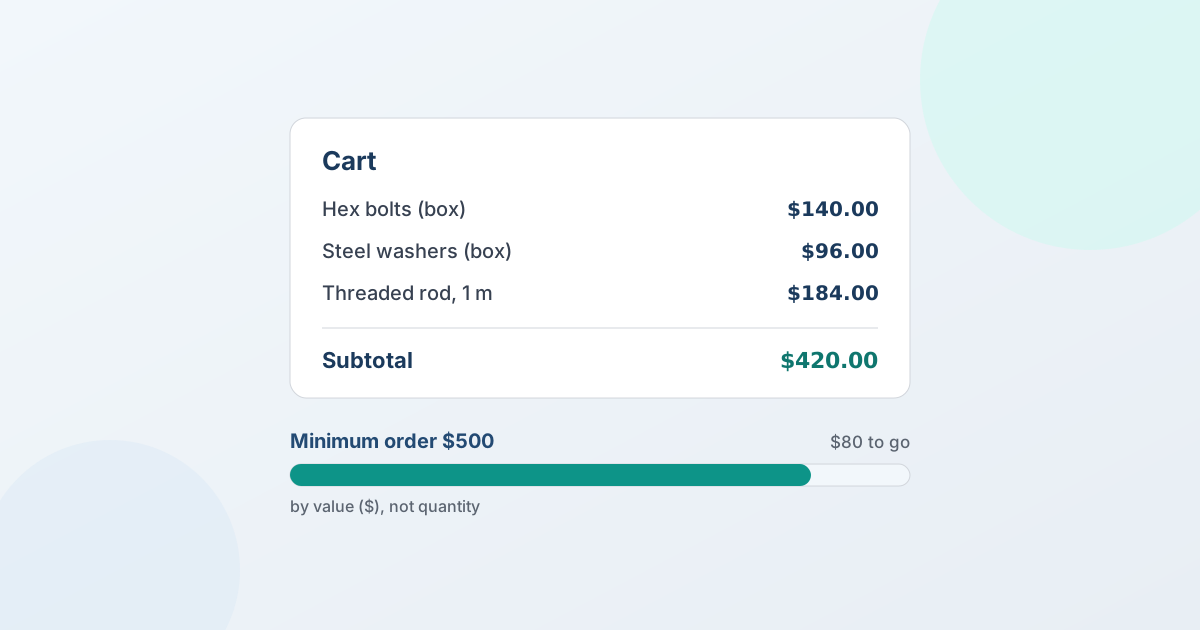
What is a minimum order value on Shopify?
A minimum order value (MOV) on Shopify is the smallest cart total - for example, $500 - a buyer must reach before they can check out. It's about money spent, which is what separates it from a minimum order quantity (MOQ), which limits the units ordered. Shopify doesn't enforce a minimum order value natively at checkout, so merchants add one with a cart-rules or order-limits app, a Shopify Functions cart-validation, or - for large and negotiated orders - a quote flow instead.
How do you set a minimum order value on Shopify?
A minimum order value (MOV) - sometimes called a minimum order amount or minimum spend - requires a cart to reach a total (say $500) before the buyer can check out. Shopify doesn't enforce this natively at checkout, so you add it with a cart-rules or order-limits app, or build a Shopify Functions cart/checkout validation that blocks checkout until the threshold is met. For large or negotiated orders, many B2B stores skip the hard block and move the buyer to a quote instead.
First, clear up the term, because it's the most common mix-up in wholesale: a minimum order value is about money, and a minimum order quantity is about units. They solve different problems and use different tools.
Minimum order value vs minimum order quantity (MOV ≠ MOQ)
In one sentence: a minimum order value (MOV) sets a floor on the cart total (money - say $500), while a minimum order quantity (MOQ) sets a floor on the units ordered (say 50 pieces). The two get used interchangeably, but they aren't the same:
- Minimum order value (MOV) - the order total must reach an amount, e.g. "spend at least $500." Good when your concern is order economics - covering picking, packing, and shipping costs on small orders.
- Minimum order quantity (MOQ) - the buyer must purchase at least a number of units, e.g. "24 per SKU." Good when your concern is production or packaging runs, like case packs.
You might use one, the other, or both ($500 minimum and 24-unit cases). Knowing which you actually need decides the tool: a value threshold and a quantity threshold are configured differently. For the quantity side, see minimum order quantities on Shopify; this guide stays on value.
Does Shopify enforce a minimum order value?
Not on its own. Standard Shopify checkout will happily take a $10 order, so the minimum has to be added. Your options:
- A cart-rules / order-limits app. The most common route - block checkout until the cart total clears your threshold, often scoped by customer tag so retail isn't affected and only wholesale buyers see the minimum.
- Shopify Functions (cart and checkout validation). A validation function can reject a checkout below your minimum. It's flexible and native, but it's developer work to build and maintain.
- A discount nudge instead of a block. Some stores prefer a free-shipping-over-$X carrot rather than a hard wall, which lifts average order value without turning buyers away.
Whichever you pick, scope it to the buyers it should apply to - a store-wide hard minimum can cost you retail sales you'd happily take.
When a quote beats a hard minimum
A hard minimum is the right tool when every order genuinely must clear a fixed bar. But often the "minimum" is really "for an order this size, let's agree the pricing first." In that case a cart block is a blunt instrument - it stops the buyer instead of starting a conversation.
That's where a quote flow fits. With QuotWay, a buyer requests a quote for a large or wholesale order, you propose pricing for the quantities and value involved, negotiate to an agreed number, and convert the accepted quote to a Shopify draft order. To be clear about the boundary: QuotWay does not enforce a minimum order value or MOQ - it doesn't sit in the checkout to block a cart. It gives the large and negotiated orders a structured path instead. So minimum-enforcement and quoting solve different jobs, and plenty of wholesale stores run both - a cart-rules app for the hard floor, and a quote flow for the deals worth a conversation. See how the quote button works for that path. The free Lite plan runs the whole quote → negotiate → draft-order loop, so you can try it before you pay - see plans and pricing.
Frequently asked questions
How do I set a minimum order value on Shopify?
Shopify doesn't enforce a minimum order value natively, so add it with a cart-rules or order-limits app that blocks checkout until the cart total reaches your threshold, or build a Shopify Functions cart/checkout validation that rejects orders below it. Scope the rule by customer tag so it applies to wholesale buyers without affecting retail. For large or negotiated orders, a quote flow is often a better fit than a hard block.
What's the difference between minimum order value and MOQ?
Minimum order value (MOV) is about the order total - "spend at least $500" - while minimum order quantity (MOQ) is about units - "buy at least 24." MOV protects order economics on small orders; MOQ suits production or case-pack runs. They're configured differently, and you can use either or both. Shopify enforces neither natively, so each needs an app, a checkout validation function, or a quote-first approach.
Does QuotWay enforce a minimum order value?
No. QuotWay is a quote and negotiation app - it doesn't sit in the checkout to block a cart, so it doesn't enforce a minimum order value or MOQ. To enforce a hard minimum, use a cart-rules/order-limits app or a Shopify checkout validation function. QuotWay's role is to give large and negotiated orders a quote path: the buyer requests a quote, you price and negotiate it, and the agreed order converts to a Shopify draft order.
Can I set a minimum order value only for wholesale buyers?
Yes. Most cart-rules and order-limits apps let you scope the minimum by customer tag or segment, so only wholesale or trade buyers face the threshold while retail shoppers check out normally. Pair that with tag-based trade pricing, or move larger wholesale orders to a quote flow where you set pricing for the quantities and value involved instead of relying on a hard cart block.
Related articles
See how QuotWay handles this on your store.