Quoting & negotiation
How to quote custom and made-to-order products on Shopify
By Jahangir Alam · August 20, 2026 · Updated August 23, 2026 · 12 min read
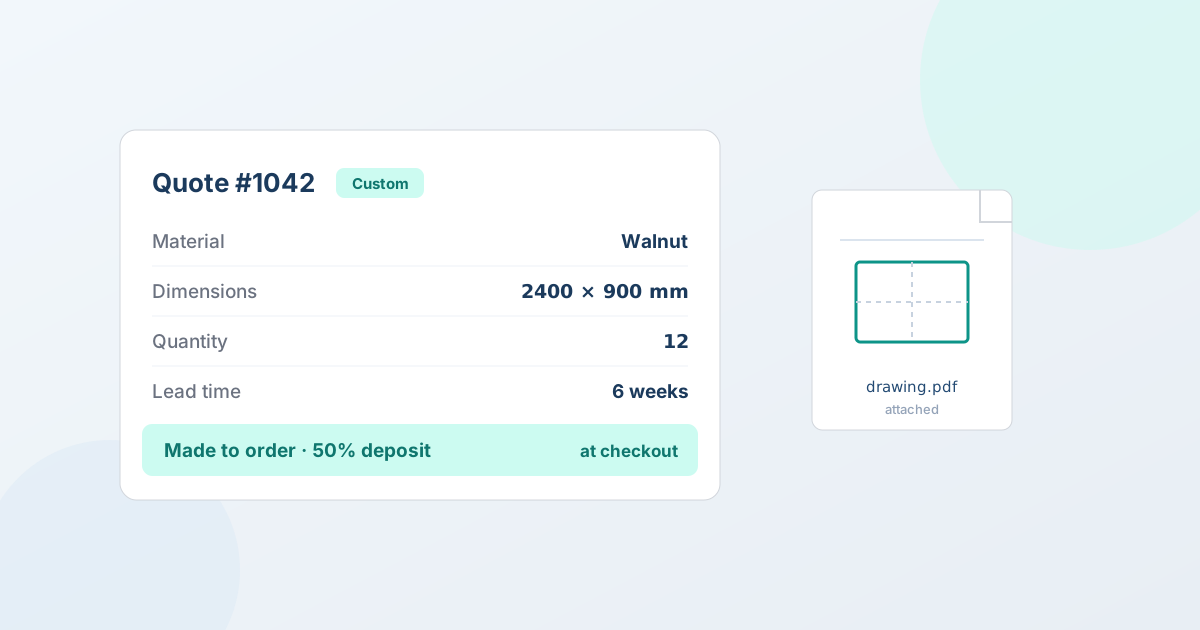
Custom and made-to-order products don't fit a standard Shopify checkout: until you know the specs - dimensions, materials, quantity, finish, lead time - there's no price to charge. That's why made-to-order businesses quote first and sell second. This is a complete guide to running custom and made-to-order product quotes on Shopify: what a good quote captures, how to price bespoke work, how the workflow runs from the buyer's request to a paid order, how to handle the revisions that always come, and where the honest boundaries are.
Custom, made-to-order, and configurable: what you're actually selling
These terms get used interchangeably, but they describe different things, and the difference decides which tool you need.
- Made-to-order means the product isn't built until someone orders it. The design might be standard, but you produce each unit on demand - a furniture maker who builds each table when it's sold, a print shop that runs a job per order.
- Custom means the product itself changes per buyer - their dimensions, their materials, their artwork. Every order is a little different, and the price moves with it.
- Configurable means the product is assembled from a defined set of options with fixed rules - pick a size, a color, and a base, and a system calculates the price automatically.
The first two - made-to-order and custom - are quote businesses: the price depends on details you have to collect and often negotiate, so there's no single number to publish. The third - configurable - is a configurator business, where a rules engine prices the combination for you. Knowing which you are matters, because a quote app and a product configurator solve different problems (more on that below). Most bespoke manufacturers, fabricators, and makers on Shopify are in the first two buckets: the price is a conversation, not a formula.
Why custom and made-to-order products need a quote, not a cart
A retail checkout assumes a fixed, published price and an immediate card payment. Custom and made-to-order work breaks both assumptions at once:
- The price depends on the spec. A different size, material, finish, or quantity changes the cost - so there's no single catalog price to list. Publish one and you're either leaving money on the table or scaring off buyers whose job is cheaper than the number suggests.
- The requirements have to be captured first. You need the buyer's dimensions, drawings, quantities, and deadline before you can price anything. A cart can't gather that; it just adds a SKU.
- The commitment matters. Custom work ties up materials and labor and usually can't be resold, so a deposit up front is standard - a cart takes full payment or nothing.
A quote workflow handles all three: the buyer requests a price and sends their requirements, you price the job and negotiate it, and the agreed deal becomes a real order - often with a deposit. For the full vertical, see quoting for manufacturing and custom orders.
What a made-to-order quote needs to capture
The quote is only as good as what you collect up front. Every detail you're missing becomes an email, and every email adds a day. A capable quote form gathers what you need to price the job in one pass:
- Specs. Dimensions, materials, finishes, quantities, tolerances, and any product-specific fields. The trick is conditional logic - the form should only ask what's relevant to what the buyer picked, so a request for a wooden table asks about wood and finish, not fabric. That keeps the form short enough that buyers finish it, while still capturing the detail you need. See custom quote-form fields and conditional logic, and which fields to ask for for a worked manufacturing field set covering material, tolerance, certification, and repeat-part questions.
- Files. Drawings, CAD files, artwork, or reference photos attached directly to the request, so you're pricing from the real thing instead of a description. Attachments are type-validated and rejected if they contain active or malicious content - a real safety check, not a virus scan.
- Context. Lead time, delivery date, quantity ranges, and any notes that affect the price. A rush job and a flexible-timeline job are priced differently, and you want to know which one you're quoting before you quote it. Bespoke work is also frequently oversized or palletised, so capture a delivery destination too - shipping and freight on B2B quotes covers pricing that half of the job.
Collecting this on the request means you price from real requirements, not a guess - and it filters out the tyre-kickers who won't take the time to describe what they actually want. See quote requests, forms, and hide price for how the button and form work, and note that custom fields are available on Starter and up (with conditional logic on Professional and up), so you can start capturing structured requirements early.
How to price custom and made-to-order work
Pricing bespoke work is where made-to-order businesses either protect their margin or quietly erode it. There's no catalog price, so each quote is a small pricing decision - which is also why an approval threshold matters more here than on a catalog line: there's no list price for a discount to be measured against. A reliable way to build one:
- Materials. The actual cost of what goes into this specific job, at this specific quantity - remembering that material cost per unit usually drops as volume rises, which is why volume matters to the quote.
- Labor and machine time. How long the job takes to make, at your real cost per hour - the part most makers underestimate on custom work, because a one-off takes longer per unit than a production run.
- Setup and tooling. Any one-time cost to prepare for the job - a die, a jig, a proof, a setup run - that a custom order carries but a repeat order might not.
- Margin, and a buffer for risk. Custom work carries more risk than catalog stock: a spec can change mid-build, a material can move in price, a first article can fail. Price in a buffer so a normal surprise doesn't turn a job unprofitable.
Because so much of this is judgment, the price is best treated as a negotiated number rather than a formula - you propose, the buyer responds, and you settle on a figure that works for the specific job. That's exactly what a quote is for, and it's why a versioned record of each round matters (see the workflow below). For the broader pricing picture, see B2B pricing strategies that protect your margins.
The custom-quote workflow on Shopify, step by step
Here's the full path from a buyer's request to a paid Shopify order, the way it runs in QuotWay:
- The buyer requests a quote. They tap "Request a quote" on the custom product, fill in the spec form, and attach their drawings. Guests can request too, with a quick email-verification step and no account required - which matters for custom work, where a lot of first contact comes from people who've never bought from you before.
- You price and negotiate the job. You send a versioned proposal with your price and terms, and counter as the spec changes - a bigger quantity, a substituted material, a tightened lead time - so the agreed spec and the agreed price stay tied together. Buyers can counter back (on Starter and up), and every round is captured as its own immutable version. See negotiation and counter-offers.
- You take a deposit (optional). For made-to-order work that can't be resold, ask for part-payment up front - "50% down, balance on delivery." More on this below.
- The agreed job becomes a Shopify order. The accepted quote converts to a native Shopify draft order with the negotiated prices carried over exactly - no re-keying, no separate system. Invoicing, payment, and fulfillment then run in Shopify like any other order. See how conversion to a draft order works.
One record runs from "here's my drawing" to "order confirmed and deposit paid" - which means when the buyer reorders, or disputes what was agreed, the whole history is right there.
Handling revisions and change orders
Custom work is rarely right on the first pass. The quantity changes, a material gets substituted, a finish gets upgraded, a deadline moves - and each change moves the price. The failure mode is a pile of emails where nobody's sure which version is current or what was agreed.
The fix is versioning. Each time you revise a proposal, it's saved as a new version, so the history of the deal is explicit: version 1 quoted the walnut at $8,000, version 3 switched to oak and 15 units at $9,400, and the buyer accepted version 3. When a change comes in after the order is agreed, you have a clear before-and-after to base a change order on, instead of arguing from memory. You can also send a revised drawing or proof back to the buyer inside the negotiation as a message attachment (on Professional and up), so the visual and the price travel together. This versioned, auditable trail is also what protects you if a buyer later says "that's not what we agreed" - the record shows exactly what was agreed, and when.
Deposits: the commitment device for made-to-order
Deposits are where custom quoting on Shopify was hardest until recently, and they matter more for made-to-order than almost any other kind of selling. Bespoke work ties up materials and labor and usually can't be resold if the buyer walks, so a deposit does three jobs at once: it filters serious buyers from browsers, it funds the materials you have to buy to start, and it shares the risk of work that has no second buyer.
On Shopify Plus stores (QuotWay's Professional plan and up), you can set a deposit percentage on the quote, let the buyer counter it, and Shopify checkout collects it on the converted draft order - the classic "50% down, balance on delivery" structure. The buyer sees the deposit on their quote, in their account, and on every PDF, and Shopify computes the exact split. You can also set a Settings default that applies a deposit automatically to any quote containing custom items, so a made-to-order job never accidentally goes out without one. See how to take a deposit on a negotiated quote for the full mechanics. (Deposits are a Shopify Plus platform capability, available from the Professional plan.)
The honest boundary: quoting, not a product configurator
If your prices really should be computed from inputs rather than set by a person, that is a different product category and worth knowing before you shortlist anything - instant quoting versus negotiated quoting draws the line.
Worth stating plainly, because it's the most common mix-up: QuotWay is a quote and negotiation app, not a product configurator. It does not build or price product variants from a rules-driven configurator - pick these options and get an automatic price. What it does is capture requirements - through the quote form, custom fields, and attachments - and then price them through negotiation.
For most made-to-order and custom businesses, that's exactly the workflow: the price is a conversation, not a formula, because the variables (a hand-finished material, an unusual dimension, a tight deadline) don't reduce to a clean pricing rule. If your core need is a rules-based configurator that generates priced variants automatically - a business where the options genuinely are fixed and the price genuinely is calculable - that's a different tool, and often a complement to a quote app rather than a replacement. QuotWay also doesn't do pre-orders; accepted quotes become standard Shopify draft orders that you fulfill on your normal timeline. Being clear about that boundary is part of choosing the right tool: use a configurator for calculable options, a quote app for negotiated bespoke work.
Common mistakes when quoting custom work
- Publishing a "from" price to a public page. It anchors buyers low and invites the wrong requests. Hide the price and lead with "Request a quote" so the conversation starts on your terms.
- Under-capturing on the form. Every missing field is a follow-up email and a slower quote. Use conditional logic to ask everything relevant in one pass.
- Forgetting setup and risk in the price. One-off work costs more per unit than production. Price the setup, the machine time, and a buffer, not just materials.
- Skipping the deposit on bespoke work. Materials you buy for a job with no second buyer are pure risk until money changes hands. Default a deposit on custom items.
- Losing the thread across revisions. Negotiating custom specs over email means nobody's sure what's current. Keep it versioned so the agreed spec and price are always explicit.
FAQ
How do I quote custom or made-to-order products on Shopify?
Add a request-a-quote workflow: the buyer requests a price on the custom product and submits the specs and any files (dimensions, materials, quantity, drawings), you send a versioned proposal and negotiate as the spec changes, and the accepted quote converts to a native Shopify draft order - optionally with a deposit collected at checkout. The quote is the record that ties the agreed spec to the agreed price.
Can I collect a deposit on a custom order?
Yes - on Shopify Plus stores, from QuotWay's Professional plan. Set a deposit percentage on the quote (the buyer can counter it), and Shopify checkout collects it on the converted draft order, with the balance on your payment terms. It's the standard "50% down, balance on delivery" structure for made-to-order work, and you can default a deposit automatically onto any quote with custom items.
Is QuotWay a product configurator?
No. QuotWay is a quote and negotiation app: it captures requirements through the quote form, custom fields, and file attachments, then prices them through negotiation. It does not generate or price product variants from a rules-driven configurator. For made-to-order businesses whose price is negotiated rather than formula-driven, that's the right fit; a rules-based configurator is a separate (often complementary) tool for products with fixed, calculable options.
What files can buyers attach to a custom quote?
Buyers can attach drawings, CAD files, artwork, and reference photos to a request. Files are type-validated and rejected if they contain active or malicious content - a real safety check, not a virus scan. Attachment counts and sizes depend on your plan, and on Professional and up you can send revised drawings or proofs back to the buyer inside the negotiation.
How do I handle changes to a custom order after it's quoted?
Use versioning. Each revised proposal is saved as its own version, so the history is explicit - what was quoted, what changed, and which version the buyer accepted. When a change comes in, you have a clear before-and-after to base a change order on, rather than reconstructing it from an email thread.
Do I need Shopify Plus to quote custom products?
No. Capturing custom requirements and quoting them works on any Shopify plan - custom fields are on Starter and up, conditional logic and message attachments on Professional and up. The one Plus-only piece is collecting a deposit at checkout; everything else in the custom-quote workflow works regardless of Plus.
Where QuotWay fits
QuotWay is a B2B quote and negotiation app for Shopify, built by EFOLI, made for exactly this: capture a custom or made-to-order request with specs and files, negotiate the spec and price together with a versioned record, take a deposit on Shopify Plus, and convert the agreed job to a native Shopify draft order - one record from first drawing to paid order. It doesn't try to be a product configurator; it runs the price conversation that bespoke work actually needs. The free Lite plan runs the full quote → negotiate → draft-order loop, so you can try it on your store before paying anything; see the plans and pricing or add QuotWay on Shopify. For the full made-to-order picture, see quoting for manufacturing and custom orders.
Sources
Related articles
See how QuotWay handles this on your store.