Shopify B2B
B2B tax exemption on Shopify: company locations, tax IDs, and quotes
By Jahangir Alam · August 23, 2026 · Updated October 7, 2026 · 9 min read
- Last verified
- Shopify API
- 2026-10
- Audience
- Shopify merchants selling tax-exempt or cross-border B2B
- Scope
- Tax exemption in Shopify B2B at API 2026-10: where exemptions live on the company location, what Shopify does not store, the EU/UK reverse-charge limitation at B2B checkout, and what a quoted order shows
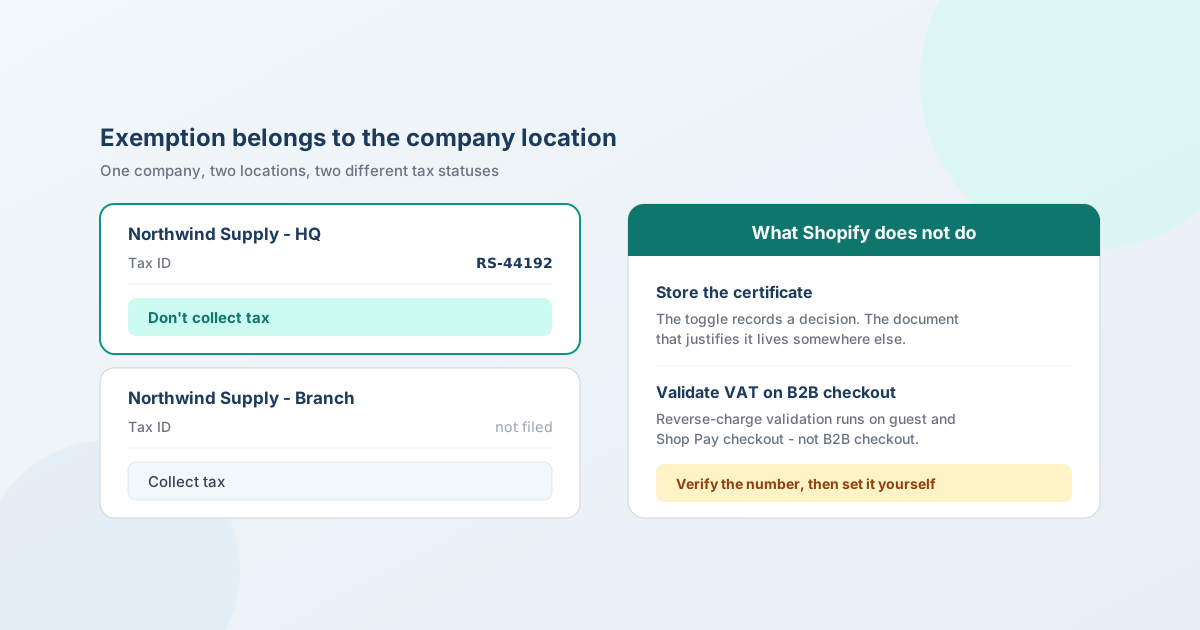
B2B tax exemptions on Shopify are set per company location, not per customer: Customers → Companies → the company → Locations → the location, then under Tax settings choose Collect tax, Don't collect tax, or Collect tax unless exemptions apply. It's available on any plan that supports Shopify B2B - not just Plus, despite a lot of published advice saying otherwise.
What Shopify won't do is hold the certificate that justifies the exemption. That gap, and a second one affecting EU and UK sellers specifically, are what this guide is really about.
This is not tax advice. It covers where the settings live and what the software does. Whether a particular buyer qualifies for exemption, which documentation you need, and how long to keep it are questions for your accountant and the relevant tax authority. Get those wrong and the liability is yours, not your platform's.
Where B2B tax exemptions live
Exemption is a property of the company location, which is the right model once you see why: a company can have an exempt head office in one state and a non-exempt branch in another. Modelling them as two locations lets each carry its own status.
Each company location holds its own Tax ID - labelled VAT number for UK and EU locations under Shopify Tax - alongside its own addresses, catalogs, payment terms, checkout settings, and contacts.
Under Tax settings you pick one of three:
| Setting | Use it when |
|---|---|
| Collect tax | Normal. The buyer is not exempt. |
| Don't collect tax | This location is exempt outright, and you hold the documentation to prove it. |
| Collect tax unless exemptions apply | Then select the specific exemptions. Tax is charged except where a selected exemption covers it. |
That third option is the one most wholesale sellers actually want: partial exemption by category rather than a blanket switch.
One precedence rule worth knowing if you also use product- or collection-level tax overrides: per Shopify's documentation, customer tax exemptions always take precedence over tax overrides. So an exempt buyer isn't charged tax on applicable products regardless of what an override says - which is usually what you want, and occasionally a surprise if you assumed the override was the last word.
It isn't Plus-only
A lot of published guidance - including several articles dated 2026 - describes per-company-location tax exemptions as a Shopify Plus feature. Per Shopify's own documentation, they're available on plans that support Shopify B2B, which since April 2026 means Basic, Grow, Advanced, and Plus.
If you've been told you need to upgrade to exempt a wholesale account, check before you do. (Do you need Shopify Plus for B2B? covers what genuinely is Plus-only - unlimited catalogs, per-company catalog assignment, deposits and partial payments.)
What Shopify will not do: hold your certificate
This is the gap that catches people, and it's worth being blunt about.
Toggling an exemption records a decision. It does not collect, validate, or store the resale certificate or exemption document behind that decision. Shopify has no native certificate collection or storage - not on standard plans, not on Plus.
Two consequences:
- A verbal or emailed claim is not an audit defence. "The buyer said they were exempt" is not a document. If you're audited, you need the certificate itself, valid for the period of the sale.
- You need somewhere to put it. A shared drive with a naming convention is a legitimate answer for a handful of accounts. Beyond that, exemption-certificate management is its own app category on the Shopify App Store, with apps that collect, validate, store, and flag expiry. QuotWay is not one of them, and neither is any quote app.
Certificates also expire, and jurisdictions differ on how often they need renewing. Whatever you use to store them needs to tell you when one lapses, because an expired certificate on file is the same as no certificate.
EU and UK: the reverse-charge trap
If you sell cross-border in the EU or UK, there's a limitation here that specifically hits B2B stores, and it isn't widely known.
How it normally works. Shopify Tax offers VAT validation at checkout: a business buyer enters their VAT number, Shopify validates it in real time against the EU's VIES system, and where the reverse charge applies, VAT is removed from the order and the buyer reports and pays it on their own return. The feature is available to stores using Shopify Tax to calculate tax in the EU or the UK; VIES is the registry Shopify names. (Corrected on 23 September 2026: this page previously also credited an HMRC lookup, which Shopify's page does not describe.)
The catch. Per Shopify's documentation, VAT validation is available for guest checkout and Shop Pay checkout - and isn't currently available for B2B-specific checkouts. So if your business buyers go through Shopify's B2B checkout, which is the whole point of running B2B, they cannot self-serve the reverse charge at checkout.
What you do instead. You set the exemption yourself on the company location. If you use Shopify Tax, a VAT number entered on a UK or EU company location is validated by Shopify Tax after you enter it - Shopify's companies page says so - but that page doesn't say the validation sets the exemption, and the VAT-validation page is clear that the checkout reverse charge isn't available for B2B-specific checkouts. So the exemption is still a setting you make. (Corrected on 7 October 2026: this page previously said no Shopify tool validates a B2B buyer's VAT number; Shopify Tax validates one entered on a UK or EU company location.)
Three more rules worth knowing:
- Eligibility follows your fulfillment location, not your store address. You need an active fulfillment location in the EU, shipping to a different EU country or to the UK.
- It doesn't apply UK-to-UK or UK-to-EU.
- There's no manual override of VIES validation where it does run - a number either validates or it doesn't.
What happens on a quoted order
If the deal was negotiated rather than self-served, tax gets computed twice, and the sequence matters.
Proposal lines carry a taxable flag, so you can mark which lines tax applies to while you're pricing. But the authoritative calculation happens later: when the accepted quote converts to a draft order, Shopify recomputes tax with its own calculator, against the company location's settings at that moment.
QuotWay compares the two and records any difference on the quote's timeline. If the recomputed tax differs from what you proposed by more than your configured threshold - 2% by default - the conversion requires your explicit acknowledgement before an order goes out, and an automated conversion halts for a human.
The practical implication is a sequencing rule: set the company location's exemption before you convert, not after. Convert first and Shopify computes tax against the settings it finds, which means an order with tax on it that you then have to unpick - and unpicking tax on a placed order is meaningfully worse than setting a toggle beforehand. One related API change: since Admin API 2026-10, changing the shipping address on an unfulfilled order through the API recalculates its tax for the new destination - an exemption set afterwards still doesn't rewrite the order's tax.
The most common cause of unexpected tax drift, incidentally, isn't exemption at all: it's the ship-to address changing between the proposal and the conversion.
A process that survives an audit
- Ask for the tax or resale ID on the application, not later. It belongs on the wholesale account form alongside business type and volume - see wholesale account applications.
- Verify it against the relevant register before you exempt anything. Shopify Tax validates UK and EU VAT numbers entered on a company location; for any other tax ID or resale number, the check is yours.
- Store the actual certificate somewhere durable, with an expiry date attached.
- Set the exemption on the company location, choosing Don't collect tax or Collect tax unless exemptions apply as fits.
- Re-check on renewal. Put the expiry in whatever calendar you'll actually look at.
- On negotiated deals, confirm the location's settings before converting the quote.
Common mistakes
- Exempting on the customer profile when the buyer belongs to a company. The company location is the right level for B2B - the profile toggle is the standard-store fallback.
- Assuming the toggle is the compliance. It's the tax calculation. The certificate is the compliance.
- Upgrading to Plus for company-level exemptions. They're on every B2B-capable plan.
- Expecting VAT validation to work on B2B checkout. It doesn't. Verify and set it manually.
- Modelling a multi-site company as one location. An exempt HQ and a non-exempt branch need separate locations to carry separate statuses.
- Converting a quote before setting the exemption, then trying to remove tax from a live order.
- Letting certificates go stale. An expired one is no better than none.
The Shopify facts in this post are kept current in the Shopify B2B reference (The object model), re-verified at every Shopify Edition and quarterly API release.
FAQ
How do I make a customer tax exempt on Shopify B2B?
Set it on the company location: Customers → Companies → the company → Locations → the location, then under Tax settings choose Don't collect tax, or Collect tax unless exemptions apply and select the relevant exemptions. Each location carries its own tax ID and status, so a company with an exempt head office and a non-exempt branch is modelled as two locations.
Do I need Shopify Plus for B2B tax exemptions?
No. Per Shopify's documentation, per-company-location tax exemptions are available on plans that support Shopify B2B, which since April 2026 means Basic, Grow, Advanced, and Plus. A number of articles published in 2026 still describe this as Plus-only, so it's worth checking Shopify's own plan documentation before upgrading for this reason.
Can Shopify store resale or exemption certificates?
No. Shopify records the exemption decision but doesn't collect, validate, or store the certificate that justifies it - on any plan. You need somewhere else to keep the document and track its expiry, whether that's a well-organised drive or one of the dedicated exemption-certificate apps on the App Store. A verbal or emailed claim isn't an audit defence.
Does Shopify validate VAT numbers for B2B reverse charge?
Shopify Tax validates VAT numbers in real time against VIES - but per Shopify's documentation this isn't currently available for B2B-specific checkouts, only guest and Shop Pay checkout. If your buyers use B2B checkout, set the exemption on the company location yourself. Separately, if you use Shopify Tax, a VAT number entered on a UK or EU company location is validated by Shopify Tax; any other tax ID is yours to verify.
How does tax work on a quoted or negotiated B2B order?
Proposal lines carry a taxable flag while you price, but Shopify recomputes tax with its own calculator when the accepted quote converts to a draft order, against the company location's settings at that moment. If the recomputed figure differs from the proposed one by more than your threshold (2% by default in QuotWay), the conversion needs your acknowledgement first. Set the exemption before converting, not after.
Where should I collect a buyer's tax ID?
On the wholesale account application, alongside business type and expected volume - it's one of the inputs to the approval decision, and asking later means chasing it. Note that collecting the number is not the same as verifying it: Shopify Tax validates a UK or EU VAT number entered on a company location, but any other tax or resale ID is yours to check against the relevant register.
What's the difference between exempting a customer and exempting a company location?
The customer-profile toggle is the standard-store mechanism and applies to that individual's future orders. The company-location setting is the B2B mechanism and belongs to the buying entity, so it applies to whoever orders for that location and travels with the account rather than the person. For B2B, the location is almost always the right level.
Where QuotWay fits
QuotWay is a B2B quote and negotiation app for Shopify, built by EFOLI, and its role in tax is deliberately narrow. Proposal lines carry a taxable flag while you price a deal; when the accepted quote converts, Shopify recomputes tax with its own calculator against the company location's settings, and QuotWay records the difference and pauses the conversion if it moves past your threshold. That's the whole of it. QuotWay does not collect, store, validate, or verify exemption certificates, does not determine whether a buyer qualifies, and is not a tax product - certificate management is a separate app category and tax eligibility is a question for your accountant. See converting quotes to orders, Shopify B2B quoting, the plans and pricing, or add QuotWay on Shopify.
Sources
Shopify pages re-verified on 7 October 2026:
- Shopify Help Center: Creating and managing B2B customers using companies - company location tax settings, tax ID fields, and Shopify Tax's validation of UK and EU VAT numbers.
- Shopify Help Center: VAT validation in checkout - VIES validation, reverse-charge eligibility, and the B2B checkout limitation.
- Shopify Help Center: B2B features by plan
- Shopify Help Center: Tax overrides and exemptions
Related articles
See how QuotWay handles this on your store.