Shopify B2B
Sales reps on Shopify B2B: admin access vs quote ownership
By Jahangir Alam · August 23, 2026 · Updated October 7, 2026 · 9 min read
- Last verified
- Shopify API
- 2026-10
- Audience
- Shopify merchants with a sales team quoting named accounts
- Scope
- Shopify's B2B sales-staff permissions at API 2026-10 - ten staff per company location, the three permissions, and the four admin pages the restriction actually covers - beside a quote layer's own roles and routing
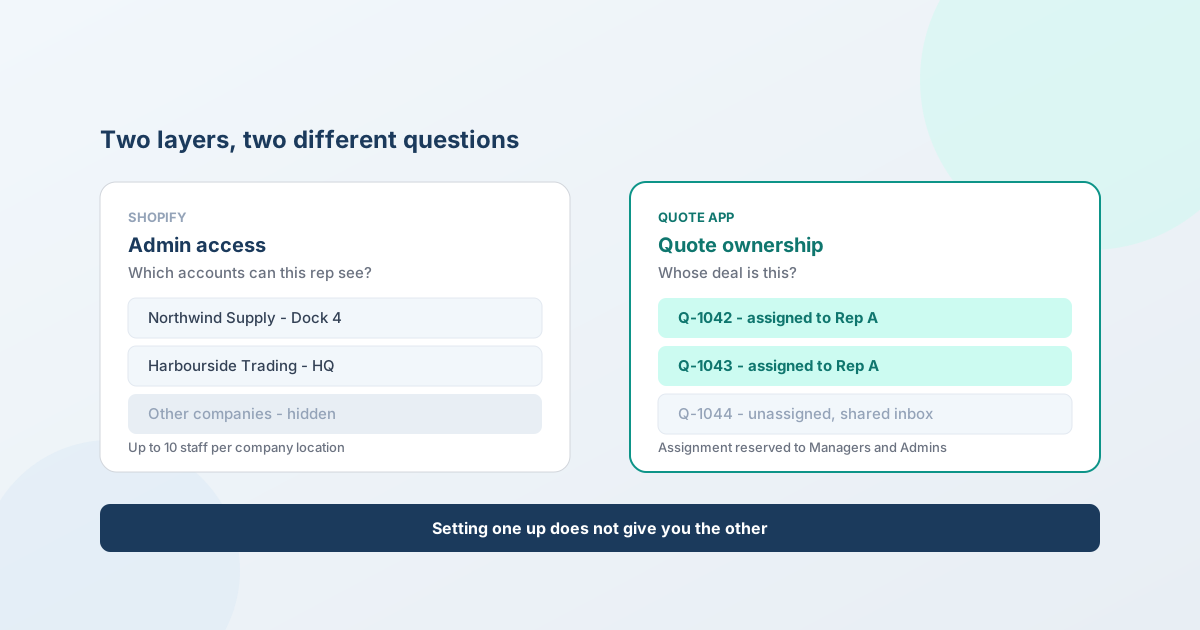
Shopify and your quote app scope two different things, and teams discover it the hard way. Shopify's B2B sales-staff permissions scope admin access - which company locations a rep can see and place orders for. A quote app scopes quote ownership - who works the deal, who can send it, who gets the notification. Setting one up does not give you the other, and a team selling through reps usually needs both.
This guide covers what each layer actually does, the limits in each that surprise people, and how to set them up so a rep sees their accounts in the admin and their deals in the quoting inbox.
The two layers
| Shopify B2B sales staff | A quote app (QuotWay) | |
|---|---|---|
| Scopes | Admin access to company locations | Ownership of individual quotes |
| Answers | "Which accounts can this person see and order for?" | "Whose deal is this, and who can send the price?" |
| Set up in | Shopify admin, staff permissions + Companies | The app's own staff settings |
| Applies to | Customers, Orders, Draft orders, Companies pages | Quotes, proposals, approvals, notifications |
The failure mode is predictable in both directions. Configure Shopify's sales-staff permissions alone and your rep sees only their accounts in the admin - then opens the quoting app and sees every quote in the business. Configure quote assignment alone and the deals route correctly, while the rep can still browse every company you have in the Shopify admin.
Neither layer is wrong. They're answering different questions.
What Shopify's B2B sales-staff permissions do
Shopify added these in February 2024, and they're available on all plans (though the number of staff accounts you get varies by plan).
Assigning reps. You assign staff to company locations from Customers → Companies. A location can have up to 10 sales staff, one person can cover multiple locations, and you can bulk-assign someone to every location within a company.
The three permissions that matter:
- View companies - see the Companies area at all.
- Assign staff to company locations - the manager-level permission for building the territory map.
- Restrict permissions to assigned company locations - the one that actually creates the boundary. The rest of the admin-access review is in the B2B security review checklist.
What a rep can then do: view account information and place orders for their assigned customers, including through draft orders - which is how phone, email, and in-person orders get captured.
The limit that surprises people. With the restriction turned on, the filtering applies to the Customers, Orders, Draft orders, and Companies pages only. Other admin pages don't filter by assigned location. If your mental model is "this rep can only ever see their accounts anywhere in Shopify," adjust it - the boundary is real but it is scoped to those four areas.
What a quote app scopes instead
Shopify has no concept of a quote, so nothing above touches who owns a deal in progress. That's the quote app's job.
QuotWay uses four fixed roles:
| Role | Can do |
|---|---|
| Admin | Everything, including staff and billing. The only role that manages either. |
| Manager | Runs the operation - edits targeting, the quote form, approvals and automation, assigns quotes, works quotes end to end. No staff or billing. |
| Sales rep | Works the quotes assigned to them: builds proposals, counters, messages buyers, converts accepted quotes. No store-wide settings. |
| View only | Reads quotes and reports. Changes nothing. |
Seats are a plan ceiling: 1 on Lite, 3 on Starter, 10 on Professional, unlimited on Enterprise.
Assignment happens two ways. A Manager or Admin assigns a quote by hand - reserved to those two roles deliberately, so a rep can't quietly reassign a deal to themselves. Or an automation rule assigns it the moment it arrives (Professional and up), and skips any quote somebody has already claimed.
A last-admin guard stops you locking yourself out: you can't demote or deactivate the only active Admin, and if a store somehow ends up with none, the next active staff member to open the app is promoted so the store is never left without one.
Routing quotes to the right rep
The auto-assign rule takes one named staff member - it is not a round-robin distributor. So you build territory or account routing by writing one rule per rep, each with conditions that match their patch. Conditions available include customer tags, company location, products or collection, currency, and quote value, combined with and/or/not.
A three-rep setup, for example:
| Rule | Condition | Assigns to |
|---|---|---|
| 1 | Customer tagged region-north |
Rep A |
| 2 | Customer tagged region-south |
Rep B |
| 3 | Quote value over $50,000 | Rep C (major accounts) |
| - | no rule matches | Stays unassigned in the shared inbox |
Rules evaluate in order and the first match wins, so put the exception - the major-accounts rule - above the territory rules if you want value to override geography. Getting that order wrong is the most common reason a routing setup "doesn't work."
Anything that matches nothing lands unassigned, which is the right default: a quote with no owner is visible, whereas a quote assigned to the wrong person is quietly someone else's problem.
Setting up both layers
- Map the territory first, on paper. Which reps, which accounts, and what decides the split - geography, industry, account size. Both layers will encode this, so it needs to exist before either.
- Shopify: create the roles. Build a staff role with View companies plus Restrict permissions to assigned company locations, and add Customers, Orders, and Draft orders management as needed. Assign it to your reps.
- Shopify: assign staff to locations. From Customers → Companies, per location or bulk across a company.
- QuotWay: add the same people, with roles. Sales rep for the reps, Manager for whoever runs quoting.
- QuotWay: write the assignment rules - one per rep, exceptions first.
- Point the approval policies at real people. A threshold routing to "Sales manager" has to resolve to someone who gets the notification - see building an approval matrix.
Honest limits
Three worth knowing before you design around this:
- QuotWay's roles are fixed. Four roles, no custom roles and no per-person permission editing. This is a genuine contrast with Shopify, whose staff permissions are composable - so if you need finely-grained access control, that part lives on Shopify's side, not ours.
- QuotWay can't read your Shopify staff list. Shopify restricts the store user list (the
read_usersscope), so we can't import your team or send invitations. You type each person's name and email, and those are labels used for display, assignment, and notifications - they don't have to match a Shopify login, but keeping them accurate keeps assignments legible. - The two assignments are separate lists. Assigning a rep to a company location in Shopify does not assign them quotes in QuotWay, and vice versa. When someone joins, leaves, or changes patch, both need updating. Put it in the onboarding checklist, because the failure is silent.
Do you actually need this?
- One person doing everything: skip both layers. Roles are overhead until there's someone to keep out.
- Two or three people, shared inbox: QuotWay roles alone are usually enough. Assign quotes by hand, keep everyone able to see everything - visibility beats boundaries at that size.
- Reps who own named accounts or territories: both layers, and the assignment rules. This is the setup they're for.
- A rep who should never see the whole customer list: that's specifically Shopify's restrict to assigned company locations permission. No quote app substitutes for it.
Common mistakes
- Assuming one layer covers both. The single most common one, and the reason this article exists.
- Ordering assignment rules by territory, then wondering why big deals go to the wrong rep. Exceptions first.
- Routing approvals to a role rather than a person. "Finance" must resolve to someone whose inbox is real.
- Letting the two staff lists drift. A rep who left is still an assignment target until someone deactivates them in both places.
- Buying seats you don't need. View-only teammates still consume a seat - deactivate people who no longer work quotes rather than upgrading around it.
- Expecting location filtering everywhere in the admin. It covers Customers, Orders, Draft orders and Companies.
The Shopify facts in this post are kept current in the Shopify B2B reference (Sales staff and admin access), re-verified at every Shopify Edition and quarterly API release.
FAQ
Can you assign sales reps to specific customers on Shopify?
Yes. Shopify's B2B sales-staff permissions let you assign staff to company locations from Customers → Companies, with up to 10 sales staff per location, and a Restrict permissions to assigned company locations permission that limits what they see. It's available on all plans. That controls admin access to accounts - it doesn't assign ownership of quotes, which is a separate layer.
Does Shopify have a sales rep portal?
Not a separate portal - reps work inside the Shopify admin with their permissions scoped to assigned company locations, placing orders on behalf of customers through draft orders. For quoting there's no native equivalent at all, since Shopify has no quote object; a quote app provides the inbox, ownership, and proposal tools reps need for negotiated deals.
How do I stop a sales rep seeing all my customers in Shopify?
Create a staff role that includes Restrict permissions to assigned company locations, then assign that rep only to their own company locations. With the restriction on, the Customers, Orders, Draft orders, and Companies pages filter to their assigned accounts. Other admin pages don't filter by location, so grant only the permissions the role genuinely needs.
How do quotes get assigned to a sales rep?
Either a Manager or Admin assigns a quote by hand, or an automation rule assigns it on arrival (Professional plan and up). Each rule routes to one named staff member, so territory routing is built as one rule per rep with conditions on customer tags, company location, products, currency, or quote value. Rules evaluate in order and the first match wins.
Can sales reps see each other's quotes?
Sales reps work the quotes assigned to them and can't edit store-wide settings; assignment itself is reserved to Managers and Admins, so a rep can't reassign a deal to themselves. If you want a genuinely shared inbox instead, simply don't assign quotes - unassigned work stays visible to the team, which is usually the better setup for a small team.
How many team members can use a Shopify quote app?
In QuotWay, seats are a plan ceiling: 1 on the free Lite plan, 3 on Starter, 10 on Professional, and unlimited on Enterprise. Every active staff member consumes a seat regardless of role, so a view-only teammate counts. If you outgrow your plan, deactivate people who no longer work quotes before considering an upgrade.
Why do I have to type my team's names into the app manually?
Because Shopify restricts the store user list - the read_users scope isn't available to apps - so no quote app can read who works at your store or send invitations on your behalf. The names and emails you enter are labels used for display, quote assignment, and notifications. They don't have to match a Shopify login exactly, but accurate ones keep assignments and emails clear.
Where QuotWay fits
QuotWay is a B2B quote and negotiation app for Shopify, built by EFOLI. Its part of this is the deal, not the admin: four roles with quote assignment reserved to Managers and Admins, automation that routes a new request to a named owner the moment it arrives (Professional and up), approval chains that can name specific staff or roles as approvers, and an append-only record of who did what on every quote. Shopify's own sales-staff permissions handle admin scoping - which accounts a rep can see and order for - and the two are complementary rather than alternatives. Seats run 1 / 3 / 10 / unlimited across the plans. See approval workflows, automation, the staff and roles guide, the plans and pricing, or add QuotWay on Shopify.
Sources
Shopify pages re-verified on 23 September 2026 and 7 October 2026:
- Shopify Help Center: Orders, data, and admin access for B2B sales staff
- Shopify changelog: Staff permissions for B2B sales reps (February 2024)
- Shopify Help Center: B2B features by plan
- QuotWay docs: Staff and roles - the four roles, seats per plan, and the last-admin guard.
Related articles
See how QuotWay handles this on your store.