Quoting & negotiation
Partial acceptance: let buyers accept part of a quote
By Jahangir Alam · June 20, 2026 · Updated September 16, 2026 · 9 min read
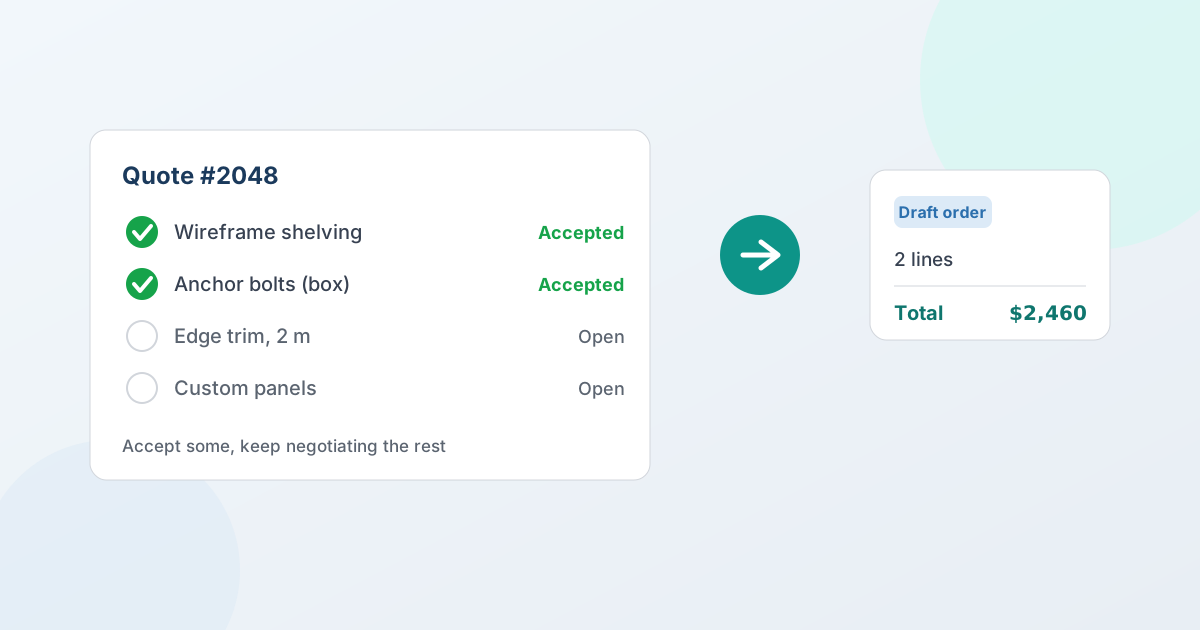
On a multi-line quote, "do you accept?" is the wrong question. A buyer usually wants two of the four lines now, doesn't want a third at any price, and needs another week on the fourth. Partial acceptance lets them say exactly that: every line carries its own decision - accept, decide later, or decline - and the accepted lines convert to a Shopify order while the rest stays alive. You close the part of the deal you can win today instead of holding the whole order hostage to one undecided line. (Quote-to-order covers the wider process this sits in.)
This guide explains what partial acceptance is, why all-or-nothing quoting quietly loses deals, why a deferred line is not a declined one, and how the workflow runs on Shopify so the accepted lines become a real order and nothing else gets lost - including the paperwork.
What partial order acceptance means
Partial order acceptance is the ability for a buyer to decide each line of a multi-line quote rather than the whole thing. A ten-line proposal isn't one decision; it's ten. The buyer might be ready to commit to seven items, want to negotiate two more, and have no use at all for the last one.
All-or-nothing quoting forces every one of those decisions to resolve before any of them can. Partial acceptance unbundles them: the seven settled lines convert to an order now, the two open ones stay in negotiation, and the declined one is recorded as declined instead of disappearing into an email. It mirrors how businesses actually buy - in stages, as budgets clear and details firm up - instead of demanding a single yes or no.
Why all-or-nothing quotes cost you deals
When a quote can only be accepted in full, one unresolved line blocks the entire order. That's a surprisingly expensive constraint:
- A single hold-up freezes everything. The buyer is ready on most of the order, but because they're still deciding on one item, nothing ships and nothing invoices. The whole deal sits.
- Momentum leaks away. Deals close on momentum. Make a buyer wait until every line is perfect and the easy 80% of the order cools off alongside the hard 20%.
- You negotiate under pressure. If the only way to release the order is to settle the last line, you're pushed to concede on it just to unstick everything else - a quiet margin leak.
- You lose the information you needed. Faced with one button for the whole quote, a buyer who wants most of it either accepts lines they weren't ready for - and you find out at delivery, or on a return - or declines a deal you had 70% closed. Most do neither, and reply by email instead.
That last one is the real cost. The quote in your system says awaiting response while the actual agreement lives in someone's inbox, and the gap between the record and the reality is where B2B quoting quietly breaks.
Three answers, not two
Every line on a sent proposal carries its own decision. From the Shopify customer account or the hosted buyer portal, the buyer sets each line to:
- Accept - commit to this line at the quoted price
- Decide later - no commitment, keep it on the table
- Decline - not wanted
All three can appear on the same quote, submitted in one go. "We're good on the first two, drop the warranty, still thinking about the spares" stops being an email and becomes the record: two accepted, one declined, one still open.
Your quote timeline summarises each acceptance as "2 accepted · 1 declined · 1 still open" and lists what happened to every line, so the next action is obvious without opening a thread. Per-line decisions are on the Professional plan and above, and the rule is enforced on the server rather than in the interface.
"Still open" is not "declined" - and the difference is money
This is the part worth dwelling on, because it's where quoting tools get sloppy.
A line the buyer deferred is a line you can still win. If your system reports it as declined, you stop working it: you read a closed door where the buyer deliberately left one ajar, and the follow-up that would have converted never gets sent.
So the two are kept apart everywhere. A deferred line is labelled Still open - in your timeline, on the quote, and in the buyer's own view. Only an explicit decline is reported as declined. Nothing infers a decline from silence, and a line the buyer simply didn't pick is never treated as one.
Declined lines don't disappear
When a buyer turns a line down, it stays on the quote - struck through, clearly marked, with a short note explaining that unselected items remain open.
It's tempting to hide what wasn't bought. Don't. Six months later, "why didn't they take the extended warranty?" is a question your own record should be able to answer, and a quote that quietly drops the rejected lines can't. Renewal conversations, win/loss reviews and disputes all depend on the quote still saying what was actually offered, and what actually happened to each part of it. Reading your own quote record six months on goes through what the record has to hold.
The paperwork has to agree
Here's a failure mode that is easy to ship and embarrassing to discover: the buyer accepts $1,400 of an $1,825 quote, and the confirmation document prints their accepted lines under a heading that says $1,825.
That document is wrong in the way that matters most - it's the one they sign, file and forward to their finance team. So on a partial acceptance, the Confirmation and Pro-Forma PDFs list only the accepted lines, headed by an Accepted total that equals the lines printed beneath it. There are no discount, shipping, tax or grand-total rows implying the whole quote was bought; shipping and tax are confirmed at order creation, and the document says so. The acceptance stamp reads "confirms acceptance of 2 items from quote QW-1019; items not listed were not accepted."
The Proposal PDF is deliberately different: it still lists every line, because its job is to record what was offered. Scoping that document to the accepted subset would misrepresent the offer you actually made.
The buyer's own view agrees too - their customer account states the accepted figure alongside the quote total, so neither side has to work out which of two numbers is theirs. For how the documents are branded and what each one is for, see PDF branding and documents.
Then convert the part that's agreed
A partially accepted quote isn't a finished quote; it's a quote with progress. From there you can:
- Convert what was accepted into a native Shopify draft order now, and keep negotiating the rest
- Send another proposal covering only the lines still open
- Let the buyer accept more later, from their account or the portal, without starting over
The accepted lines are settled and don't reopen. The open ones stay exactly as negotiable as they were, attached to the same quote with their full history - what was proposed, what was countered, where the conversation stands - so you pick up precisely where you left off. Each round is captured as its own version; see negotiation and counter-offers for how that history works.
Partial acceptance only helps if the accepted lines convert accurately, so two safeguards keep it clean:
- Negotiated prices are locked in. Each accepted line carries the price you agreed, snapshotted at conversion - not today's catalog price. The order matches the quote.
- Tax and shipping are re-checked. Before the draft order is created, a drift check recalculates both against current rules rather than the figures from when the quote was drafted. That check runs on every plan.
Because the result is a native Shopify draft order, the accepted lines live in Shopify like any other order - you invoice, take payment and fulfill the way you already do, with the deferred lines still open elsewhere on the quote. The full conversion story is in the guide to Shopify draft orders for B2B.
Splitting one quote into multiple orders
Partial acceptance pairs naturally with its sibling feature: splitting a quote into more than one order. Sometimes the accepted lines need to become several orders rather than one - different ship-to addresses, staged deliveries, or separate locations.
On Professional and above, you can split a quote into multiple Shopify draft orders, grouped by line grouping or by shipping address, so each order matches how it actually ships and gets fulfilled on its own. Accept what's agreed, then split how it ships. Each group reconciles its own shipping, which matters when freight is a real cost; see shipping and freight on B2B quotes. The mechanics of both live on the convert-to-orders feature page, which has an interactive demo.
Where partial acceptance fits your quoting
Partial acceptance is most valuable once your quotes regularly run to several lines and your buyers commit in stages - established wholesale accounts, distributors, and any deal where the order is really a basket of separate decisions. It's a quoting-depth feature, so it sits on the Professional ($79/mo) and Enterprise ($199/mo) plans, alongside split conversion and deeper analytics. Whole-quote acceptance and conversion to a Shopify draft order are available on every plan, including the free Lite plan and Starter ($29/mo).
If you're weighing whether you need this level of quoting depth, the simplest test is your own quotes: if a typical proposal has more than a handful of lines and buyers rarely accept all of them at once, all-or-nothing is costing you closed orders. QuotWay is a B2B quote and negotiation app for Shopify, built by EFOLI, that runs partial acceptance, splitting and conversion inside your existing store - start on the free Lite plan and add partial acceptance on Professional. See pricing for the full breakdown, or accept part of a quote for the step-by-step.
FAQ
What is partial order acceptance in B2B?
Partial order acceptance lets a buyer decide each line of a multi-line quote rather than accepting or rejecting the whole thing at once. Each line can be accepted, left open, or declined. The accepted lines convert to a Shopify order right away at the agreed prices, the open ones stay live for further negotiation, and the declined ones stay visible on the record. It lets you close the part of a deal you can win today.
Can a buyer accept only some items on a quote?
Yes, on the Professional and Enterprise plans. Buyers set each line to accept, decide later, or decline from their Shopify customer account or a hosted portal, and submit all of those answers together. You then convert only the accepted lines into a draft order. Whole-quote acceptance and conversion are available on every plan.
What happens to the items a buyer didn't accept?
It depends which answer they gave, and the distinction is deliberate. A line they left open is labelled still open - it keeps its full proposal and counter-offer history, so you carry on negotiating exactly where you left off. A line they declined stays on the quote too, struck through and marked, so your record still shows what was offered and what happened to it. Nothing is deleted, and a deferred line is never reported as declined.
Can a buyer accept some lines and counter-offer on others?
Yes. They accept the lines they're happy with, leave the rest open, and those open lines can be countered in the next round. The negotiation continues on the open lines while the accepted ones stay settled and don't reopen.
Does the draft order include the declined lines?
No. Conversion is built from what the buyer accepted, so the Shopify order contains exactly the accepted lines - at the negotiated prices, with tax and shipping re-checked before it commits.
Does the buyer see a total for the whole quote or just their part?
Both, on purpose. The quote total still describes the whole quote, because lines that are still open may yet be agreed; the accepted figure is what they have actually committed to. Their customer account shows both, and the Confirmation and Pro-Forma PDFs are scoped to the accepted lines under an Accepted total, so the signed document always matches what was agreed.
Can one quote become more than one order?
Yes, on Professional and above. You can split a quote into multiple Shopify draft orders, grouped by line grouping or shipping address, so each order matches how it actually ships. Splitting works alongside partial acceptance: accept the agreed lines, then split them into separate orders for different addresses, staged deliveries, or locations.
Do partially accepted lines keep the negotiated price?
Yes. Each accepted line is converted at the price you agreed, snapshotted at conversion rather than re-read from your catalog, so the order matches the quote. A drift check re-runs tax and shipping before the draft order is created, on every plan, so current rules are reflected while the negotiated line prices stay locked.
Related articles
See how QuotWay handles this on your store.