Engineering
When the catalog price changes mid-negotiation: which price a quote should use
By Jahangir Alam · October 31, 2026 · 10 min read
- Last verified
- Shopify API
- 2026-10
- Audience
- Developers and agencies building or reviewing negotiation and quote approvals on a Shopify quote layer
- Scope
- Catalog price changes while a quote is open, at API 2026-10: where a Shopify price moves (variant price, price-list fixed prices and percentage adjustments, quantity breaks, catalog assignment, exchange rates) and which webhooks exist, four prices per line and their jobs, when to re-resolve the current price and when never to, resolving it with contextualPricing at the line's quantity with provenance and failure handling, showing the seller what moved, currency, and test cases
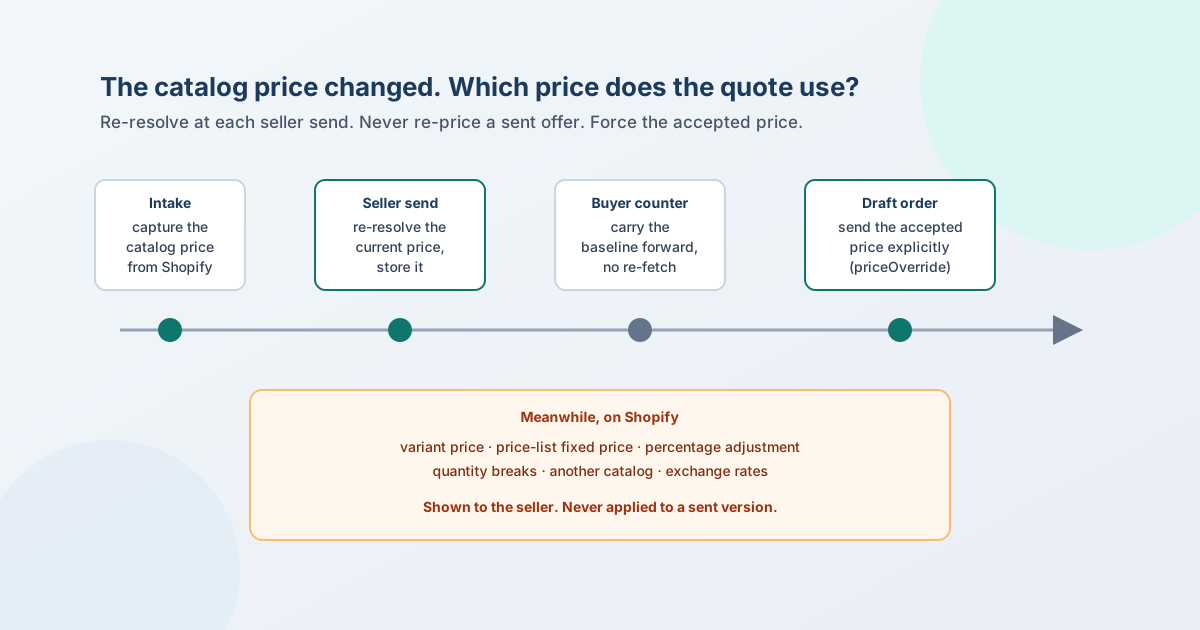
A catalog price that changes while a quote is open should never change the offer the buyer is holding. It should change what the seller sees and what the next seller version is checked against. That takes four prices per line, each with one job: the catalog price captured when the line entered the quote, the current price the buyer would pay today, the buyer's requested price, and the offered price. The offer is frozen once sent. The current price is re-resolved server-side at each seller send and stored with the version. A buyer's counter carries it forward unchanged, and nothing is re-priced after a version is sent. When the accepted quote becomes a Shopify draft order, the accepted price is sent explicitly.
This page is that design, with simplified code. Immutable quote versions covers why a sent version is never edited, and why a quote converts at the wrong price covers the draft-order side; this page is about the time in between, while the negotiation is open. Where QuotWay is the example, it is described as it works today; the rest are recommendations, labelled as such.
Shopify facts below were checked against Shopify's own pages on 31 October 2026 at API version 2026-10; sources are at the end.
Where a Shopify price can move
"The catalog price" is not one number on Shopify. A buyer's price is the result of several inputs, and each can change on its own:
| What changes | What it does to the buyer's price | Does a webhook tell you? |
|---|---|---|
| The variant's price | Moves the default price, and every price-list price set as a percentage adjustment | products/update - which also fires when a product is ordered |
| A fixed price on a price list | Moves that buyer's price for that variant only | No topic names price lists |
| A price list's percentage adjustment | Moves every variant on the list without a fixed price or volume pricing | No topic names price lists |
| Deleting a fixed price | Falls back to the list's percentage adjustment | No topic names price lists |
| Volume pricing and quantity breaks | Changes the price above a quantity threshold; once a product has volume pricing, the catalog's percentage adjustment no longer applies to it | No topic names quantity breaks |
| Assigning another catalog to the buyer | Can change the price: "the more specific price is used", and where neither catalog is more specific, the lower price | Not documented |
| Market exchange rates | Converted prices "change automatically with market exchange rates", unless you use manual rates or fixed international prices | No |
Two consequences shape the rest of the design. First, there is no event you can subscribe to that covers B2B price changes, so a quote layer can't keep its prices fresh by listening. It has to re-resolve the price at the moments that matter. Second, the variant's own price is the wrong number for a B2B buyer. The right number is the price after every adjustment, for that buyer, at that quantity.
Four prices, four jobs
Each line keeps four prices. They look redundant until you ask which decision each one serves:
| Price | Job | Written | Re-read |
|---|---|---|---|
| Captured catalog price | History: what the buyer saw when they asked | Once, when the line enters the quote | Never |
| Current price (baseline) | The decision baseline: discount %, floor checks, approval thresholds | At each seller send, server-side | At editor load (display), at each seller send |
| Requested price | The buyer's ask | When the buyer submits or counters | Never - a counter is a new version |
| Offered price | The offer | When the seller sends a version | Never - the next offer is a new version |
The captured price and the current price are kept apart on purpose. Merging them loses either the history (what did the buyer see when they asked?) or the decision basis (how deep is this discount today?). A floor rule that compares the offer with a three-week-old catalog price is checking the wrong discount.
When to re-resolve, and when never to
The current price is read at a few defined moments, and each has a different purpose:
| Moment | Re-resolve the current price? | Why |
|---|---|---|
| Intake - the buyer submits a request | Record what the buyer saw; resolve server-side before any decision uses it | The storefront can submit the price the buyer was shown, which is the right history. A price sent by a browser can't be checked against the catalog until the server resolves it, so it shouldn't become the decision baseline unchecked. |
| Editor load - the seller opens the quote | Yes, for display | The seller should see what moved before writing an offer. Nothing is stored. |
| Seller send - a new version goes out | Yes, authoritatively, and store it on the version | Floor and approval checks run on this number. Storing it means the decision can be explained later. |
| Buyer counter | No - carry the version's baseline forward | The buyer is answering a version. Re-pricing under them changes the question they answered. |
| Approval re-evaluation | No - use the stored baseline | The approver decides on the numbers that will go out, not on a newer price. |
| After a version is sent | Never | A sent version is a document. A changed price is information for the next seller version. |
| Conversion to a draft order | No - force the accepted price | Without an explicit price, Shopify prices the line at the current catalog price. |
The last row is the one most often missed, and it's covered in depth in why a quote converts at the wrong price: for a variant line, priceOverride replaces the catalog price; the custom-line price field is ignored when a variant is set.
Resolving the current price with contextualPricing
Shopify's Admin API resolves a buyer's price in one field; what a Shopify B2B quote should start from walks through the chain of catalogs, price lists and quantity rules behind it. ProductVariant.contextualPricing takes a context - a companyLocationId for a B2B buyer, or a country for a market - and returns "the final price after all adjustments are applied", the quantity breaks, the quantity rule and an auditTrail recording "the adjustments used to determine the final price, in order of their application".
query CurrentPrices($ids: [ID!]!, $location: ID!) {
  nodes(ids: $ids) {
    ... on ProductVariant {
      id
      contextualPricing(context: { companyLocationId: $location }) {
        price { amount currencyCode }
        quantityPriceBreaks(first: 10) {
          nodes { minimumQuantity price { amount currencyCode } }
        }
        auditTrail { priceAdjustments { __typename } }
      }
    }
  }
}
Three details decide whether the number is right.
Resolve at the line's quantity. price is the price for one unit. A B2B line for 500 units may sit above a quantity break, and the buyer's real catalog price is the break price. Comparing an offer with the single-unit price makes every discount look deeper than it is, so floors and approvals fire on deals that don't need them. Breaks apply per variant and don't combine across variants. A sketch (recommendation):
// The buyer's catalog price at a given quantity: the highest break the quantity reaches,
// else the base contextual price.
function priceAtQuantity(cp: ContextualPricing, quantity: number): Money {
  const reached = cp.quantityPriceBreaks.nodes
    .filter((b) => b.minimumQuantity <= quantity)
    .sort((a, b) => b.minimumQuantity - a.minimumQuantity)[0];
  return reached ? reached.price : cp.price;
}
Keep the provenance. Store where the number came from beside it: the context used, the time and, if you can determine it, the catalog. "Discount 18% against 42.00" is only checkable if you can say what 42.00 was. The audit trail helps explain how a price was reached, but it names no catalog or price list, and it is empty when Shopify can't return a complete trail.
Decide what a failure means. Shopify can time out, or a scope can be missing. Silently skipping the floor check because the current price is unknown turns an outage into a pricing hole. Fall back to the last stored baseline and flag the line, or block the send for lines with no baseline at all (recommendation). Either is defensible; "no baseline, so no check" isn't.
Telling the seller what moved
Re-resolving at editor load is only useful if the seller sees the result. Show, per line, the captured price, the current price and the difference, before the seller writes an offer. Then the response is a decision, not an accident. A changed price leaves three honest options:
- Honour the offer. The buyer is holding a sent version at the old price. Keep it until it expires; the expiry date is the price-protection window you chose. How long a quote should be valid is the decision about that window.
- Re-quote. Send a new seller version at a new price, with the reason. The old version stays in the history, untouched.
- Let it expire and start again from current prices.
Watch for the price going down. If the current price drops below an open offer, the buyer can see the lower price in your store. Flag that case as well as rises: an offer above the buyer's own catalog price is a trust problem, not only a margin question.
Currency: a rate is a price too
For a quote in the buyer's currency, the exchange rate is another input that moves. Shopify converts prices "automatically with market exchange rates" unless the store uses manual rates, and "international fixed prices will always take precedence over a manual conversion rate".
Two rules keep this manageable (recommendation). Fix the quote's currency when the quote is created, and never convert a sent offer. When the current price comes back in a different currency from the quote, convert it with a recorded rate - and record which rate, because "the price rose" and "the rate moved" lead to different conversations with the buyer. On the draft-order side, the exchange-rate section covers what Shopify does when a draft is created or edited in another currency.
What never moves
- A sent version's prices. A catalog change after sending doesn't touch the offer.
- Accepted lines. The acceptance names its version and records its prices.
- The draft order's line prices. They are sent from the accepted version, explicitly, so the current catalog price can't replace them.
Immutable quote versions explains why the first two hold. Creating the draft order exactly once covers the third without duplicates.
Test cases for your own build
- Raise a variant's price after a quote is sent. The sent offer and the buyer's view don't change.
- Raise it, then send a new seller version. The new version stores the new current price, and the floor check uses it.
- Change a fixed price on a B2B price list. The editor shows the change on the next load, without any webhook.
- Change a price list's percentage adjustment. Every variant without a fixed price moves; variants with one don't.
- Quote 500 units of a variant with a break at 100. The baseline is the break price, not the single-unit price.
- Let the buyer counter after a price change. The counter carries the version's baseline; nothing is re-fetched.
- Make price resolution fail. The send either blocks or proceeds with a flagged, stored baseline - never with no floor check.
- Lower the price below an open offer. The seller sees the drop.
- Accept, then change the catalog price, then convert. The draft order carries the accepted price.
Where QuotWay fits
On company-aware quotes, QuotWay re-resolves the company-location price at every seller send, server-side, with contextualPricing and the quote's company location - not from the editor's copy. It stores the price on each version line, records the catalog it was resolved against on the version, and uses it as the baseline for price floors and discount approvals. A buyer's counter carries both the captured catalog price and that baseline forward without re-fetching either. The proposal editor shows each line's catalog reference and warns when a product isn't on the buyer's company-location catalog. A sent version is never re-priced, and converting an accepted quote sends the accepted price on every line of the Shopify draft order.
Company-aware quoting needs the Enterprise plan and a Shopify store with B2B; see Shopify B2B quoting, negotiation and pricing.
FAQ
Does a catalog price change affect a quote I've already sent?
It shouldn't. A sent version stores its own prices, so the offer the buyer is holding stays as sent. The change matters for the next seller version, whose floor and approval checks should use the current price, and for conversion, where the accepted price must be sent explicitly or Shopify uses the current catalog price.
Which price should discount approvals and price floors use?
The buyer's current price for that line, resolved server-side when the seller sends, at the line's quantity, and stored with the version. Not the price captured when the line entered the quote, which may be weeks old, and not a price supplied by the browser.
Is there a Shopify webhook for B2B price list changes?
Not one that names them. In API version 2026-10, the webhook topics include products/update, which fires when variants change (and when a product is ordered), but no topic names price lists, catalogs or quantity price breaks. Re-resolve prices at the moments a quote needs them instead of relying on an event.
How do I get a company location's price with the Admin API?
Query contextualPricing on the product variant with context: { companyLocationId: ... }. It returns the final price after all adjustments, the quantity price breaks, the quantity rule and an audit trail of the adjustments applied. Pick the break price for the line's quantity.
Should a buyer's counter-offer re-price against the current catalog?
No. A counter answers a specific version, so it carries that version's prices and baseline forward. Re-pricing under the buyer changes the question they answered. Pick up the new price when the seller sends the next version.
What if the catalog price goes down while a quote is open?
Flag it to the seller. An offer above the buyer's current catalog price is visible to the buyer in your store. The seller can re-quote at a lower price as a new version, or keep the offer and explain it; either way it should be a decision, not something found out at checkout.
Sources
Shopify pages, read on 31 October 2026 (API version 2026-10):
- WebhookSubscriptionTopic -
products/updateand the topics that exist - ContextualPricingContext and ProductVariantContextualPricing - context fields, final price, quantity breaks, audit trail
- PricingAuditTrail and QuantityPriceBreak
- PriceList and PriceListPriceOriginType - fixed and relative prices
- Build a catalog - percentage adjustments, deleting fixed prices, checking prices with
contextualPricing - Catalogs with Markets - "the more specific price is used", then the lower price when neither catalog is more specific
- Currency conversions and exchange rates - market rates, manual rates, fixed international prices
QuotWay behaviour is described from its public documentation and the app's source, read on 31 October 2026.
Related articles
See how QuotWay handles this on your store.