Shopify AI & integrations
How to use Shopify Sidekick to manage your B2B quotes
By Jahangir Alam · July 2, 2026 · Updated July 8, 2026 · 8 min read
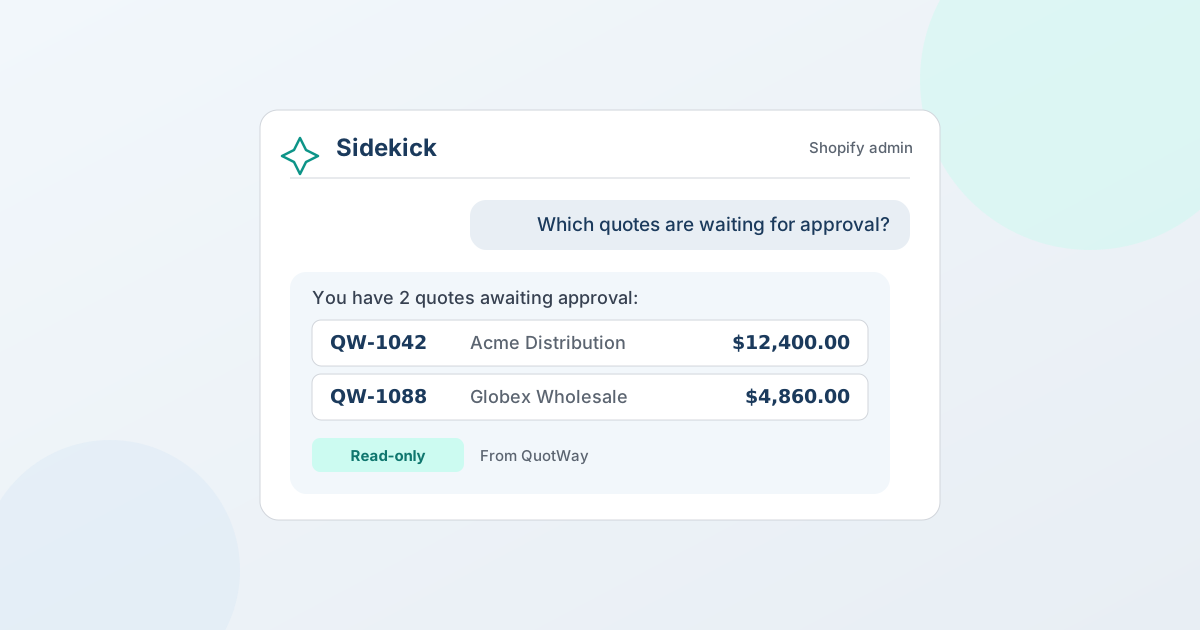
Shopify Sidekick is the AI assistant built into your Shopify admin, and with a quote app like QuotWay installed, you can ask it about your B2B quotes in plain language — "which quotes are waiting for approval?" or "what's my conversion rate this month?" — and get answers straight from the app, without leaving the page you're on. This guide covers what Sidekick is, how apps plug into it, and exactly what you can ask about your quotes today.
What is Shopify Sidekick?
Shopify Sidekick is Shopify's built-in, commerce-focused AI assistant, powered by Shopify Magic. You chat with it from any page in the Shopify admin — by text, voice, or screen share — and it can answer questions about your store and help you get things done. Sidekick is free and included with every Shopify plan, and it's built around a simple safety rule: it never changes your store without your approval — it proposes, you confirm.
Out of the box, merchants use Sidekick to:
- Look up store data and analytics ("show me last month's bestsellers")
- Edit products, manage orders, and draft content
- Build Shopify Flow automations from a plain-English description
- Save frequently used prompts as reusable "Skills"
What's newer — and where this guide focuses — is that Sidekick can now work with third-party apps, so it can answer questions using an app's own data.
How do apps work with Shopify Sidekick?
Apps connect to Sidekick through Sidekick app extensions. An app registers a small set of tools that Sidekick can call; when you ask a question that matches, Sidekick runs the tool, reads the app's data, and answers in the chat — often with a link back into the app. Two things make this trustworthy:
- The app decides what's exposed. It publishes a focused set of read tools, not its whole database.
- Your permissions still apply. Answers respect your staff roles, so a teammate can't surface data they couldn't already see.
The result: instead of "open the app → find the page → read the number," you just ask. QuotWay uses this to make your entire quote pipeline answerable from the Sidekick chat.
How QuotWay works with Shopify Sidekick
Once QuotWay is installed, Sidekick can answer questions about your quotes, your pipeline, and your B2B accounts — and open any quote it names in one click. It looks things up, summarizes them, and takes you to the quote; it doesn't set prices, send, or convert quotes on its own (more on that below). Here's what you can ask about:
| Ask about… | Sidekick answers with… |
|---|---|
| A specific quote | Status, total, buyer, company, the recommended next step, and the line items (product, quantity, negotiated price, discount vs. list) |
| Finding quotes | A filtered list by status, buyer, company, amount, or date — "open", "awaiting approval", "accepted", "declined", "expired" |
| What needs attention | Quotes expiring soon, quotes with a bounced buyer email, and proposals sent with no response |
| Approvals | Which quotes are waiting on an approval decision, merchant-side or buyer-side |
| Pipeline & performance | Quotes created, conversion rate, win rate, open pipeline value, and average cycle time for a period |
| Products & customers | Your most-quoted products and your top customers by quoted value |
| B2B companies | Top companies and company locations by quote value, and a summary for any named company (Enterprise + B2B-capable) |
| Your setup | Where the quote button shows, your automation rules, your approval policies, and your quote-form fields |
Questions you can ask, verbatim
- "Which quotes are waiting for approval?"
- "Show my open quotes over $5,000."
- "What's the status of QW-1042, and what's the next step?"
- "What's my quote conversion rate this month?"
- "How much is in my open quote pipeline?"
- "Which companies quote the most this quarter?"
- "What's in the proposal for QW-1042?"
- "What quotes need my attention today?"
You don't need commands or syntax — ask the way you'd ask a colleague, and Sidekick picks the right QuotWay tool.
Why ask Sidekick instead of opening the app?
For a B2B or wholesale team running quotes and negotiations all day, the value is speed and context:
- Answers where you already are. Get a quote's status or a pipeline figure inside the chat, without breaking your flow on the page you're on.
- No dashboards to hunt through. "What's my conversion rate this month?" is faster than opening Analytics, picking a range, and reading a chart.
- A better morning routine. Ask "what quotes need my attention?" and work the list — expiring quotes, unanswered proposals, and bounced buyer emails, surfaced in one answer.
- Easy for the whole team. Anyone can ask in plain language; there's nothing to learn about where each report lives.
How to set it up
You'll need QuotWay installed and Sidekick open — that's it.
Step 1 — Install QuotWay
Add QuotWay to your store. There's a free Lite plan and a 14-day trial on paid plans.
Step 2 — Open Sidekick
Click the Sidekick icon in your Shopify admin (usually in the top bar). Sidekick is free and built into Shopify, so there's nothing extra to install.
Step 3 — Ask about your quotes
Try "which quotes are waiting for approval?" or "what's my quote conversion rate this month?". Sidekick answers from QuotWay, usually including the quote's reference so you can find it fast.
That's the whole setup — no configuration, no code.
What's live today, and what's coming
- Live now: asking Sidekick questions about your quotes, pipeline, approvals, and B2B accounts.
- Live now: opening a quote straight from an answer, starting a new quote with the buyer's email pre-filled, and asking for a proposal to be prepared at a discount — the editor opens with it applied and waits for you to review and send. Shopify added the
application/quoteintent type in August 2026 — the capability we had requested — and QuotWay was first to ship on it. See open a quote from Sidekick. - Not available: Sidekick sending anything to a buyer, setting an individual line price, or converting a quote. Those remain actions you take in QuotWay, where your approvals and rules apply.
Being upfront: Sidekick prepares the work and gets you to it — you are still the one who presses Send.
A note on plans
The Sidekick integration is included on every QuotWay plan, and Sidekick itself is free on every Shopify plan. Some answers reflect features tied to your plan — for example, per-company B2B analytics is an Enterprise, B2B-capable feature. See pricing for the full breakdown.
FAQ
Does QuotWay work with Shopify Sidekick?
Yes. QuotWay works with Shopify Sidekick, the AI assistant built into the Shopify admin. You can ask Sidekick about your quotes in plain language and it answers straight from QuotWay — a quote's status and next step, open quotes by amount or company, quotes waiting on approval, pipeline metrics, top products and customers, and B2B company insights. Every quote it names is clickable, so one click opens that quote in QuotWay. Available on every QuotWay plan.
What can Shopify Sidekick do with QuotWay?
Sidekick can look up a specific quote (status, total, buyer, company, next step, and line items), search and filter your quotes, list quotes that need attention or are waiting on approval, report pipeline KPIs like conversion rate and win rate, surface your top-quoted products and customers, and — on Enterprise with a B2B-capable store — show per-company and per-location quoting insights.
Can Sidekick create or send quotes for me?
Partly. Sidekick can open any quote it names, start a new quote with the buyer's email pre-filled, and prepare a proposal at a discount for you to review. It cannot send anything to a buyer, set an individual line price, or convert a quote — you take those actions yourself in QuotWay, where your approvals and rules apply.
Is Shopify Sidekick free?
Yes. Shopify Sidekick is free and included with every Shopify plan. The QuotWay integration is also included on every QuotWay plan, though some answers reflect features tied to your plan.
Is my quote data safe with Sidekick?
Yes. QuotWay's Sidekick tools only read your data, are scoped to your store, and respect each staff member's QuotWay permissions. They return only the data you asked for — no payment-card data or secrets.
Which apps work with Shopify Sidekick?
A growing number of Shopify apps expose data to Sidekick through app extensions. For B2B quoting and negotiation, QuotWay lets you ask Sidekick about your quotes, pipeline, approvals, and company accounts — answered from the app inside your admin.
Sources
The Shopify Sidekick facts in this guide are verified against Shopify's official documentation:
Related articles
See how QuotWay handles this on your store.