Shopify B2B
Shopify draft orders for B2B: a complete workflow guide
By Jahangir Alam · June 20, 2026 · Updated August 28, 2026 · 8 min read
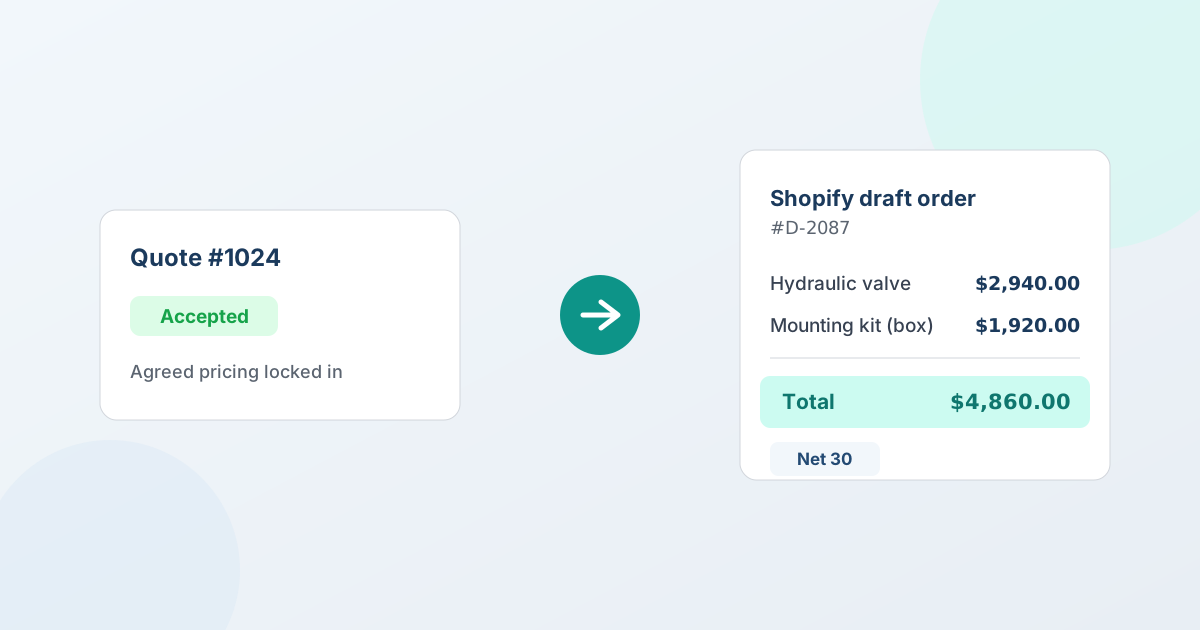
A Shopify draft order is an order a merchant builds in the admin before the buyer pays - you set the line items and prices, then send an invoice to complete it. For B2B, that's exactly the shape a quote-to-order workflow needs: once a buyer accepts a quote, the agreed lines and prices become a draft order, you send the invoice, and the buyer pays through Shopify checkout. No re-keying, no separate system, and the finished order lands in your Shopify reports like any other sale.
This guide explains what draft orders are, why they're the backbone of B2B selling on Shopify, and how to run the full quote-to-draft-order workflow on your store - including partial acceptance, splitting an order, and applying payment terms.
This guide covers the Shopify mechanic. For the wider process it sits inside - the stages, where it breaks, and how to measure it - see quote-to-order.
What a Shopify draft order is
A draft order is Shopify's own term for an order created in the admin rather than through the storefront checkout. Instead of a shopper adding items to a cart and paying, the merchant (or an app) assembles the order: chooses the products, sets the quantities and prices, applies any discount, and then sends the buyer an invoice to pay.
That small difference - the merchant sets the price before the buyer pays - is what makes draft orders the natural fit for B2B. Retail checkout calculates the price from your catalog. A draft order lets you put the negotiated price on the order, which is the whole point of quoting.
Once a draft order is paid (or marked paid on terms), it becomes a regular Shopify order. Fulfillment, inventory, taxes, and reporting all run through the same pipeline as every other sale. (For the bigger picture of how draft orders fit alongside Companies and payment terms, see Shopify B2B features explained.)
Why draft orders are the backbone of B2B on Shopify
Most B2B sales can't go through a standard cart, because the price isn't fixed until the deal is. A buyer requests a quote, you propose a price, you may go a round or two on it, and only then is there a number to charge. Draft orders are how that agreed number becomes a real order:
- They carry exact, negotiated prices line by line, instead of catalog prices.
- They can be invoiced on payment terms (Net 30, Net 60, due on receipt) rather than charged immediately.
- They become native Shopify orders once accepted or paid - so there's no export step and no second copy of the order living in another tool.
The alternative - re-keying an agreed quote into Shopify by hand - is where B2B teams lose the most time and make the most mistakes. A quote-to-draft-order workflow removes that step entirely.
The quote-to-draft-order workflow, step by step
Here's the full path from an accepted quote to a paid Shopify order, the way it runs in QuotWay:
- The buyer accepts the quote. After any negotiation, the buyer accepts the proposal from their Shopify customer account or a hosted buyer portal. The accepted version is the record of what was agreed.
- You convert it to a draft order. One action turns the accepted quote into a native Shopify draft order. The line items, quantities, negotiated prices, and the buyer's address come across exactly as agreed. Conversion is available on every plan, including the free Lite plan (where it's metered).
- A drift check runs. Before the order is committed, QuotWay re-checks tax and shipping so the totals reflect current rules rather than the figures from when the quote was first drafted.
- The draft order opens in Shopify. It's a real Shopify draft order - the same object you'd create by hand in your admin - so you can edit it, send the invoice, and fulfill it the way you already do.
- The buyer pays. Send the invoice and collect payment through Shopify checkout, or invoice on payment terms for B2B accounts. The order completes and lands in your Shopify reports.
That's the entire loop, and none of it leaves Shopify. The next sections cover the parts that matter most when deals get larger.
Negotiated prices are locked in at conversion
The prices you agreed on are the prices on the order. QuotWay snapshots the negotiated line pricing at the moment of conversion, so the draft order matches the accepted quote - even if your catalog prices have moved since the quote was drafted.
- Each line carries its negotiated price, not today's catalog price.
- Discounts, custom lines, and per-line adjustments come through intact.
- The accepted quote version stays as the auditable record of what was agreed.
There's no silent drift between "what we shook on" and "what got ordered" - the agreed number is the ordered number. (This pairs with how each negotiation round is captured as an immutable version; see negotiation and counter-offers.)
Accept part of a quote, convert only those lines
Buyers rarely say yes to everything at once. On the Professional and Enterprise plans, a buyer can accept some lines and defer others, and you convert only the accepted lines into a draft order. The rest stays open on the quote, ready for another round.
- Buyers accept or defer line by line - partial acceptance, not all-or-nothing.
- You convert the accepted lines now; the deferred lines stay open on the quote.
- Nothing is lost - keep negotiating the remaining lines, or convert them later.
This is how you close the part of a deal you can win today instead of waiting on the whole quote. On the Lite and Starter plans, conversion is whole-quote.
Split one quote into multiple draft orders
One quote sometimes needs to become several orders - different shipping addresses, staged deliveries, or multiple locations. On Professional and above, you can split a quote into multiple draft orders, grouped by line grouping or by shipping address, so each order matches how it actually ships.
- Split by group or shipping address into separate draft orders.
- Each resulting draft order is a real Shopify order with its own lines and total.
- It works alongside partial acceptance - accept what's agreed, then split how it ships.
For a multi-location buyer, that means one negotiated quote can become one order per location, each routed and fulfilled on its own.
Drift detection re-checks tax and shipping
Quotes can sit open for days while a buyer decides. In that time, tax rules or shipping rates can change. Before QuotWay commits the draft order, a drift check recalculates tax and shipping so the order reflects current reality - not the numbers from when the quote was first drafted. This runs on every plan, so there are no surprise totals on the converted order. The negotiated line prices stay locked; only tax and shipping reconcile. How the shipping figure gets onto the quote in the first place - locked or pending - is covered in shipping and freight on B2B quotes.
Invoicing, payment terms, and fulfillment
Because the order is a native Shopify draft order, everything after conversion runs in Shopify:
- Automatic invoice send and paid-status tracking are available on Starter and above. On the free Lite plan, you send the invoice manually from Shopify.
- Refund and cancel status sync back to the quote on every plan, so the quote and the order never tell different stories.
- Payment terms on conversion - Net 30, Net 60, or due on receipt - apply when you convert a company-aware quote, on the Enterprise plan with a B2B-capable store. This reads and applies the buyer's Shopify payment terms; see Shopify B2B quoting.
- Deposits at checkout - on Shopify Plus stores (Professional plan and up), the converted draft order can carry a negotiated deposit, so Shopify checkout collects part-payment up front and the balance follows the payment terms; see how to take a deposit on a negotiated quote.
When you uninstall QuotWay, your Shopify orders are still your Shopify orders - there's no parallel order silo to lose.
Set it up on your store
You don't need a separate order system to do any of this. QuotWay is a B2B quote and negotiation app for Shopify, built by EFOLI, that turns accepted quotes into native Shopify draft orders - prices locked in, nothing retyped. A practical way to start:
- Add QuotWay and let buyers request quotes (or create quotes yourself for existing accounts).
- Negotiate to "yes," then convert the accepted quote to a Shopify draft order.
- Send the invoice and collect payment in Shopify, or invoice on terms for B2B accounts.
The free Lite plan runs the full quote → negotiate → draft-order loop (up to 10 quotes a month), so you can convert your next accepted quote into a real Shopify order before paying anything. Partial acceptance and split conversion come in on Professional ($79/mo); automatic invoicing starts on Starter ($29/mo); payment terms on conversion are on Enterprise ($199/mo) for B2B-capable stores. Each paid plan includes a 14-day trial - the full breakdown is on the pricing page, and the convert-to-orders feature page has an interactive demo you can try.
FAQ
What happens when a quote is accepted in QuotWay?
An accepted quote becomes a real Shopify draft order with the negotiated prices carried over exactly - no re-keying and no CSV export. On Professional and above you can accept and convert just selected lines, and split a quote into multiple draft orders. Conversion is available on every plan, and it's metered on the free Lite plan.
What is a Shopify draft order, and why does QuotWay use it?
A draft order is Shopify's own term for an order a merchant creates in the admin before it's paid - you can edit lines, send an invoice, and collect payment. QuotWay converts accepted quotes into native draft orders so the deal lives in Shopify, not in a separate system, and you invoice and fulfill the way you already do.
Can I convert only part of a quote?
Yes, on Professional and above. Buyers accept lines individually, and you convert only the accepted lines into a draft order; the deferred lines stay open on the quote for another round. You can also split a quote into multiple draft orders by group or shipping address. On Lite and Starter, conversion is whole-quote.
Does QuotWay re-check tax and shipping before converting?
Yes, on every plan. Before QuotWay creates the draft order, a drift check recalculates tax and shipping so the order reflects current rules rather than the figures from when the quote was first drafted. The negotiated line prices stay locked; tax and shipping reconcile to reality at conversion.
Does conversion send the invoice and apply payment terms?
Automatic invoice send and paid-status tracking are available on Starter and above; on Lite you send the invoice manually from Shopify. On a company-aware quote - Enterprise, with a B2B-capable store - conversion applies the buyer's Shopify payment terms to the order. Refund and cancel status sync back to the quote on all plans.
The platform-level limits behind all of this - inventory reservation, the 500-line ceiling, why Shopify Scripts don't run, and what a non-store currency changes - are collected in Shopify draft orders: the limits and gotchas the docs bury.
Sources
The time-sensitive Shopify facts in this guide are verified against Shopify's official documentation:
Related articles
See how QuotWay handles this on your store.