Shopify AI & integrations
What you can build with the QuotWay API and webhooks
By Jahangir Alam · September 30, 2026 · 12 min read
- Last verified
- Audience
- Merchants on the Enterprise plan, and the developers and agencies connecting QuotWay to an ERP, CRM, headless storefront or BI tool
- Scope
- The QuotWay REST API v1 and outbound webhooks as launched on 30 September 2026: six build recipes with their events, endpoints and pitfalls, the design decisions behind the API, its limits, and questions to ask any quote app's API
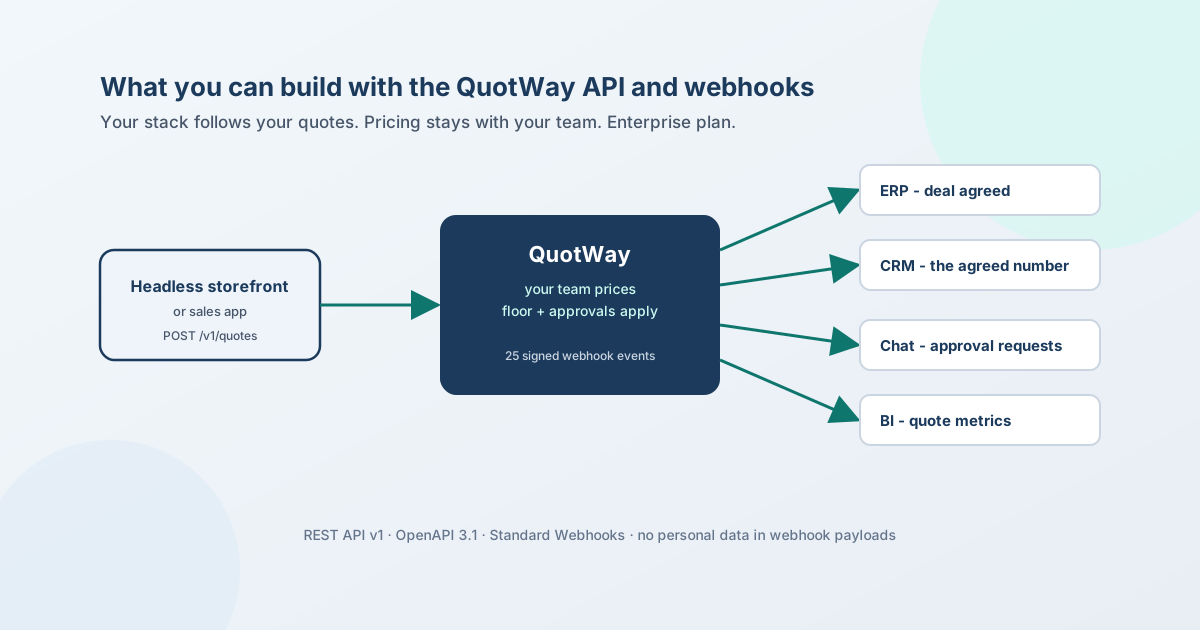
QuotWay now has a public REST API and signed outbound webhooks, on the Enterprise plan - including during the 14-day free trial. Together they let the rest of your stack follow your quotes without anyone re-typing a number: your ERP learns about an accepted quote the moment the buyer accepts, your CRM deal shows the figure that was actually agreed, a headless storefront or a sales app can send in quote requests, and your team hears about approvals where it already works.
One thing it never does is price. The API records what buyers ask for and sends proposals your team already priced; prices, your price floor and your approval policies stay in QuotWay, where your team controls them.
This post is six things you can build, the pitfall in each, why the API is designed the way it is, and the questions worth asking any quote app's API. The reference is in the API docs; every fact here matches them as of 30 September 2026.
What's available
| Piece | What it gives you |
|---|---|
REST API v1 at api.quotway.com |
Read quotes (lines, totals, events, PDFs, analytics), create quote requests, post messages, send a proposal your team already saved |
| Outbound webhooks | A signed HTTPS request for 25 quote events - from a new request through proposals, counters, acceptance, conversion and payment, plus every approval decision |
| Events feed | GET /v1/events: the last 30 days of events in order, to catch up on anything a receiver missed |
| Keys | Scoped (read_quotes, read_customer_data, read_analytics, write_quotes, manage_webhooks), optional expiry and IP allowlist, a 24-hour overlap when you roll one; qw_test_ keys for development stores |
| Spec | OpenAPI 3.1 at https://api.quotway.com/openapi.json - import it into Postman, Insomnia or a code generator |
Keys are created by a store Admin in Settings → Integrations → API keys. The limits are 120 requests a minute per key and 300 per store.
1. Tell your ERP the moment a deal is agreed
Events: quote.accepted, quote.partially_accepted, quote.converted · Scope: read_quotes
When a buyer accepts, a webhook reaches your endpoint within moments. Your handler verifies it, answers 200, and fetches the full quote to create or update the sales record your ERP keeps for the deal - the quote number, the buyer's company, the agreed lines and the totals. When the quote becomes a Shopify draft order, quote.converted fires once per draft order, with the link your ERP can store beside the order - how that conversion is kept to exactly one draft order is its own engineering story.
The order itself should still reach the ERP the way your other orders do - through your existing Shopify connector - and the converted draft order carries the quote's reference so the two meet. The webhook adds the negotiation behind the order; it doesn't replace the order sync. ERP, CRM and PIM integration patterns sets out which system should write which field.
The handler, with the official Standard Webhooks library:
import express from "express";
import { Webhook } from "standardwebhooks";

const wh = new Webhook(process.env.QUOTWAY_WEBHOOK_SECRET); // "whsec_…"
const app = express();

// Keep the body raw for this route - verification needs the exact bytes.
app.post("/hooks/quotway", express.raw({ type: "application/json" }), async (req, res) => {
  let event;
  try {
    event = wh.verify(req.body.toString("utf8"), req.headers);
  } catch {
    return res.status(400).send("Invalid signature");
  }

  const eventId = req.headers["webhook-id"];
  if (await alreadyProcessed(eventId)) return res.sendStatus(200);

  await enqueueForProcessing(eventId, event); // fetch event.data.url and upsert, in the background
  res.sendStatus(200);
});
The pitfall: deliveries are at least once and not in order. The same event can arrive twice, and a retry an hour later carries the quote as it is then. So de-duplicate on the webhook-id header, order by data.sequence, and for anything you write to a system of record, fetch the quote from data.url rather than trusting the summary in the payload.
2. Keep the CRM deal on the number that was actually agreed
Events: the negotiation and outcome events · Scope: read_quotes (plus read_customer_data if the CRM needs the buyer's contact details)
A CRM deal that tracks a quote needs two things: the right stage, and the right amount. The stages map directly:
| QuotWay event | Deal stage |
|---|---|
quote.created |
New request |
quote.proposal_sent |
Proposal sent |
quote.countered |
Negotiation |
quote.merchant_approval.requested |
Internal review |
quote.accepted |
Won |
quote.partially_accepted |
Won in part - the undecided lines are still open |
quote.declined, quote.buyer_approval.rejected |
Lost |
quote.expired |
Expired - worth a follow-up, not necessarily lost |
quote.order_completed |
Paid |
The amount is where CRMs usually go wrong. On a partial acceptance, the quote's total still shows the whole original offer - that's what was offered, and it is never rewritten. Store totals.headline instead: it is the figure to act on, and totals.headline_mode says why it is that number (none or full - the offer total; decided or open - the accepted total). When the mode is open, still_open_total is what's still in play, so a deal can show both the agreed part and the part the buyer hasn't decided on yet.
The pitfall: a line the buyer didn't pick on a partial acceptance is still open, not declined. Mapping it to "lost" undercounts the pipeline and sends a follow-up to a buyer who hasn't said no.
3. Take quote requests from a headless storefront or a sales app
Endpoint: POST /v1/quotes · Scope: write_quotes
A Hydrogen storefront, a trade-counter app or a sales rep's tool can send a quote request the same way the Online Store's "Request a quote" button does - from its server, with the key kept server-side:
curl https://api.quotway.com/v1/quotes \
  -H "Authorization: Bearer $QUOTWAY_API_KEY" \
  -H "Content-Type: application/json" \
  -H "Idempotency-Key: 9d3e1f7a-5b2c-4e8d-a1f0-6c7b8a9d0e12" \
  -d '{
    "buyer": { "email": "buyer@example.com", "name": "Dana Ortiz", "company_name": "Acme Restaurant Group" },
    "lines": [ { "variant_id": "gid://shopify/ProductVariant/4455667788", "quantity": 100, "requested_price": "11.50" } ],
    "notes": "Delivery to our Denver kitchen, please."
  }'
The request goes through the same intake as the storefront: your targeting rules decide whether it's allowed, your quote form's custom fields are validated, your automation rules run on it, and your team gets the usual "new quote" email. requested_price is only the buyer's target - the price your team offers is set in QuotWay. Pass a Shopify customer_id and QuotWay checks the customer's real tags and B2B company memberships; if they are a contact of a company location, the quote becomes company-aware, exactly as it would for a buyer signed in on your store.
The pitfall: the 201 response says submitted, but your automation rules act on the new quote within moments - an auto-send rule can send a proposal, an auto-decline rule can decline it. Don't assume a quote you just created is still submitted; listen for quote.proposal_sent, quote.declined and quote.assigned, or fetch it again before acting. And always send an Idempotency-Key: if the connection drops after the quote was created, the retry returns the same response instead of a duplicate request.
4. Put approval requests where your team already works
Events: quote.merchant_approval.requested, .granted, .rejected
When a proposal needs internal sign-off - a discount over your threshold, a high-value quote - quote.merchant_approval.requested fires. A small relay can turn it into a message in the channel your approvers watch, with the quote number and a link to open it in QuotWay; .granted and .rejected close the loop. Any system that can receive a signed webhook can do this: your own endpoint, or an integration platform's generic webhook trigger.
The approval itself still happens in QuotWay, under your approval policies. The message is a notification, not a button that approves.
The pitfall: webhook payloads carry no buyer names, emails or free text by design, so the message has what it needs to route (the quote number, status, totals) and nothing personal. If your approvers need more, fetch the quote with a key that has the right scopes - and think twice before pasting buyer details into a shared channel.
5. Pull quote metrics into your BI tool
Endpoint: GET /v1/analytics/summary · Scope: read_analytics
curl -G https://api.quotway.com/v1/analytics/summary \
  -H "Authorization: Bearer $QUOTWAY_API_KEY" \
  --data-urlencode "period=week" \
  --data-urlencode "limit=4"
It returns the same pre-computed metrics as QuotWay's analytics dashboard - volume, accepted and converted value, pipeline and response times - by day, week or month, in UTC and the store's base currency. A scheduled job that pulls it into a warehouse or a spreadsheet is the whole integration; the key needs no access to personal data.
6. Release proposals after a check in another system
Endpoint: POST /v1/quotes/{id}/send-proposal · Scope: write_quotes
Some teams price in QuotWay but want another system to decide when a proposal goes out - an ERP that confirms margin or stock, a CRM step that marks the deal ready, a job that releases the morning's proposals at nine. send-proposal sends the proposal your team already saved in the proposal editor, with exactly the checks the admin runs: the quote must be able to take a proposal, a company-aware quote's catalog prices are re-read from Shopify, a line below your price floor stops the send unless the call explicitly confirms it (the same confirmation the admin asks for), and an approval policy parks the proposal for sign-off instead of sending it.
The pitfall: if nobody saved a proposal, there's nothing to send - the call returns 409 no_staged_proposal. The API sends what your team priced; it never prices.
Why it's built this way
Six decisions shape the API, and each one is a reason to trust what it does.
- It never sets prices. Pricing is where a quote tool earns or loses money, and it stays with your team - the price floor, the approval policies and the proposal editor apply to everything, including what arrives through the API. There are no endpoints to price or edit lines, accept or decline on a buyer's behalf, or convert a quote to a draft order.
- Webhooks carry no personal data. A payload has identifiers, the event type, and the quote's number, status, currency and totals - never a buyer's name, email, phone, address or message. Buyer details come only from the API, and only with a key that has the
read_customer_datascope. A misconfigured endpoint can't leak what it was never sent. - Webhooks follow the Standard Webhooks specification. The signature headers are the standard ones, so you verify with the official
standardwebhookslibraries instead of hand-rolled code. During a secret rotation, deliveries are signed with both secrets for 24 hours, so nothing fails while you switch. - Deliveries are retried, then replayable. A failed delivery is retried seven times - eight attempts over about 3.7 days; an endpoint that keeps failing is disabled and your team is emailed. Anything missed is still in
GET /v1/eventsfor 30 days, in order. - Every write is idempotent. Every
POSTtakes anIdempotency-Key, honoured for 24 hours, so a retried request can't create a second quote or send a proposal twice. - Errors are specific and stable. Errors follow RFC 9457 with a stable
code-not_eligible,below_price_floor,insufficient_scope- that links to its own entry in the errors reference, so an integration can branch on a code instead of parsing a sentence.
What it doesn't do (yet)
- No packaged connectors. There is no app in Zapier's directory, no MCP server, and no built-in connection to HubSpot, Salesforce or Klaviyo. You can connect any of those systems through the API and webhooks.
- No SDKs, no GraphQL API, and no sandbox. The OpenAPI spec imports into most tools;
qw_test_keys work on a Shopify development store, against that store's real data. - No pricing, line editing, acceptance or conversion through the API - by design, as above.
Questions to ask any quote app's API
Whichever app you're evaluating, these separate an API you can build on from a line on a pricing page:
- Is the documentation public, with a machine-readable spec you can import?
- Are webhooks signed, and can you verify them with a standard library rather than custom code?
- What happens to a delivery your endpoint misses - how long is it retried, and can you replay it?
- Can a retried request create a duplicate, or do writes accept an idempotency key?
- Do webhook payloads carry customer data, and can you scope a key so it can't read any?
- Can the API change prices - and if it can, do your price floor and approvals still apply?
- How much notice do you get before a breaking change? (QuotWay's API Terms commit to at least six months.)
The rest of an app evaluation - data handling, API versions, what's enforced server-side - is in how to evaluate a Shopify B2B app.
Getting started
- Make sure the store is on Enterprise, or on the 14-day trial - pricing has the plan detail.
- Create a key in Settings → Integrations → API keys with only the scopes you need, and accept the API Terms of Use.
- Follow the quickstart: check the key with
/v1/ping, list quotes, create a request - about ten minutes. - Add a webhook endpoint in Settings → Integrations → Webhooks, and send a test ping.
The product side is on the API & webhooks feature page.
FAQ
Does QuotWay have an API?
Yes. QuotWay has a public REST API (v1) at api.quotway.com and signed outbound webhooks, on the Enterprise plan - including during the 14-day free trial. It reads quotes, creates quote requests, posts messages and sends proposals your team already priced; it never sets prices.
Which plan includes the QuotWay API and webhooks?
The Enterprise plan ($199 a month), and a store on the 14-day free trial can use both. If a store moves to a lower plan, its keys and webhook endpoints are kept but paused until it's back on Enterprise.
Can I create quotes from a headless Shopify storefront?
Yes - with POST /v1/quotes from your storefront's server. The request goes through the same targeting rules, custom-field validation and automation rules as the Online Store's quote button, and lands as a request for your team to price.
Do QuotWay webhooks include customer data?
No. Webhook payloads contain identifiers, the event type and the quote's number, status, currency and totals - no names, emails, phone numbers, addresses or messages. Buyer contact details come only from the API, with a key that has the read_customer_data scope.
How do I verify a QuotWay webhook signature?
QuotWay follows the Standard Webhooks specification, so use the official standardwebhooks library for your language: pass it the raw request body, the webhook-id, webhook-timestamp and webhook-signature headers, and your endpoint's whsec_ secret. Reject anything that doesn't verify.
Can the API set prices or accept a quote for the buyer?
No. There are no endpoints to price or edit lines, accept or decline on the buyer's behalf, or convert a quote. Sending a proposal through the API sends the one your team saved, with the same price-floor and approval checks as the admin.
Can QuotWay connect to Zapier or HubSpot?
Through the API and webhooks, yes - for example, a webhook sent to an integration platform's generic webhook trigger, or your own service that updates the CRM. There is no packaged app in Zapier's directory and no native connection to HubSpot today.
Sources
QuotWay's API documentation, read on 30 September 2026:
- API overview, quickstart and authentication, keys and scopes
- Webhooks - the event catalog, payloads, signatures, retries and ordering
- Create quotes, messages and proposals, the quote object, events, analytics and rate limits
- Errors and the OpenAPI specification
- API Terms of Use
Related articles
See how QuotWay handles this on your store.